
Copiar vínculo al Portapapeles
Copiado
I have noticed this flashing occurring on the last 2 updates of Illustrator (Currently 25.3), and it usually stops if I quit one of my more memory intensive programs like Photoshop, InDesign or Excel, I have 40 GB of additiopnal ram installed. Are the updated Illustrator much more memory intensive or is this some kind of bug? Please help.
Hi there,
Sorry to hear about this trouble. We tried, but couldn't replicate this behavior. We'd appreciate if you could share a few more details like:
We'd be looking forward to your response!
Regards,
Srishti
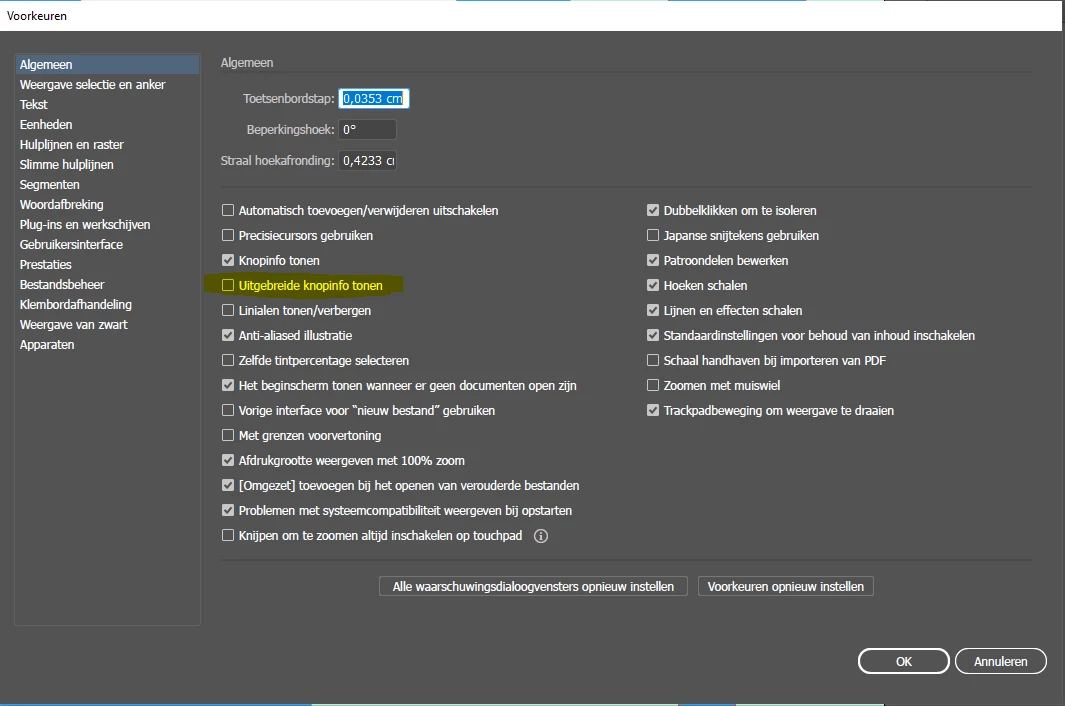
I have had this issue for seveal updates now. On my system it is specifically related to the extra info popup for buttons in the UI. When hovering over buttons on the toolbar, the flickering occurs right before the extra info popups are displayed. When I turn this option off the flickering stops occuring. Hope this helps.
Ive attached a screenshot, but it is in Dutch, sorry. Apparanlty I have to completely reinstall my apps to switch to the english international UI. Bizarre.
Copiar vínculo al Portapapeles
Copiado
Can you attach a screenshot which popup (panel?) you mean. I don't know wich element in shiwch program you are talking about... All the best, uesix
Copiar vínculo al Portapapeles
Copiado
Ive attached a screenshot, but it is in Dutch, sorry. Apparanlty I have to completely reinstall my apps to switch to the english international UI. Bizarre.
Copiar vínculo al Portapapeles
Copiado
These are the animated popups that cause the flickering on my system: windows 10, illustrator 20.0.3 64 bit
Copiar vínculo al Portapapeles
Copiado
Copiar vínculo al Portapapeles
Copiado
Oh that'S great! Yes I turned it off and it looks like the issue has gone!... I have to check it out for a while but I think it's really gone! Oh it was so annoying... expecially while edditing a text e.g.
I know this language bizzare procedure... but it's just one of so much Adobe software wiardness.
the pop ups ar called "Rich-Quickinfos" or "Rich-Tooltips" ... annoying and useless, too...
Copiar vínculo al Portapapeles
Copiado
This is AMAZING! It works!
(I'm using a Macbook Pro M2 Max - Ventura 13.2 + extended Samsung screen)
No more flickering!
Thank you so much ❤️
Copiar vínculo al Portapapeles
Copiado
This is NOT a correct answer. I turned off those popups months ago. it may work for a short time but the issue always returns.
Copiar vínculo al Portapapeles
Copiado
I was having this issue with Mac OS Big Sur 11.6.8 and Illustrator 2022 - only on my external Acer XR382CQK monitor. What seemed to work was using View>View using CPU (which made it super laggy), and then switching back to View using GPU.
Copiar vínculo al Portapapeles
Copiado
Hi, I have been experiencing the same issue on Illustrator 27.3.1. Macbook Pro 14" M2 Max and Ventura.
But I have tested one important thing.
If I take the entire artwork and copy/paste into a new document and save it, this new document opens fine, no pink blinking. So it seems to be related only with old Illustrator documents when opens in latest illustrator version.
Example: One document created on Illustrator 24, opened in 27.3.1 blinks. If I resave it in 27.3.1 it still blinks. It I copy/paste the entire artwork in a new document and save it, it stop blinking when opened.
Hope it helps Adobe for isolate and resolve the issue.
Copiar vínculo al Portapapeles
Copiado
Same here. Stunning. Ugh.
Copiar vínculo al Portapapeles
Copiado
Encuentra más inspiración, eventos y recursos en la nueva comunidad de Adobe
Explorar ahora