


New Participant
June 8, 2021
Answered

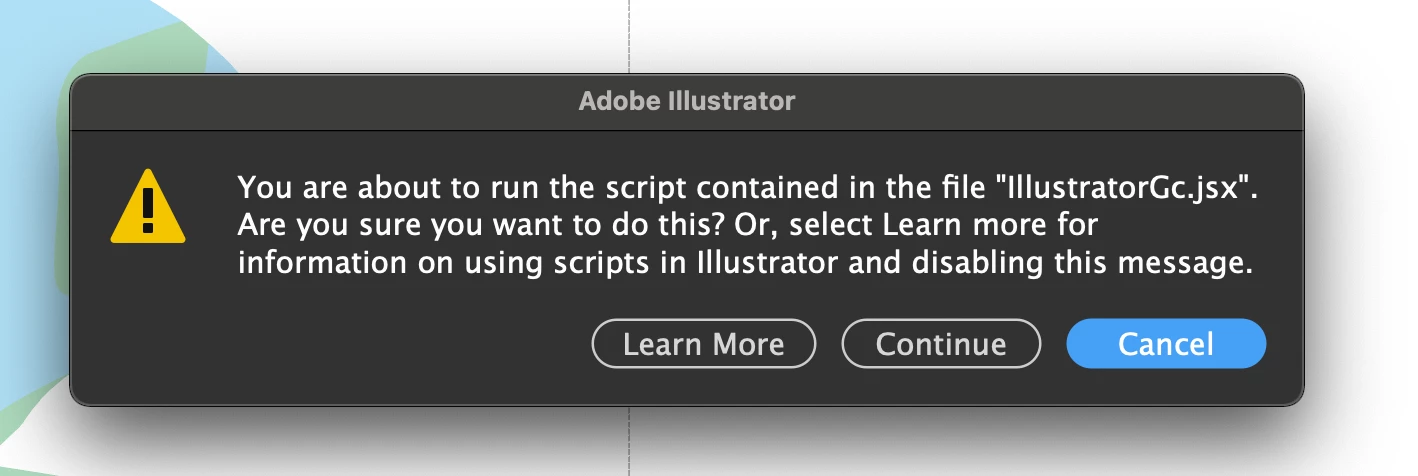
IllustratorGc.jsx script error while launching Illustrator 25.3

  • June 8, 2021
  • 53 replies
  • 118095 views

Updated this morning to Illustrator 25.3 - as soon as the update was done this scripting error began appearing (every 30 seconds). .. Personally went back to 25.2.3 which has solved this issue. 


{Renamed by MOD}

Correct answer Srishti Bali

Hi all,


We hope the issue is resolved by now. If not, please update the logitech driver to latest version (9.40.75) and share your observations with us.


Regards,

Srishti

53 replies

Participating Frequently
June 21, 2021

Same problem here after updating Illustrator. Adobe please fix this asap. We pay a hugh amount of money for this feature overloaded piece of software. Stop playing around with features nobody asked for and focus on the core functionality - maybe your softwar would run much smoother...

New Participant
June 16, 2021

Quando uso la vesione normale ho un problema che ogni 5 sec mi esce fuori una scritta con scritto "Stai per eseguire lo script contenuto nel file IllustratorGc.jsx", impedendomi di lavorare con il programma, non riesco a togliere questo avviso.

mi potete aiutare è per caso un bug di illustrator?

io ho risolto usando la versione beta di Illustrator che l'errore non me lo da, ma preferirei usare la versione stabile e ufficile.

grazie mille

Doug A Roberts
Community Expert
June 16, 2021

This is to do with Logitech Options, and the mods here are compiling every post into this thread:


https://community.adobe.com/t5/illustrator/illustratorgc-jsx-script-error-while-launching-illustrator-25-3/td-p/12099399


Have a read and see if any of that is helpful. I haven't experienced this myself so I don't know any particular solutions firsthand.

New Participant
June 16, 2021

This issue still persists. Im getting a popup all the time. I have the latest version of 8.54.147


I wish Adobe or Logitech would provide a solution that actually works.


The best option i can find is to turn off Application Specific Settings in Logi Options for now. Which disables all custom key mappings for illustrator.

Participating Frequently
June 16, 2021

So did this work?  Curious as I want to update Illustrator to the latest version, so if this fixes the problem then I'll give it a go.

New Participant
June 17, 2021

i have latest illustrator and latest logi options and was still getting this issue.

what i did actually worked... which was disable application specific settings in logi options as pictures in screenshot attached to last post


New Participant
June 16, 2021

Hi all,

Since the last update, a popup window appears each time I launch Illustrator: "You're about to run the script contained in the file "IllustratorGc.jsx. Are you sure you want to do that?""

if I choose to continue or cancel, the result is the same: the windows disappear and appears again few second later. Because of if I cannot simply work in illustrator!

I tried to delete the script folder located in "/Applications/Adobe lllustrator 2021/Startup Scripts/", my preferences and reinstall illustrator - nothing worked.

I attached the screenshot for reference.


New Participant
June 15, 2021

Can anybody tell me how to stop this popping up all the time.

What I can find is to make a jsx file, but what is this?


GerssonDelgado
Inspiring
June 15, 2021
New Participant
June 14, 2021

Can anyone help solve this problem? I never used scripts and I don't understand why it's asking this in the first place?

If anyone can let me know what I need to do to stop receiving this pop-up it would much help - Thanks 


Charu Rajput
Community Expert
June 14, 2021

H,,

Please check if you have an app installed called "Logi Options" or you have Logitech webcam. If you do, please update it to the latest version & let us know if it helps. 


https://community.adobe.com/t5/illustrator/illustratorgc-jsx-script-error-while-launching-illustrator-25-3/m-p/12112005#M279436


Best regards
Srishti Bali
Community Manager
Community Manager
June 14, 2021

Hi all,


I hope the issue is resolved by now. If not, please check out this help article ( https://helpx.adobe.com/illustrator/kb/fix-scripting-error.html ) for more details.


Regards,

Srishti

Participating Frequently
June 14, 2021

Hi...I've updated to the latest Logitech app and the message it still appearing.  So have had to reinstall Illustrator 25.2.2 to hopefully stop the issue until whoever is responsible for the bug has it sorted.

Please advise as and when it's been done.  Many thanks, Daniel

Inspiring
June 15, 2021

May be worth signing up to the Logi Options+ software beta - I have just done so, and so far so good, no more messages. Out of interest are you running on an M1 Mac?

New Participant
June 14, 2021

Hi there,
I have no idea what this is, it keep popping up every 30 secs whether I hit cancel or continue or learn more.

I've never seen this before, so weird

Please help


Ashutosh_Mishra
Inspiring
June 14, 2021

Hi there,


Sorry to hear about your experience. Please check if you have an app installed called "Logi Options" or you have Logitech webcam. If you do, please update it to the latest version & let us know if it helps.


Regards,

Ashutosh

yescreative
New Participant
June 11, 2021

I am experiencing an issue where I continually receive a pop up message "you are about to run the script contained in the file illustratorGx.jsx" Regardless of whether I click cancel or continue I continue to receive the message. 

I have done the following to no effect

  • Upgraded illustrator to the current version.
  • Deleted Illustrator Preferences
  • Upgraded OSX to 11.4
  • Upgraded Photoshop for good measure

Any help would be greatly appreciated.

Thanks

Ton Frederiks
Community Expert
June 11, 2021
New Participant
June 10, 2021

I am getting this message on some files over and over again, even after I closed them: "You are about to run the script contained in the file "IllustratorGc.jsx". Are you sure you want to do this? Or select learn more for information on using scripts in Illustrator or disabling this message". 
Once I open a file I get the message ad no mather what option I click it appears over an over again.


This is where the learn more button leads me:
https://helpx.adobe.com/illustrator/user-guide.html/illustrator/using/automation-scripts.ug.html

Help is very much appreciated.

Doug A Roberts
Community Expert
June 10, 2021
New Participant
June 10, 2021

Thanks I removed an reinstalled Logitech Options and now it seem to work for now.