


Participating Frequently
May 20, 2022
Question

Merge Outlines to 1 Solid Stroke?

  • May 20, 2022
  • 16 replies
  • 8684 views

Hi everyone. This has been bugging me since I started my career.

Is it at all possible to merge two outline strokes together? (See attached image).

Since you can outline a singular stroke, I don't understand why there's no option (that I know of) to do the opposite.

I've googled this problem a million different ways and most solutions involve blending the two together, offsetting the path, or rasterizing/image tracing. None of which provide results that look good or are quicker than tracing the inside with a pen tool.

I've also tried finding plugins through Adobe CC and google, but have come up with nothing.

Any info about possible solutions/plugins would be incredibly valuable.
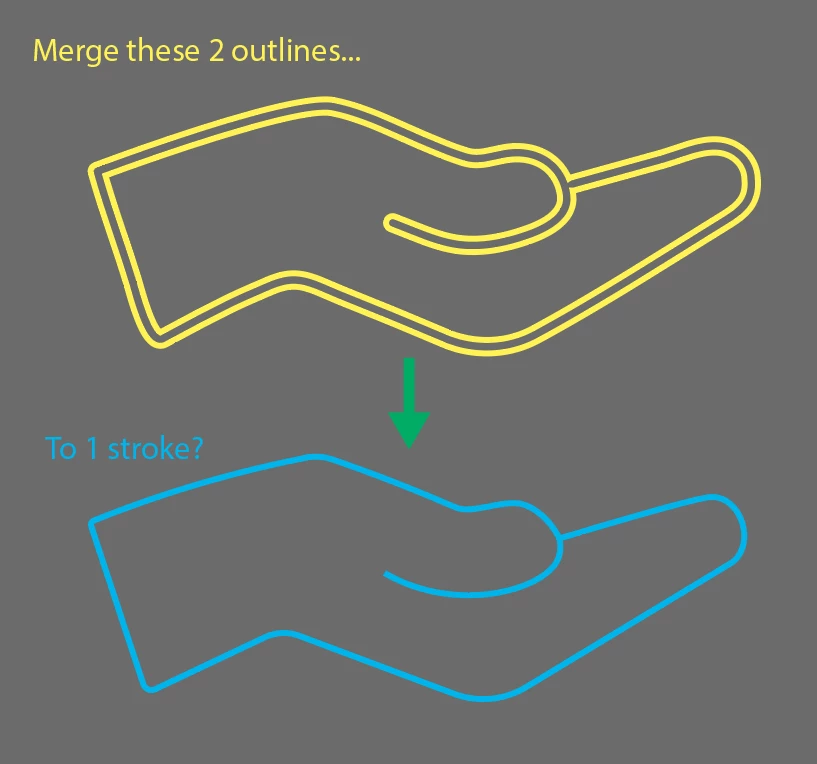


Thanks!

16 replies

kphotopage
Brainiac
May 21, 2022

Scott, You could try https://online.rapidresizer.com/tracer.php

It’s a free online, trace to find center lines. Vector


So, I gave it a test run.

I was working with Fills. The Double fills shown in orange.

I fill the center with Black.

I submitted a screenshot of the black fill, .png file

It traced it, and I downloaded an .ai file.

Shown in red, center stroke. (I just had to resize it.)

Not bad.


K

Participating Frequently
May 21, 2022

Wow that's really good!


I know I'm being a bit greedy but I was hoping to have a solution I could run within illustrator to keep my workflow as smooth as possible. 


It would be cool if they also had a plugin or something.


Thanks for the info!

michelew83603738
Community Expert
May 20, 2022

Seems like there would be an easier way - the blend method as mentioned. You could also make a Live Paint Object and fill in the negative space, expand, delete the unwanted outside areas and then create an Offset Path with a negative number to get that interior area as a stroke. Just an alternative way to think about it.

Kurt Gold
Community Expert
May 20, 2022

Probably yes and no at the same time, Michele.


I think the basic idea in this case is to (possibly) mass convert outlined strokes into stroked objects again. Something that may be pretty useful in many situations. For example, you may think of a rather complex subway map with a lot of lines that, for whatever reason, have been converted to outlines (filled paths). Then there may be many reasons why one would want to convert those filled paths into stroked paths again.


The Blend method is of course a very good approach, but it certainly would have to be done path by path. A nightmare if you are dealing, for example, with subway maps of Paris or some other metropolitan areas.


Therefore I tried to create a way to automate the conversion with a selection of many filled paths at the same time. If you take a look at the Happy New Year sample file and run the action, you can see what I mean.


Admittedly, the Stroker action will still have to be improved, but it already works in many cases. There are already improvements and perhaps I may post them if desired.


Participating Frequently
May 21, 2022

It would be great to see the updated actions posted. I'm dying to see how they work.

Participating Frequently
May 20, 2022

Edit: Attached is a link to the AI file containing the object I'm working with for better reference. https://drive.google.com/file/d/1mVUf1h_TkRvtdKkL6sam-_EddrXQxa1x/view?usp=sharing

chanaart
Community Expert
May 20, 2022


Create a brush from your drawing ( the Yellow part)

Apply the brush to a line... Expand apperanse. UnGroup and use the shape builder tool to merge what you need. 


1. Create a brush from an appearance.

2. Draw the brush

3. Expand apperance

4. Ungroup

5. Slect and use shape builder.


Participating Frequently
May 20, 2022

Thanks, chanaart! That didn't work, unfortunately.

Attached is a link to the AI file containing the object I'm working with for better reference. https://drive.google.com/file/d/1mVUf1h_TkRvtdKkL6sam-_EddrXQxa1x/view?usp=sharing 

Kurt Gold
Community Expert
May 20, 2022

Not quite sure if this may be useful for you, but you may have a look here:


Stroker


In the meantime, I've improved this approach a couple of times (among other things with the ability to convert multi-coloured filled objects into stroked objects, but then I didn't follow it up because there was almost no feedback, so there are chances that only a few Illustrator users actually need this kind of conversion.


Participating Frequently
May 20, 2022

Thanks Kurt! For some reason, it's telling me "The object Expand Appearance is not currently available."


Any idea what that's about?

Kurt Gold
Community Expert
May 20, 2022

Have you tried it with the sample .ai file I provided? Or did you use a different Illustrator file?


Mike_Gondek10189183
Community Expert
May 20, 2022


Make a blend with 1 specified step. Then object >> expand and delete the inner and outer shape.