


New Participant
April 6, 2017
Answered

Setting the bleed in AI via Javascript

  • April 6, 2017
  • 8 replies
  • 18921 views

Hi All,

I'm writing a function to change the artboard size and add bleed depending on certain conditions.

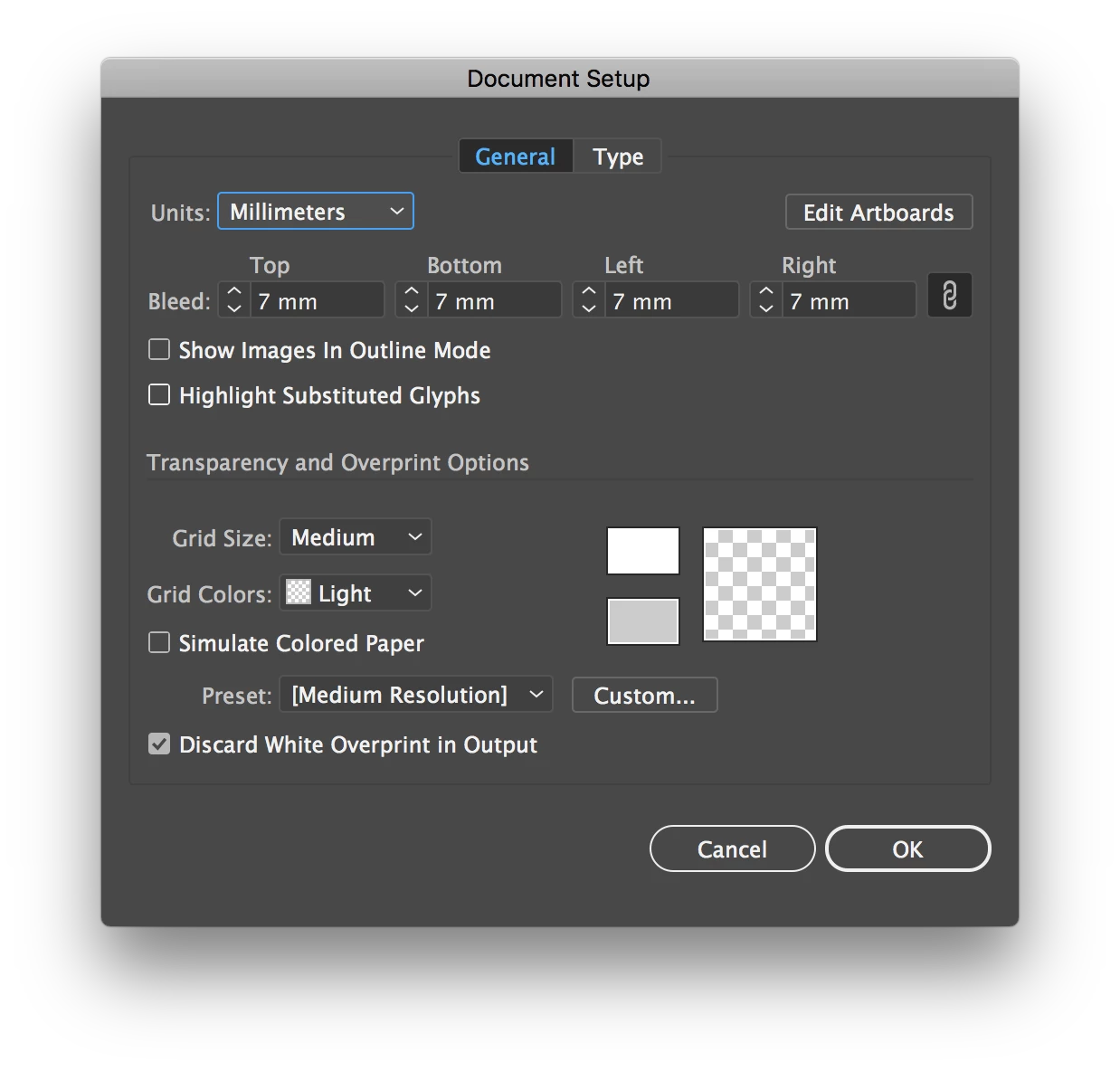
I can't actually believe this is causing me trouble but here it is, I'm trying to set the bleed dimensions in AI document with Javascript. All I've found so far is setting up PDF export options or print options, but not the actual artboard Document Setup. I just want to be able to set bleed to a newly created document like in this window:

So similar to Indesign:

with(myDocument.documentPreferences){

  documentBleedUniformSize = true;

  documentBleedTopOffset = 7;

  }

(CC2017)
Correct answer yury_ostanin

Summarizing best solution by far: we can change bleed size using preinstalled plugin.

Windows

https://goo.gl/YE1Vah by tomr11694738

Drop plugin in ProgramFiles\Adobe\Adobe Illustrator\Plug-ins\Extensions. Use following code to run it:

app.sendScriptMessage ("My_plugin_name", "mySelector", bleeds);

where bleeds is bleedoffset in points.

Mac

GitHub - ten-A/Bleed by Ten A

All hail to these two dudes.

8 replies

Egor Chistyakov
Inspiring
July 17, 2025

Even though a solution exists, we need a simple way to access theese.

Here’s a user request you can upvote if you agree: http://illustrator.uservoice.com/forums/908050/suggestions/50205060

TySprice
Known Participant
July 19, 2025

Yes, definitely wish it was baked into extendscript and we didn't have to go to such ends to modify bleed. The bleed Plugin does not work on Apple Silicon macs so the hacky way of doing things by no means covers all the bases. It is really less and less of a solution as time goes by.

TySprice
Known Participant
June 23, 2025

For anyone currently attempting to do this on a Mac. This link worked for me. Huge thanks to @Ten A 

https://github.com/ten-A/Bleed 


I also had to un-quarantine the plugin and followed the instructions in this link to do so.


https://www.motunation.com/forum/viewtopic.php?t=72872 


First copied the plugin into the plugins folder within the Illustrator application folder. Ran Illustrator once, let it complain then quit Illustrator. Then followed the steps in the second link to un-quarantine the plugin. Now works like a charm.

Stanly Hoffman
Known Participant
April 27, 2019

Tried to make 1.5 mm bleeds offset and got 1.411 mm... As well I can't make 1.5 pts offset, its always rounds it to 1. So plugin rounds the values by points, needs to be fixed.

Stanly Hoffman
Known Participant
April 29, 2019

This one did the job for 1.5 mm offset: app.sendScriptMessage ("My_plugin_name", "mySelector", "4,252"); 

Thank you, tomr11694738.

yury_ostanin
yury_ostaninCorrect answer
Inspiring
March 23, 2018

Summarizing best solution by far: we can change bleed size using preinstalled plugin.

Windows

https://goo.gl/YE1Vah by tomr11694738

Drop plugin in ProgramFiles\Adobe\Adobe Illustrator\Plug-ins\Extensions. Use following code to run it:

app.sendScriptMessage ("My_plugin_name", "mySelector", bleeds);

where bleeds is bleedoffset in points.

Mac

GitHub - ten-A/Bleed by Ten A

All hail to these two dudes.

Ten A
Adobe Expert
March 23, 2018

Here is a sample build for AI(Macintosh) ver.21 and later. You can download from the アプリケーション自動化総合コミュニティフォーラム (Japan) .

Bleed.aip.zip

Commentary also available in [AI]Javascriptの機能を拡張する方法 (Sorry, its a Japanese article. However, you can translate via google...)

New Participant
May 2, 2019

Just writing a note about this one. This plugin worked on Illustrator CC 2019 on Mac OS X 10.14.4.

Instructions:

1. Download and unzip Bleed.aip.zip mentioned here (or clone from github and compile. fun.)

2. Place the resulting Bleed.aip plugin to folder /Applications/Adobe Illustrator CC 2019/Plug-ins.localized/Extensions

3. Write a driver Javascript as follows:

$ cat script.js
   alert (setBleed ( 51.0236 ));  // unit: pt; range: 0-72.0

function  setBleed (n) {
       var  result = app.sendScriptMessage ( 'Bleed', 'Bleed' , n);
       return  result;
}

4. Start Illustrator

5. Select menu File -> Scripts -> Other Script ...

6. Select the script you wrote on step #3

All this information has been available on this thread or linked threads. However, the exact needed steps seemed to be a bit scattered, so I thought writing this down will save my effort next time I'm having this problem.

Great thanks to the guys who took the effort to produce this plugin!

Inspiring
April 17, 2017

Another possible way with script:

- Save document uncompressed so that we can parse the bleed data, and close it.

- Open and read the saved file, use this regex to replace the bleed value: ([\d.]*)(?= /Real \(Bleed(Left|Right|Top|Bottom)Value\))
, then save it. Note that the bleed value are in point unit.

- Now the bleed changed, open it in Illustrator again, and save it compressed if needed.

Silly-V
Brainiac
October 31, 2017

I changed your regexp to this because it was putting my bleed single-digit value in 2x:

/((\d{1,2}))(?= \/Real \(Bleed(Left|Right|Top|Bottom)Value\))/g

Here is the function:

function setBleed(doc, bleed, newName){

  /*

    Thanks to moluapple.

    bleed in points

  */

  var opts = new IllustratorSaveOptions();

  opts.compressed = false;

  opts.pdfCompatible = false;

  doc.saveAs(File(newName), opts);

  var f = app.activeDocument.fullName;

  var contents;

  f.open('r');

  contents = f.read();

  f.close();

  contents = contents.replace(/((\d{1,2}))(?= \/Real \(Bleed(Left|Right|Top|Bottom)Value\))/g, bleed);

  f.open('w');

  f.write(contents);

  f.close();

  app.activeDocument.close();

  app.open(f);

  var opts2 = new IllustratorSaveOptions();

  opts2.compressed = true;

  opts2.pdfCompatible = true;

  app.activeDocument.saveAs(app.activeDocument.fullName, opts2);

}

Participating Frequently
June 20, 2018

I'm having trouble getting this function mentioned above to work (I marked where it fails) :

function setBleed(doc, bleed, newName){ 

  /*

    Thanks to moluapple.

    bleed in points

  */ 

  var opts = new IllustratorSaveOptions(); 

  opts.compressed = false; 

  opts.pdfCompatible = false; 

  doc.saveAs(File(newName), opts); 

  var f = app.activeDocument.fullName; 

  var contents; 

  f.open('r'); 

  contents = f.read(); 

  f.close(); 

  contents = contents.replace(/((\d{1,2}))(?= \/Real \(Bleed(Left|Right|Top|Bottom)Value\))/g, bleed); 

  f.open('w'); 

  f.write(contents); 

  f.close(); 

  app.activeDocument.close();

//THIS IS WHERE IT FAILS 

  app.open(f); 

  var opts2 = new IllustratorSaveOptions(); 

  opts2.compressed = true; 

  opts2.pdfCompatible = true; 

  app.activeDocument.saveAs(app.activeDocument.fullName, opts2); 

Did this work for you? I couldn't get this to work, and I can't use a plug-in for my script since the script will eventually be run on someone else's computer. If this solution ended up working for anyone then I might keep toying around with it to see if I can get it to work. When I run it Illustrator says that the new file is in an unknown format and so won't load. I get this problem essentially anytime I try to write to an illustrator file.

Inspiring
April 15, 2017

Matts, do you have Windows system? I can try to make a Win plugin which can be used by your script.

Well, to be honest, I made the one for testing purpose.The plugin sets bleeds from txt file.

You write some number to txt file with  script, run action, bleeds change - voila.

But if you don't have win system, there's no point uploading this plugin.

Silly-V
Brainiac
April 16, 2017

What is a difference which would make your plugin Windows-only? To make it for Macs, would the entire code need to be re-written, or only certain parts?

Inspiring
April 19, 2017

This is magic Tom, how do I use it?


Good news is that it's possible to implement for scripting any feature, offered by SDK(pixel calculation, dividing bezier curves, finding duplicates etc).

For example, you can write pixel calculation in plugin, make it available for scriptmessage. Then you just run, say, such a string:

colorTextString = app.sendScriptMessage ("PluginName", "Calculate_average", "");

and get average color for gradient object or rasterimage (in text string, but it's no problem to parse it).

Keep in mind, that sendscriptmessage can not only send information to plugin, but also receive.

Bad news: plugins are platform-dependent and currently I can compile for Win only.

New Participant
April 13, 2017

Bump,

Is there really no way to do this?

Silly-V
Brainiac
April 13, 2017

We must not give up the search

Silly-V
Brainiac
April 6, 2017

That's a good question, I can't find it!

CarlosCanto
Adobe Expert
April 7, 2017

Save as PDF with Bleed...then re Save as Ai


[edit: please ignore, I should have tested it before posting]

New Participant
April 10, 2017

Yes, problem is even setting it up for pdf export does absolutely nothing.

var dest = "~/Desktop/testme1.pdf";

var doc = app.activeDocument;

var myFile = new File(dest);

var saveOpts;

setSaveOptions();

saveFileToPDF(myFile);

function saveFileToPDF(myFile){

    var originalInteractionLevel = userInteractionLevel;     

    userInteractionLevel = UserInteractionLevel.DONTDISPLAYALERTS;  

    doc.saveAs(myFile,saveOpts);    

    userInteractionLevel = originalInteractionLevel;    

}

function setSaveOptions(){

    saveOpts = new PDFSaveOptions();

    saveOpts.compatibility = PDFCompatibility.ACROBAT5;

    saveOpts.generateThumbnails = true;

    saveOpts.optimization = true;

    saveOpts.preserveEditability = true;

    saveOpts.bleedOffsetRect = [2,2,2,2];

    saveOpts.trimMarks = true;

}

After this media box is the size of trim marks but the art is cropped to the Artboard size, (not +2).