


Inspiring
April 10, 2020
Question

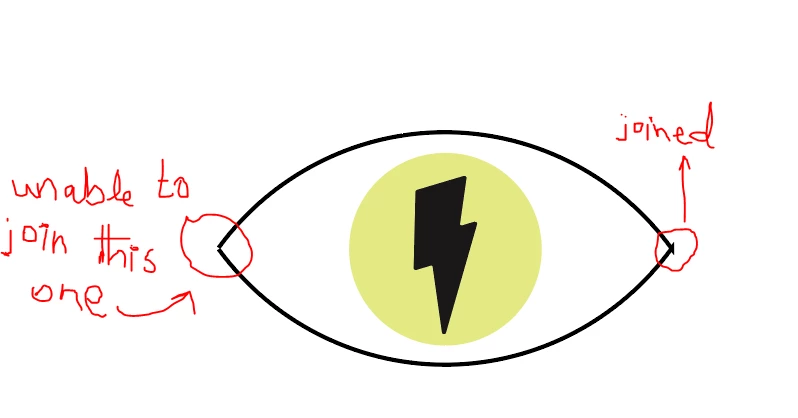
unable to join a path

  • April 10, 2020
  • 6 replies
  • 2782 views

In the following link of Ai tutorial:

https://helpx.adobe.com/sea/illustrator/how-to/drawing-tools-basics.html?playlist=/services/playlist.helpx/products:SG_ILLUSTRATOR_1_1/learn-path:get-started/set-header:ccx-designer/playlist:ccl-get-started-2/en_SEA.json&ref=helpx.adobe.com

while working on the 5th video, I was unable to join the second part of the eye:
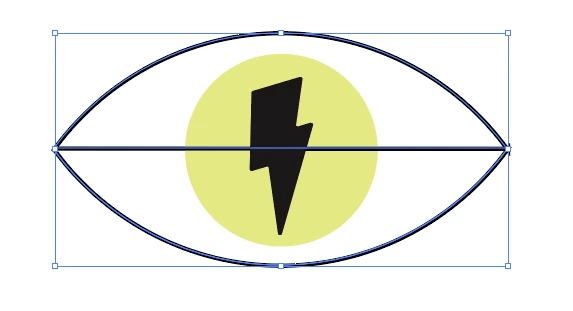
When I join the left one, the following thing happens:
I even closed illustrator then reopened, still the same.


This topic has been closed for replies.

6 replies

pixxxelschubser
Community Expert
April 10, 2022

Found it:

Join Paths Not Working (It Keeps Selecting an Anchor Point in Middle of Line as Endpoint) 


Here my contribution to the topic at that time:

Hi Jacob,

@Turq98BC is totally right. The file is wrong!


There are two identical arcs exactly one above the other - nested in several groups. Furthermore the start and and end point of the arc are not exactly horizontally aligned.


Not the best template for beginners! And IMHO I would use the Join Tool instead of the menu command: Join


By @pixxxelschubser


jane-e
Community Expert
April 10, 2022


@pixxxelschubser wrote:

Not the best template for beginners! And IMHO I would use the Join Tool instead of the menu command: Join


The Join tool is what I said earlier in this thread, so I agree! Directions for use are up near the top of this thread. The tutorial is from Brian Wood — I recognize his voice.


Jane

pixxxelschubser
Community Expert
April 10, 2022

I know this topic from another older thread.


If I remember correctly - one of the two arches is double over each other. Please check first if this is still the case. (I'm pretty sure I reported the incorrect file to the team at the time.)

heathjl85
New Participant
April 10, 2022

I have the same issue. I see that no one has posted a solution.  


Monika Gause
Community Expert
April 10, 2022

Did you use the Join tool as described by Nancy?

heathjl85
New Participant
April 10, 2022

Yes. Please read all the other comments on this thread. We have followed the tutorial and completed each of the steps, including the Join Tool.

Participating Frequently
June 3, 2021

Hey there, I am also having this same issue during the tutorial. For folks trying to help, could you please check out the video, the files, and the instructions. In going through the exercise, I am getting the exact same problem. Check out Video 5 here: https://helpx.adobe.com/illustrator/how-to/drawing-tools-basics.html?playlist=/services/playlist.helpx/products:SG_ILLUSTRATOR_1_1/learn-path:get-started/set-header:ccx-designer/playlist:ccl-get-started-2/en_us.json&ref=helpx.adobe.com


[One image with irrelevant content removed by moderator]


jane-e
Community Expert
June 3, 2021

Hi @Birdie0101 


In your screen shots, the paths have a gap on one side and overlap on the other side. See here for details:

https://helpx.adobe.com/illustrator/how-to/join-trim-paths-lines.html


~ Jane


Participating Frequently
June 3, 2021

Yes, I have seen these too. I'm curious if you actually did part 5 of the tutorial? It really is confusing and doesn't seem to show how to fix the problem. Could you give it a watch and try to follow along. 

Participating Frequently
April 11, 2020

That exactly my problem

jane-e
Community Expert
April 16, 2020

"That exactly my problem"


If your problem is exactly the same as the OP's, then use the Join tool and drag across each side of the eye.


~ Jane

Participating Frequently
April 16, 2020

I've try that already, it's doesn't working

Jacob Bugge
Community Expert
April 10, 2020

Star2,


There seems to be a mismatch of the Anchor Points in both sides: to the right the arcs cross so you have the end Anchor Point of the lower arc above that of the upper one and a short vertical segment between them, hence the two Miter Join spikes; to the left the arcs do not (even) meet (no overlap of the Butt Caps).


Going back and obtaining coinciding end Anchor Points would be a good start.


But there seems to be a contradiction between "unable to join this one" and "When I join the left one, the following thing happens:"


How have you obtained the second non solution?