



XYPN
Participant
January 18, 2021
Answered

Turn off Illustrator "Catch up with what's new" notification

  • January 18, 2021
  • 26 replies
  • 28621 views

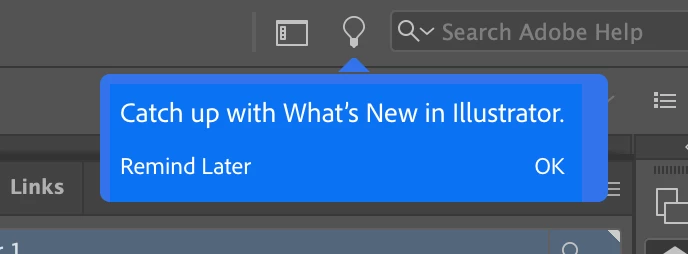
Does anyone know how to turn off this notification for the Learn window in Illustrator? It pops up every single time I open Illustrator, multiple times a day regardless of when I last opened, and it's driving me crazy. It's not useful or interesting, but I can't find anyone that's successfully turned it off. 
 

Correct answer Srishti Bali

Hi all,


We're extremely sorry to hear about this trouble.  I understand how distracting and frustrating it could be. Ideally, it should stop once you close it. We're currently investigating is issue but unfortunately couldn't replicate this behavior at our end. 


We need your help replicating this issue. In case you are still facing this issue, please feeel free to send us a DM. We'd be happy to help.


Regards,

Srishti


26 replies

cool_fritz
Inspiring
March 1, 2021

For the love of all that's holy, someone please tell me there is a way to turn off the exceptionally annoying big blue "Catch up with What's New in Illustrator" box that appears EVERYTIME I launch Illustrator now?! See screenshot.


I've tried hitting Ok, just hitting the Light Bulb Icon, looking through Preferences—nothing. If I click 'Ok' it launches a stupid Pane that I have close, and if I don't click Ok it STAYS there, in all it's giant, blue annoyingness. And even better, sometimes I hit 'Ok', then close the pop up Learn panel, and the blue box reappears! Who thought this was a good idea?


Please, please, please let there be some buried setting that I missed...

----------- MacBook Pro 16 | 2.3 GHz 8-Core Intel Core i9 | 32 GB 2667 MHz DDR4 (RAM) | AMD Radeon Pro 5500M 8 GB
cool_fritz
Inspiring
March 1, 2021

Not sure why screenshot didn't load, I'll try again...


----------- MacBook Pro 16 | 2.3 GHz 8-Core Intel Core i9 | 32 GB 2667 MHz DDR4 (RAM) | AMD Radeon Pro 5500M 8 GB
christopherc53187563
Participant
February 25, 2021

I am having the same problem and do most of my work in Illustrator. This was added with the update. I tried turning off notifications in preferences but that doesn't stop this. Why would anyone think adding something so disruptive would be an idea? It should display once and then never be shown again. If you click on it, it offers you no way to turn it off again. You have one of two options, remind me again forever every single time you reopen the program, or clieck OK and then manually close the window. It seems like such a sophomoric thing to do not to mention pandering to experienced professionals. Whoever's idea this was, knows absolutley nothing about the core audience using this program daily.

HBLChris
Participant
February 12, 2021

Same problem as well. sometimes it pops up halfway through the day even. If it was ONLY when I opened, as much as it's irritating I could overlook it... but popping up at random intervals is terribly distracting. 

Participating Frequently
February 11, 2021

Having the same issue. Very frustrating. 

S_Gans
Community Expert
Community Expert
February 8, 2021

So far, it appears that the Illustrator team has failed to address this issue for some years.
However a user came up with what appears to be a possible workaround. Please note: this is not Adobe approved, nor do I recommend it - but if you feel confident in your computer abilities - AND have a great backup, maybe follow the suggestions on this page:
https://community.adobe.com/t5/illustrator/how-do-i-turn-off-that-annoying-tour-window/td-p/9608050

Adobe Community Expert / Adobe Certified Instructor
Inspiring
January 18, 2021

I haven't seen this particular type of notification addressed in the forums... When I open a document I get the following popup, and neither Remind Later or Ok make it go away permanently. It pops back up after maybe 15 minutes. It happens with both new and existing docs. I could deal with it if it would at least go away till the next launch, but this is pretty annoying. It blocks the palettes under it so I have to deal with it.


Show tool tips is disabled in prefs. I even added the Learn palette to my workspace.

Other thoughts?  Illustrator v25.1 on Mac OS 10.15.7.


Thanks.


Monika Gause
Community Expert
Community Expert
January 18, 2021

Tooltips are an entire different thing.


If the popups appear again and again this points to issues with the preferences file. Do you experience crashes when closing Illustrator?


Monika Gause
Community Expert
Community Expert
January 19, 2021

Hi Monika, yes, sometimes. Of course, after I posted that it popped up once and then it was gone all day. Getting ready to quit for the day, will post back here tomorrow. 


You should concentrate on solving the crashing thing.

It maybe has to do with preferences corruption and this would also explain the recurring help popups.


https://helpx.adobe.com/illustrator/using/setting-preferences.html


Resetting the preferences will delete all your settings