Participant
August 2, 2022
Answered

Acrobat does not follow the page numbers correctly when I export an InDesign file

  • August 2, 2022
  • 4 replies
  • 2364 views

Hi everyone, I will do my best to wrap up my question clearly and shortly.


I have an InDesign file that has the first 14 pages numbered in Roman numerals. After page XIV, it turns to numbers from Roman numerals and starts with page 1. I am having no problem in page order jumping from a page to another page in InDesign. However, when I export this file as pdf, Acrobat does not differenciate the Latin numerals from numbers. The pdf starts with 1 instead of i, and as a result, the page numbers get messy. Because the first 14 pages are in Roman numerals and they are disregarded by Acrobat, when I try to jump to page 18 for instance, it jumps to 4. And if I try to jump to page 5, it carries me to page v, instead of 5. Our design team also tried to export the same InDesign file. Even all of our export settings are perfectly the same, some succeeded to have the Acrobat follow the correct order and some had the same issue as mine. I added some screenshots with my notes in order to represent the situation visually.


Looking forward to hear if anybody knows why this is happening and how I can fix it.


Cheers!
This topic has been closed for replies.
Correct answer Laubender

Hi @Oyku & Serra ,

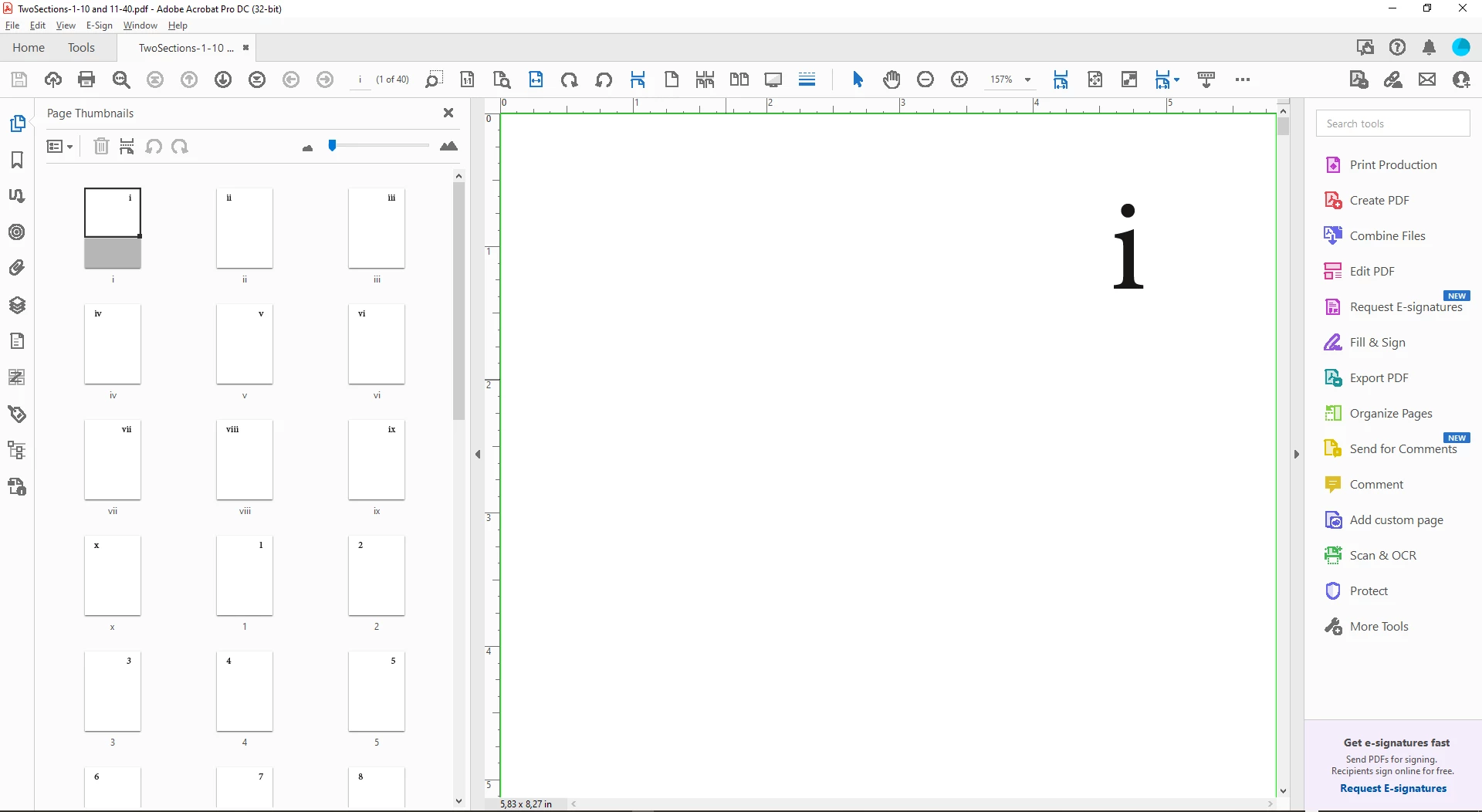
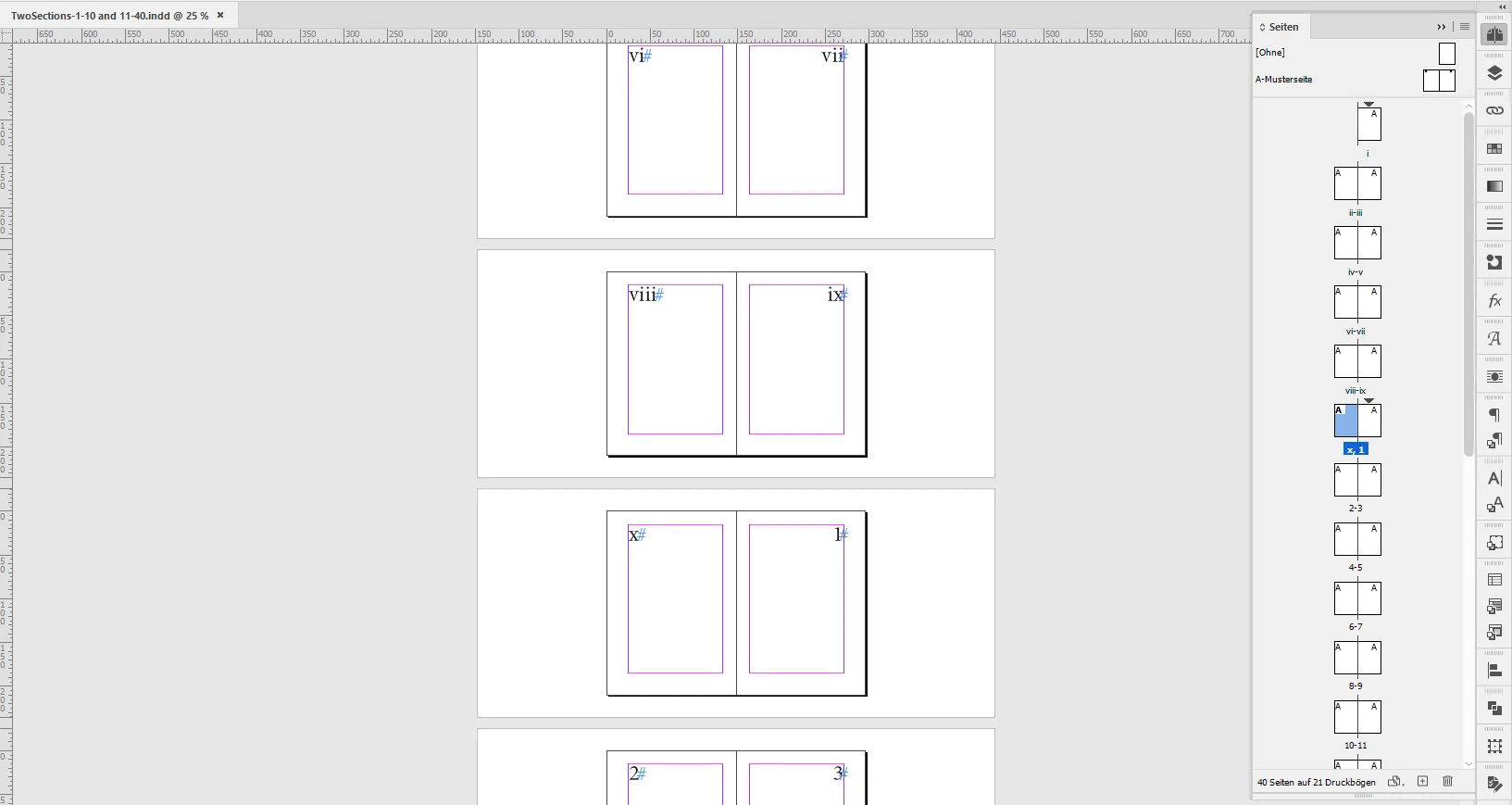
when I create two sections in my Page panel in InDesign, the first one with roman numerals, the second one with latin numerals beginning with number 1 and export the PDF to PDF (Print) with a PDF/X-4 preset I see no issues with the numbering in Acrobat Pro or Adobe Reader. Tested with InDesign 2022 version 17.3.0 on Windows 10:


Attached the InDesign document and the exported PDF.

Don't know what's going wrong on your side.


Regards,
Uwe Laubender
( Adobe Community Professional )


4 replies

Community Expert
August 3, 2022

Hi Brad and Rob,

after inspecting the first screenshot a little closer I definitely can see two sections in the visible pages of the document of @Oyku & Serra :


The numbering seems to be alright as far as I can tell.

What's a bit odd is page xiv that seems to be in landscape mode and the [1] on the next page.

Also that this document is not a facing-pages document.


Regards,
Uwe Laubender
( Adobe Community Professional )

rob day
Community Expert
Community Expert
August 2, 2022

Hi @Oyku & Serra , Also, you can set the Acrobat page labels in the Page Thumbnails panel—choose Page Labels... from the drop down:


You can select a page range and set the Page Numbering


Brad @ Roaring Mouse
Community Expert
Community Expert
August 2, 2022

One thing I noticed in your screen grabs is that you do not have "use logical page numbers" turned on in your Acrobat.

You SHOULD be seeing something like this when exported from ID:

 Go to Preferences > Page Display > Use logical page numbers


see if this makes a difference

rob day
Community Expert
Community Expert
August 2, 2022

Hi Brad, Should it be checked or unchecked? I have it checked in my example


EDIT: Nevermind I read too fast, I can see you suggested it should be checked


James Gifford—NitroPress
Legend
August 2, 2022

Actually, that's an interesting question. Are "logical" page numbers the underlying sequence, or the ones assigned by sections? 🙂


LaubenderCommunity ExpertCorrect answer
Community Expert
August 2, 2022

Hi @Oyku & Serra ,

when I create two sections in my Page panel in InDesign, the first one with roman numerals, the second one with latin numerals beginning with number 1 and export the PDF to PDF (Print) with a PDF/X-4 preset I see no issues with the numbering in Acrobat Pro or Adobe Reader. Tested with InDesign 2022 version 17.3.0 on Windows 10:


Attached the InDesign document and the exported PDF.

Don't know what's going wrong on your side.


Regards,
Uwe Laubender
( Adobe Community Professional )


James Gifford—NitroPress
Legend
August 2, 2022

This. You have to use sections to break out different page numbering schemes, such as i-xvi for front matter and then 1-240 for body pages.


It sounds as if you used some other scheme, maybe even manual numbering? PDF doesn't know anything about text-number, only logical, automatic numbering.