Here another idea for none-CS6 versions above CS5 (edit: AND also for CS6):
We could try to reach and execute the menu command for page labels and compare the state of labels before and after invoking the menu. That possibly would not affect the selection state of the selected pages in the Pages panel.
Regards,
Uwe
//EDITED
Hi together,
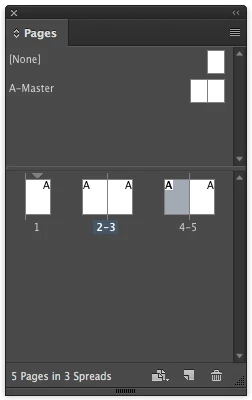
below some code that is looking for active pages in the Pages panel where the property pageColor is exploited.
Since pageColor cannot be applied individuallly on pages on a given masterSpread—all pages on a master spread are colored the same, if you apply pageColor to a single page, one cannot detect if a single page on a master is selected in the Pages panel.
However, for selected document pages the function is working as it should.
Notes and some important issues:
1. The code below is overwriting already set values of pageColor. It's up to you to refine it.
2. In case of selected master pages, one cannot tell the exact page, only the spread.
3. If the "None" master is selected, it will return an empty array.
4. It's for CS6 and above, because the menu structure changed from CS5.5 to CS6.
But it would be easy to do a version for CS5 and CS5.5 as well, I think.
Tested with CC 2017 on Mac OSX 10.10.5, but should also run on Windows.
// CODE EDITED BECAUSE MOVING THIS THREAD TO THE NEW FORUM CHANGED THE CODE:
/**
* @@@BUILDINFO@@@ GetPages-SELECTED-IN-PAGES-PANEL-v2.0.jsx !Version! Sun Jan 15 2017 14:10:32 GMT+0100
*/

/*

	1. ISSUE | If a single master page is selected, all pages of the master are stored as selected.
	2. ISSUE | The script will reset all pages' pageColor to: PageColorOptions.USE_MASTER_COLOR
	ToDo:
	Get the initial state of pageColor for all pages and apply it again after retrieving the info.
	Or use several undos.

	3. ISSUE | CS6 and above

*/


// WARNING :
// With CS5 and CS5.5 there are different menu hierarchies
// NOT IMPLEMENTED HERE!!
// But basically the trick should work with CS5 and CS5.5 as well.

// THIS ONE IS FOR CS6 and ABOVE:

// Full code variation in:
// GetPages-SELECTED-IN-PAGES-PANEL-v1.0.jsx


/*
// Core functionality:

app.menus.item("$ID/PagesPanelPopup").
	submenus.itemByName("$ID/PageAttributesSubMenu").
	submenus.itemByName("$ID/PageColorLabelMenu").
	menuItems[-1].associatedMenuAction.invoke();
*/

// VERSION 1 working with CS6 ONLY:

/**
* @@@BUILDINFO@@@ GetPages-SELECTED-IN-PAGES-PANEL-v1.0.jsx !Version! Fri Jan 13 2017 11:41:41 GMT+0100
*/

/*
	Script by Uwe Laubender published at Adobe InDesign Scripting forum:

	active page vs selected page
	Jarek Foltman Jan 10, 2017
	https://forums.adobe.com/message/9251733#9251733

*/

app.scriptPreferences.userInteractionLevel = UserInteractionLevels.INTERACT_WITH_ALL;

app.doScript
	(

	addTextFrameToSelectedPagesInThePagesPanel,
	ScriptLanguage.JAVASCRIPT,
	[],
	UndoModes.ENTIRE_SCRIPT,
	"Add text frame to the selected pages in the Pages panel | SCRIPT"

	);

// USE CASE EXAMPLE:

function addTextFrameToSelectedPagesInThePagesPanel()
{

	if(parseInt(app.version) < 8 )
	{
		alert
		(
			"SORRY:"+"\r"+
			"This is script can ONLY work with InDesign CS6 and later."
		);
		return
	}

	var doc = app.documents[0];
	var selectedPagesArray = getSelectedPagesInPagesPanel();

	for(var n=0;n<selectedPagesArray.length;n++)
	{
		var textFrame = selectedPagesArray[n].textFrames.add
		(
			{
				geometricBounds : selectedPagesArray[n].bounds ,
				fillColor : doc.colors.itemByName("Yellow") ,
				strokeColor : "None" ,
				contents : "Selected in Pages panel."
			}
		)
		textFrame.texts[0].pointSize = 80;
		textFrame.texts[0].justification = Justification.CENTER_ALIGN;
		textFrame.textFramePreferences.verticalJustification = VerticalJustification.CENTER_ALIGN;
	}

};

// Will return empty array or array with pages
// Could be pages of master spreads or document pages

function getSelectedPagesInPagesPanel()
{
	var resultArray = [];

	if(app.documents.length == 0){return resultArray };

	// What happens, if the Pages panel is closed?
	// Is the selection of pages still valid?

	// RESULT AFTER TESTING:
	// If the Pages panel is closed, after opening it again, the first page of the document is always selected.
	// So it's best I think to do nothing if the Pages panel is closed.
	// Return empty array:

	 if(!app.panels.itemByName("$ID/Pages").visible){return resultArray };

	var doc = app.documents[0];

	doc.masterSpreads.everyItem().pages.everyItem().pageColor = PageColorOptions.USE_MASTER_COLOR;
	doc.pages.everyItem().pageColor = PageColorOptions.USE_MASTER_COLOR;

	try
	{
	app.menus.item("$ID/PagesPanelPopup").
		submenus.itemByName("$ID/PageAttributesSubMenu").
		submenus.itemByName("$ID/PageColorLabelMenu").
		menuItems[-1].associatedMenuAction.invoke();
	}catch(e)
	{
		// Master "None" selected in the Pages Panel
		return resultArray;
	}

	var masterPages = doc.masterSpreads.everyItem().pages.everyItem().getElements();
	var masterPagesLength = masterPages.length;
	var docPages = doc.pages.everyItem().getElements();
	var docPagesLength = docPages.length;

	// Master pages first:

	for(var n=0;n<masterPagesLength;n++)
	{
		if(masterPages[n].pageColor != 1346594413)
		{
			resultArray[resultArray.length++] = masterPages[n];
		};

		// $.writeln(n+"\t"+"master | pageColor"+"\t"+masterPages[n].pageColor.toString() );
	};

	// Then document pages:

	for(var n=0;n<docPagesLength;n++)
	{
		if(docPages[n].pageColor != 1346594413)
		{
			resultArray[resultArray.length++] = docPages[n];
		};

		// $.writeln(n+"\t"+"doc | pageColor"+"\t"+docPages[n].pageColor.toString() );

	};

	doc.masterSpreads.everyItem().pages.everyItem().pageColor = PageColorOptions.USE_MASTER_COLOR;
	doc.pages.everyItem().pageColor = PageColorOptions.USE_MASTER_COLOR;

	return resultArray;

};
Regards,
Uwe



 AdChoices