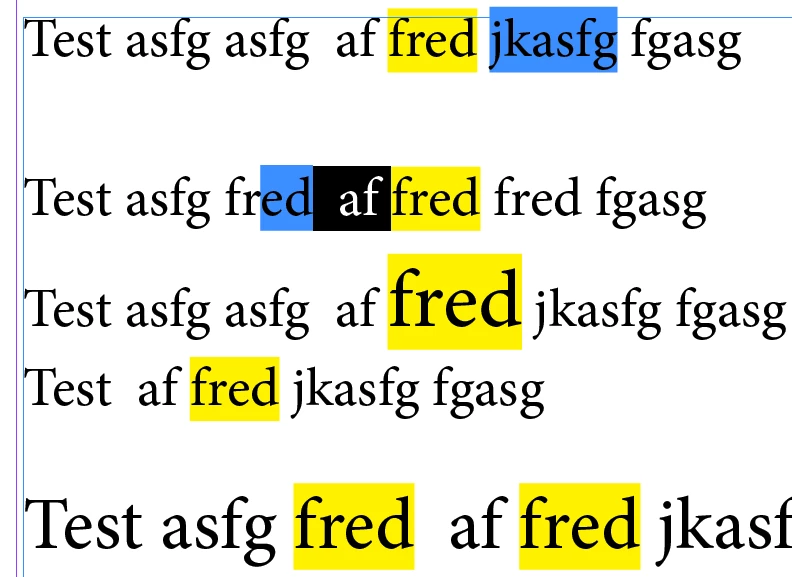
The below one is a better.
I removes a bug and also if no "what" is provided to the highlight function and there's no entry in the find what of the find text panel and some text is selected then that text will be highlighted.
An idea in the script is that a keyboard short cut can be applied for it and it will get it's info from the find text panel.
// Highlight function by Trevor
// http://creative-scripts.com
// Custom Scripts for Adobe InDesign, Illustrator and a lot more
// Beta Version 1
// https://forums.adobe.com/message/8898663#8898663
function highlight(what, color) {
var range, s, doc;
doc = app.properties.activeDocument;
if (!doc) {
return 'No Active Document';
}
s = app.selection && app.selection[0];
range = (s && s.properties.underline !== undefined && s.characters.length) ? s : doc;
app.doScript(f, ScriptLanguage.JAVASCRIPT, undefined, UndoModes.ENTIRE_SCRIPT, 'Highlight Text');
function f() {
var finds, find, l, leading, pointSize, currentChangeProps;
color = color || app.activeDocument.colors.itemByName('Yellow');
// Store current find change text settings
currentFindTextWhat = app.findTextPreferences.findWhat;
currentChangeProps = app.changeTextPreferences.properties;
what = what || currentFindTextWhat;
if (what !== '') {
// if no what is provided then the current entry in the find text panel will be used
app.findTextPreferences.findWhat = what;
app.changeTextPreferences.changeTo = '';
app.changeTextPreferences.underline = true;
app.changeTextPreferences.underlineColor = color;
finds = range.findText();
range.changeText();
l = finds.length;
while (l--) {
find = finds;
leading = find.leading;
pointSize = find.pointSize;
leading = pointSize * find.autoLeading / 100;
find.underlineWeight = leading + 'pt'; // This is presuming that font and leading size is set to points!
find.underlineOffset = (pointSize - leading) * 1.5; // The 1.5 might need tweaking but seems to work well
}
app.findTextPreferences.findWhat = currentFindTextWhat;
app.changeTextPreferences.properties = currentChangeProps;
} else if (range !== app.activeDocument) {
leading = range.leading;
pointSize = range.pointSize;
leading = pointSize * range.autoLeading / 100;
range.underline = true;
range.underlineColor = color;
range.underlineWeight = leading + 'pt'; // This is presuming that font and leading size is set to points!
range.underlineOffset = (pointSize - leading) * 1.5; // The 1.5 might need tweaking but seems to work well
}
}
}
/***************************************************************************************************************************************
** If text is selected then the "highlighting" is only applied within the selected text **
** Otherwise the "highlighting" is applied within the whole document **
** One could change this to apply to what ever is selected in the Find text document if one wanted to **
** To highlight the word(s) in the find text panel just use highlight(); or highlight(undefined, app.activeDocument.swatches[5]); **
** One can use highlight('Foo'); to highlight "foo" and ignore what's in the find text panel **
** The formating / styles etc. for the find are taken from the find panel **
** If one provides a swatch as the second argument highlight(undefined, app.activeDocument.swatches[5]); that swatch will be used **
** otherwise yellow will be used **
** If one provides a swatch as the second argument highlight(undefined, app.activeDocument.swatches[5]); that swatch will be used **
** If text is selected and what argument is given and the find what in the find panel is empty then the selected text is highlighted **
**************************************************************************************************************************************/
highlight();




 AdChoices