


Petteri_Paananen
Inspiring
August 21, 2011
Question

Adding section to active page

  • August 21, 2011
  • 2 replies
  • 4105 views

Hi

I´m trying to create a very simple javascript for adding new section to active page. So far I have made following code:

var myDoc = app.activeDocument;
var numero = app.activeWindow.activePage.name;
var numero2 = numero -1;
myDoc.sections.add(myDoc.pages[numero2]);

It basically works as it should, whren I double-click some page thumbnail in pages panel, that page will become active... and if I run the script at that point it usually adds section to active page pretty nicely....

However, if I use that script with Configurator 2.0 and create a custom panel, with Add a section button (where I have attached that same javascript) InDesign starts to throw me some weird alert:
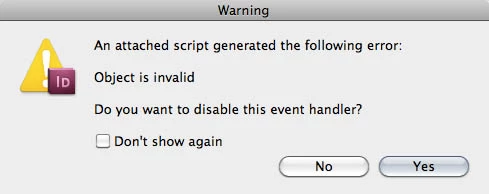
If I answer yes, script will work as it should, but I would like to make it work so that users won´t get that alert at all....

If I run that scrpt from Scripts panel, it works without alerts...

Another thing I have tried to figure out is how to create some kind of error handler that would stop the script if active page already has a section start, now script generates a javascript error in those cases.... it would be more classy if simply nothing happened....

Any help appreciated.... thanks

This topic has been closed for replies.

2 replies

Harbs.
Brainiac
August 22, 2011

I have not played with Configurator much.

One thing you can try is using app.documents[0] instead of activeDcoument.

You can also wrap the whole thing in a try/catch. This would probably solve both of your issues in one go...

Harbs

John Hawkinson
Inspiring
August 22, 2011

In case it wasn't clear, if you

try {
 ...
} catch (e) {
  $.writeln("Error "+e.message+" at line "+e.line);
}

then you'll know what it is complaining about, instead of being a mystery.

Petteri_Paananen
Inspiring
August 22, 2011

Thanks guys...=) but no luck here....

And I noticed something quite weird. This script is meant to use with single pages, but when I accidentally used it with facing pages spreads, I got that same alert + script changed the way page numbers are marked below thumbs:

It replaced 10-11 with 10,11

I also tried

try {
var myDoc = app.documents[0];
var numero = app.documents[0].layoutWindows[0].activePage.name;
var numero2 = numero -1;
myDoc.sections.add(myDoc.pages[numero2]);
} catch (e)
{  $.writeln("Error "+e.message+" at line "+e.line);}

But I still have that same alert.... When I run that code in Extend Script ToolKit, I got following javascrip console message:

Error undefined is not an object at line 2
Result: undefined

John Hawkinson
Inspiring
August 21, 2011

Does it work better with?:

var numero = app.activeDocument.layoutWindows[0].activePage.name;

just a guess.

Petteri_Paananen
Inspiring
August 22, 2011

No, it gives me same alert... thanks anyway....=)