


Joely10623436
Community Expert
Community Expert
June 25, 2025
Question

Adobe InDesign 2025.app ist beschädigt und kann nicht geöffnet werden.

  • June 25, 2025
  • 1 reply
  • 378 views

Liebe ID-User: Wer kennt dieses Problem auch bzw. hat eine Lösung?

  • MacOS Sequoia 15.5
  • Creative Cloud 6.7.0.278
  • InDesign 20.4


Fehler trat plötzlich auf. Deinstallieren/Installieren, Neustart etc. half nicht.
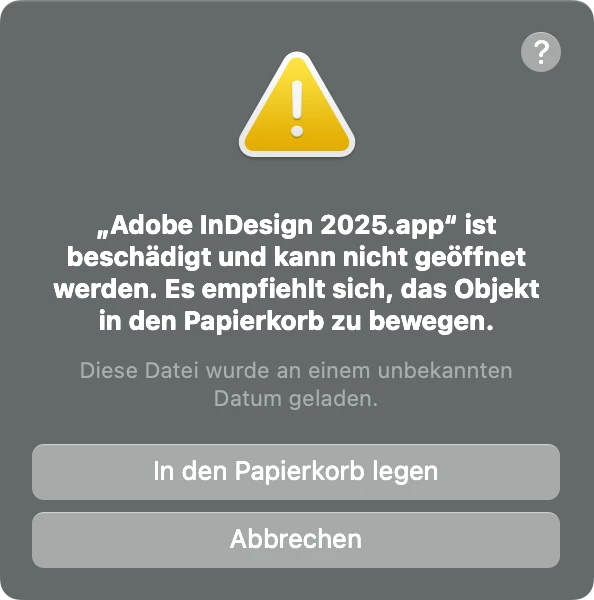
 

1 reply

Abhishek Rao
Community Manager
Community Manager
June 25, 2025

Hi @Joely10623436,


Thanks for sharing the details and the screenshot. Since reinstalling InDesign through normal means didn't help, I'd recommend using the Creative Cloud Cleaner Tool to completely remove all traces of InDesign from your system. This ensures that any corrupt or residual files are cleared out before a fresh install. You can find the steps here:
https://adobe.ly/4lIdoX1

Once you’ve removed InDesign using the cleaner tool, please reinstall it using the official guide here:
https://adobe.ly/4k6h6bq

After reinstalling, try launching the app again and let me know if the issue is resolved.


Happy to follow up if needed!

Abhishek 

Joely10623436
Community Expert
Community Expert
June 25, 2025
HARSHIKA_VERMA
Community Manager
Community Manager
June 26, 2025

Hi Joel,


Thank you for reporting the issue. Strange to hear that the Cleaner tool is not working for you. I checked on my end, and it seems to be working fine.

Would you mind checking this direct link: https://adobe.ly/4eloTB3 and let me know if that works for you?


Thanks,

Harshika