Abhishek Rao
Community Manager
Community Manager
October 14, 2024
StickyQuestion

Adobe InDesign MAX Release: MathML Support to create math expressions

  • October 14, 2024
  • 17 replies
  • 7530 views

Hello Everyone,

We are thrilled to introduce the new MathML feature in InDesign. Now, you can easily create, style, and edit math expressions with the new MathML panel. Seamlessly integrate complex equations into your documents, styled to match your text. Perfect for scientific and academic content!


Insert a math expression

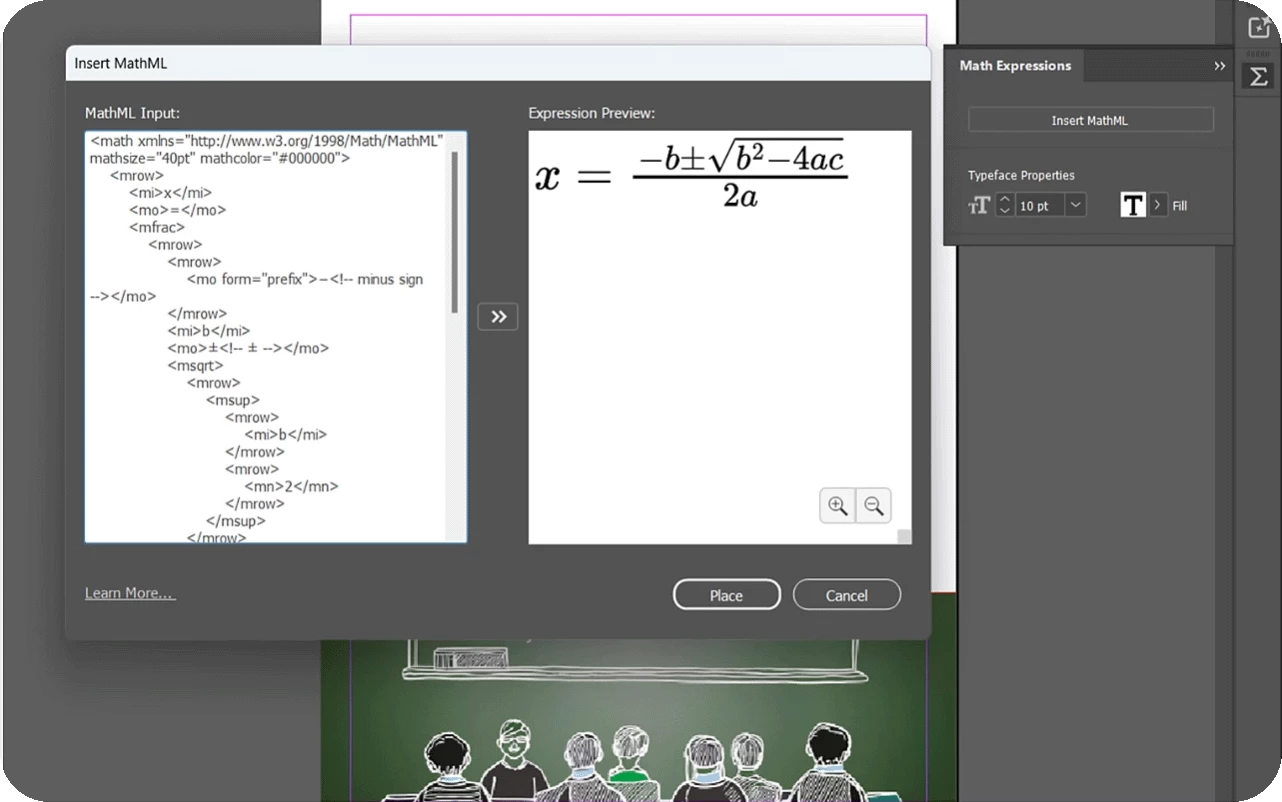
  1. Create or open any InDesign document and select Object > Insert MathML.
  2.  Add the MathML code in the MathML Input section.
  3. Select the Preview Expression icon to see the expression in the Expression Preview section.
  4.  Select Place. Your math expression is placed as an SVG file in your document. You can anchor it just like any other SVG.
    5. Update the Font Size and Fill color (including document colors) in the Math Expressions panel to match the rest of your document.


Edit a math expression

1. Right-click the math expression and select Edit MathML.

2. Update the MathML code in the MathML Input section.

3. Select the Preview Expression icon to see the updated expression in the Expression Preview section.

4. Select Save.


For more details, please click here. 

If this was helpful, please click the Upvote icon in the top left corner of this post. Your feedback helps us improve the experience. Thank you!


Have questions? Click 'Reply' below to ask.

Click 'Follow' below to bookmark this post for easy reference.

17 replies

New Participant
October 24, 2024

When I start adding crossouts, carries or extra color to MathML addition or subtraction, msline seems to break, is that to be expected?

Community Expert
October 23, 2024

I found how to create equations with MathML on Drillster. It will be more complicated than expected but it's OK. I don't know if it's the good place to ask this question, but do you know (if it has already been created) where to find the symbols of Real Numbers components, I mean : N, Z, D, Q and R with the double bar like as below (last page of my worksheets on real numbers) - of course I can create those glyphs in a font designed by myself, but I'm sure anybody linked to Maths would need those. Pi is also complicated to be found.


jctremblay
Community Expert
October 23, 2024

Voici...

<math>
  <mrow>
    <mi>&naturals;</mi>
    <mo>&subset;</mo>
    <mi>&integers;</mi>
    <mo>&subset;</mo>
    <mi>&rationals;</mi>
    <mo>&subset;</mo>
    <mi>&reals;</mi>
    <mo>&subset;</mo>
    <mi>&complexes;</mi>
  </mrow>
</math>


Community Expert
October 23, 2024

Merci beaucoup Jean-Claude 🙂

Community Expert
October 22, 2024

I enjoy that feature so much!
I "sell" (do my best to catch interest for) Maths to middle school students, this will be very useful 🙂

Community Expert
October 21, 2024

Looks good

Community Expert
October 17, 2024

cool feature but I have ADHD, this will just have my brain going all tweet tweet. 

@mj
Community Expert
October 18, 2024

🤣

Inspiring
October 16, 2024

Please, can you stop using these annoying animated gifs in community forums? I think, just static image will be OK (like in Photoshop forum). Not in this subpage, but in main thread. Or am I the only one who finds them annoying?

James Gifford—NitroPress
Brainiac
October 22, 2024

Most browsers can be set to block GIF animations. Here's one link —

https://www.howtogeek.com/257408/how-to-stop-animated-gifs-from-playing-in-your-web-browser/

Inspiring
November 23, 2024

Thank you, it works (Animation Policy for Chrome).


Hmm, but this plugin breaks the Outlook web interface in Chrome. so i im back with animated s_it here.

Frans v.d. Geest
Community Expert
October 16, 2024

...a SVG in RGB colors... and no way to change that. Half baked.

Community Manager
October 16, 2024

Hi, Sorry for the trouble. Please share a screen recording depicting the issue, and we will share it with our product team for further suggestions. 


^VS

jctremblay
Community Expert
October 16, 2024

@Vivek12 Adobe and InDesign product team is well aware of the limitations and issues with Math ML Object being internal SVG content with color defined in RGB.