Thanks for your responses; your issue makes a lot more sense to me now. The short answer is "the reason there are dupes in your XML export is becuase there are dupes in the source English XML that I believe was exported from your content management system." Here's a screenshot:
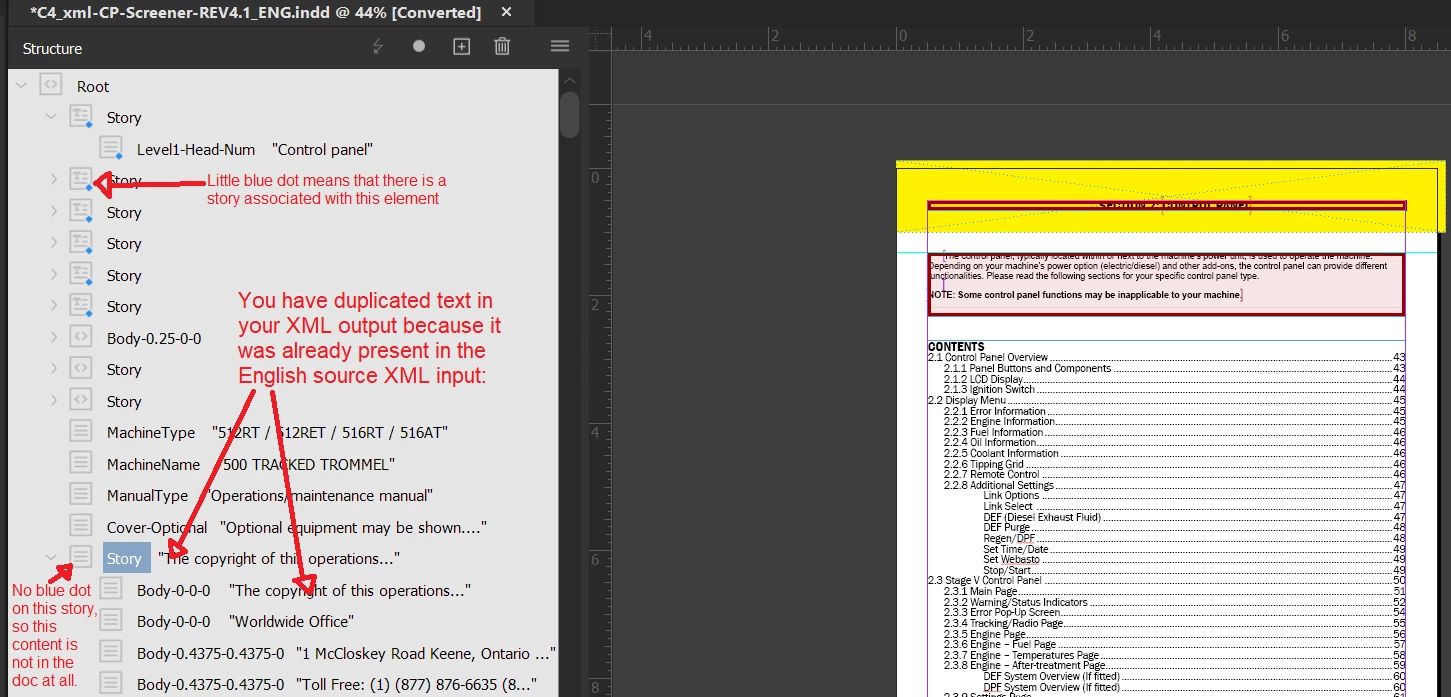
The only way to get those translations back into your INDD, right now, is by getting a good translation of the XML, with or without dupes, or by manually copying and pasting each string from the Word doc to the InDesign spreads.
Here's the long version:
Your organization already had a translation workflow in place, and so I think you were following instructions when you exported XML instead of IDML. That makes sense, especially since it's clear that the EN doc is all tagged up for an XML worklow. If that's the case, is your vendor a firm (or person) who has done work for your organization before? If so, they're probably used to working with your XML output. So it'd be weird, for them, to get Word instead of XML. They must have seen the dupes in your XML output and said to you "Hey, there are dupes in here! Please fix and resend." At which point the best thing to do would have been to figure out the cause of the dupes and fix them, in order to send them correct XML.
Those duplicated strings are clearly in the English XML. I am not sure how your document came to be, but it sure looks like someone (a tech writer) exported an XML file from some sort of content management system, which was then imported into an InDesign Template, whereupon someone (you?) populated the document with the XML English content. The massive number of unused elements most likely results from the XML-creation stage, long before said XML was imported into InDesign.
I suspect that you have instructions on how to get that translated XML back into your English source document, yes? It'd be something like:
a) Click File -> Import XML
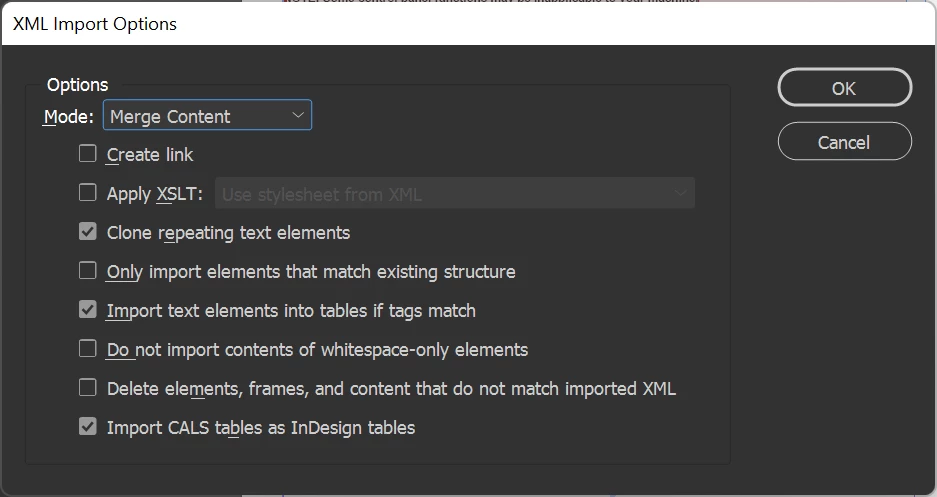
b) Choose... I dunno? I suspect that you're supposed to see this menu, which you get by clicking Show XML Import Options at the Import XML file picker dialog.
I withdraw my advice that you should find a new provider right away. If you sent them Word docs, then they should reasonably return Word docs. If they've worked with your org before and expect XML, I have an idea about what might have happened on their side, I've been in their shoes before.
Me: "Um, hey boss? This is weird. Client sent Word instead of XML this time."
Boss: "Must be the new guy. Did he say anything about it?"
Me: "No, just sent me Word docs without comment."
Boss: "Okay, process 'em and send 'em back as Word docs."
Me: "Isn't that going to break their workflow?"
Boss: "Yup."
Me: "New guy is going to have to copy and paste each string by hand?"
Boss: "Yup."
Me: ".... okay, boss, will do."
So, I think that is where you are. You have all the strings in Word, and would have to copy in bits by hand. That will be extremely time-consuming, and error-prone. I imagine you'd have to be very careful to leave each XML tag as-is. That is because I suspect that there is need for that document to have properly tagged XML downstream from you. If I'm wrong, and it's going to print only, then you don't techincally need all of those tags. I can't guess, though.
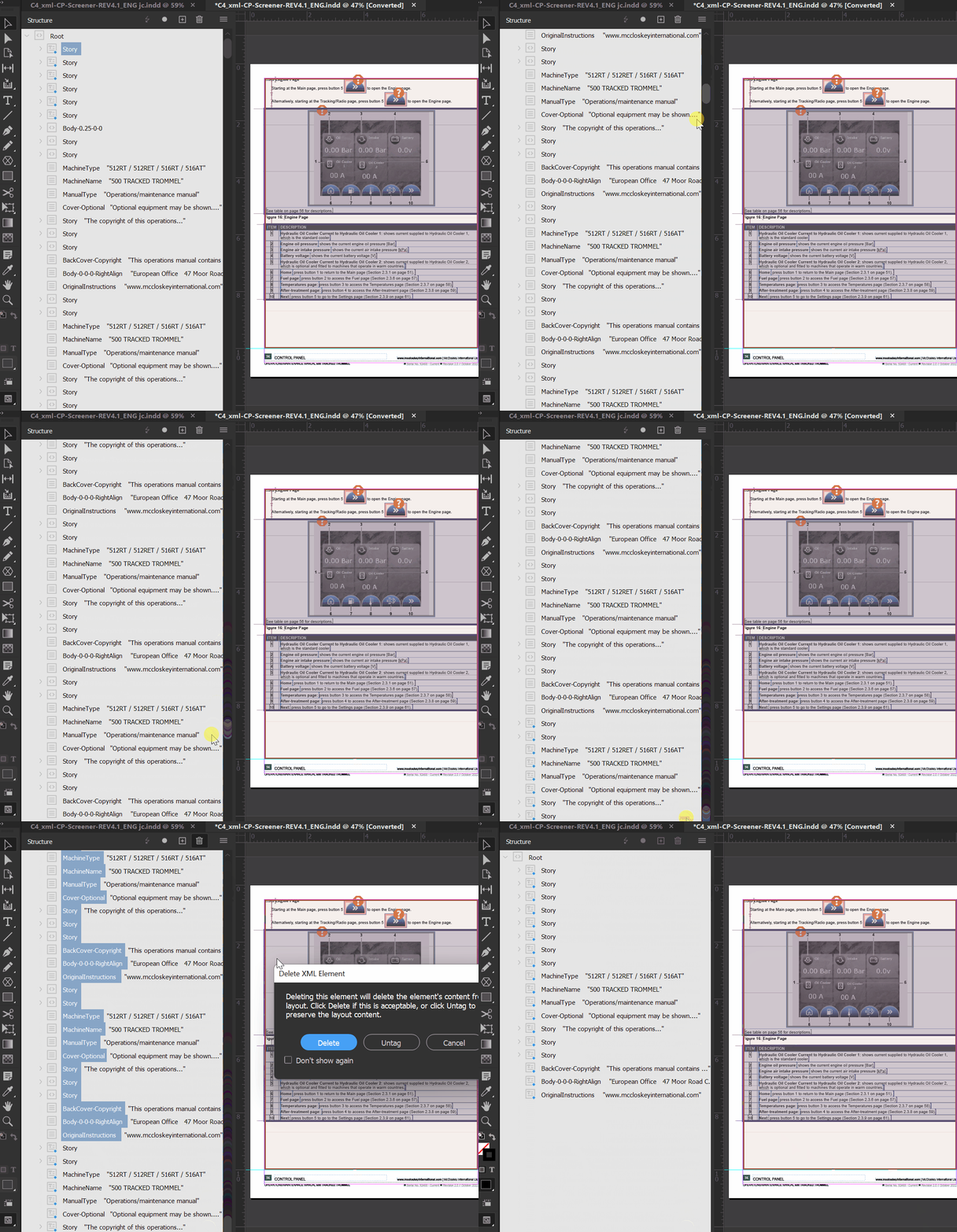
I do think it's clear that you don't need those dupes to be translated. What I'd do is delete the unused content from the Structure panel, re-export XML, and re-send to the vendor. Here's a little GIF showing what I'd do; I would shift-select the dupes and trash 'em all at once.
It'd be better if you could go back to the vendor, say "Can you re-apply your translation memory to the fixed XML I've attached here, and deliver the translated XML back to me?" They'd most likely say "Sure, that's just a minimum charge." No new translation should be necessary, if they've already translated that content in your Word file. That would be the best-case scenario (it assumes that they're capturing translations in a translation memory). If you can get that file from your vendor (assuming you can get the money for the vendor to do their jobs again, then it should be simple to Import that XML and Replace the old content with the new content.
(There is a third way, but I don't advise it for you. It's what I would do: I'd fix and re-export my XML, then I would take my source English doc and the vendor's Portuguese Word doc and perform an alignment; put each pair of strings into a translation memory database. Then I'd apply that database to my cleaned XML, and re-import the Portuguese XML into InDesign. However, for that, you kinda have to be a localization nerd who already has some kind of translation memory tool, and the capacity to kinda read Portuguese so you can peform a good alignment. I'd do that, because I am already that localization nerd, and already have the translation tech environment, and I read enough Spanish to feel confident in reading technical Portuguese. That work is what I'm speculating your vendor would want to charge you a minimum charge to perform.)



 AdChoices