


Inspiring
July 30, 2019
Answered

Align decimal points in bullets and numbering list

  • July 30, 2019
  • 2 replies
  • 3123 views

Hi There

I have a paragraph style for numbered bullets and everything works great until the list have tap's, but while I creating in auto bullets numbering option the dot's not to align decimal points like below output view. I'd using the tab option the style nothing changes. Something I mistake in tabs measurements.

Any help or thoughts would be appreciated.

On my output:
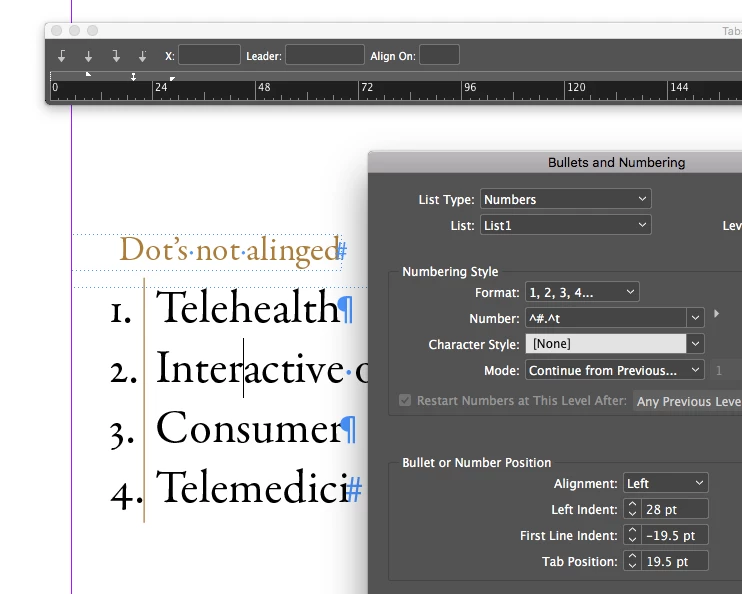
Orignal Output:

    This topic has been closed for replies.
    Correct answer Ogistian

    Hi All, I find my mistakes, I forget the option of alignment right in numbering style. Thanks you.

    2 replies

    Barb Binder
    Community Expert
    July 30, 2019

    I have to step into class, Ogistian, but had one more thought to share: the tab setting that you referenced is controlling the position of the text, not the numbers. I'd like to be able to set a decimal tab to control the decimal positions for the numbers themselves, but InDesign currently does not allow us to add a tab at the beginning (or middle, for that matter) of the Number format.

    For example, you have this: ^#.^t. I would like the option to define: ^t^#.^t which would allow me to align to the decimal point as I hit two digit numbers. This is not an option for now.

    ~Barb

    ~Barb at Rocky Mountain Training
    John Mensinger
    Community Expert
    July 30, 2019

    I just do it like this:

    It doesn't hang the 2-digit numbers outside the frame, which would be a little closer to ideal, but it still works. The Left Indent value is the only tricky part; different fonts will require different amounts to align the dots.

    Barb Binder
    Community Expert
    July 30, 2019

    Yes, as long as your First Line Indent is a negative value, it won't work; it must be 0 or greater.


    Yay! Thank you so much! I can't believe I didn't know this.

    ~Barb

    ~Barb at Rocky Mountain Training
    Barb Binder
    Community Expert
    July 30, 2019

    Hi Ogistian:

    The issue with the numbers in your screen shot appears to be that you are using a font with proportional figures—meaning that they are different widths. Assuming you are using an OpenType font, change the Figure Style in OpenType Features for your paragraph style to one of the two tabular options

    Proportional figures:

    Tabular figures:

    ~Barb

    ~Barb at Rocky Mountain Training
    OgistianAuthor
    Inspiring
    July 30, 2019

    Hi Barb, Thanks for your reply, On this project the numbers are in old styles only. So those points need to align decimal with old style number's. see again below output. Suggestion needs any good other way to control.

    OgistianAuthorCorrect answer
    Inspiring
    July 30, 2019

    Hi All, I find my mistakes, I forget the option of alignment right in numbering style. Thanks you.