


New Participant
May 20, 2020
Question

All text highlighted in multiple colors when opening INDD file

  • May 20, 2020
  • 5 replies
  • 3384 views

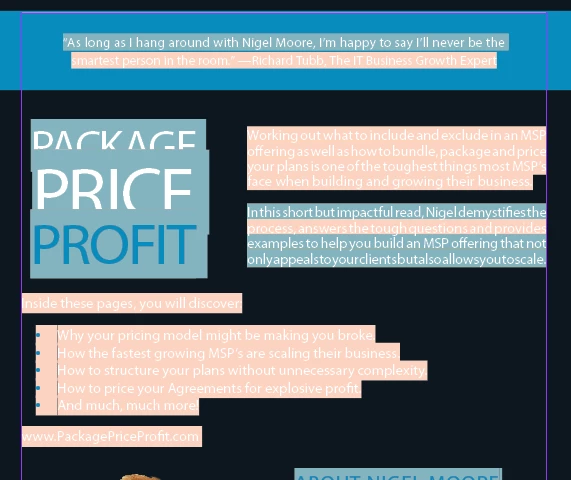
Every time I open a file that was created by a vendor we work with, the text is always highlighted in a muted teal / ocean blue color. I can't seem to ever get it to go away. It's only in InDesign - the PDF's I create are fine. This one now has a light pink/peach color too. I can't figure out why. Any help is appreciated!  


5 replies

Derek Cross
Braniac
May 20, 2020

I'm with Barb -- the Style Override Highlighter is your friend; learn to use it.

Braniac
May 20, 2020

You can disable the Style Override Highlighter by clicking the + icon in the top right corner of the Paragraph Styles panel or the Character Styles panel. That will remove the teal highlighting. I choose to work without overrides so I find the override highlighter invaluable, and always keep it enabled. Your vendor may have chosen to work with overrides, in which case, feel free to disable the highlighting.


And Uwe's answer is entirely on point for the pink highlighting. You are not using the fonts that were choosen by the designer in that document, instead, InDesign is deciding for you which ones to substitute. The vendor can fix this by packaging the file before sending it to you. The package command in InDesign will copy the document, the fonts (outside of CJK and Adobe fonts), and all of the linked graphics. If you glance down at the status bar, you will likely see a red light, which indicates that this file has errors. There may be additional errors (modified links or missing links)  but I suspect you're going to see missing fonts will make up a lot of them. You do want to resolve this before you send this file out for printing.


~Barb

Braniac
May 20, 2020

BC15 said: "…the PDF's I create are fine."


Hi BC15,

no, the PDFs will be not fine, because one or more fonts are missing.

You first have to deal with that issue before exporting PDFs.


Example for a missing font ( from my German InDesign ) :


Also the activated Preflight is showing this in detail, font name, characters and page name:


Regards,
Uwe Laubender

( ACP )


rob day
Braniac
May 20, 2020

You can control the highlighting via Preferences>Composition>Highlight

Derek Cross
Braniac
May 20, 2020

The pink indicates you haven't the font(s) installed and the blue is the Style Override Highlighter