Participating Frequently
November 14, 2024
Answered

Alt key modifier issue

  • November 14, 2024
  • 2 replies
  • 849 views

Hi everybody 🙂


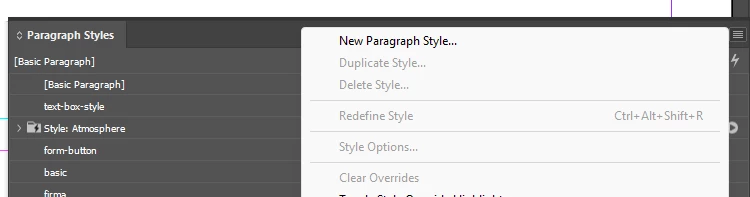
I've recently started using my adobe suite under Windows 11 and been experiencing issues with the alt key. This is happening apparently in every program but, as an example in inDesign, when clicking the panel options in Paragraph Styles and holding the alt key as modifier the menu closes after a second.


Thanks in advance
This topic has been closed for replies.
Correct answer Dave Creamer of IDEAS

Hi Dave,

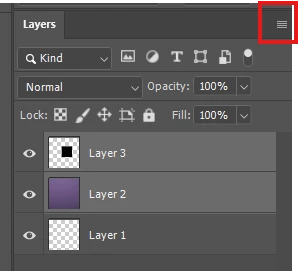
I'll give u an example in photoshop. When merging layers or a group of layers through the layers panel menu, if you hold option/alt key and then click 'merge layers' or 'merge visible' will place a new merged layer above, keeping the former below.


Just tested this behavior in macos and seems to be happening in windows only.


Thanks!


OK--I use the keyboard shortcut (Cntl-Alt-Shift-E or Cmd-Opt-Shift-E) for that, however, the Alt-menu key works for me. The menu does not go away (I didn't test the Layers panel originally).


Since you posted in InDesign, what do you use the Alt key on the Paragraph Styles panel?


2 replies

JR Boulay
Adobe Expert
November 20, 2024

Please note that on Windows there are two ALT keys that work differently: Alt and AltGr

Acrobate du PDF, InDesigner et Photoshopographe
Participating Frequently
November 20, 2024

Hi! 

yes, I'm only referring to left alt key. Just in case someone else find this useful:


  • Merge Selected Layers:

    • Windows: Select the layers you want to merge, then press Ctrl+E.

    • Mac: Select the layers you want to merge, then press Cmd+E.

  • Merge All Visible Layers:

    • Windows: Press Ctrl+Shift+E.

    • Mac: Press Cmd+Shift+E.

  • Merge All Layers into the Background Layer:

    • Windows: Press Ctrl+Alt+Shift+E.

    • Mac: Press Cmd+Option+Shift+E.

  • Merge Layers to a New Layer:

    • Windows: Press Ctrl+Alt+E.

    • Mac: Press Cmd+Option+E

Thanks again 🙂


Abhishek Rao
Community Manager
Community Manager
November 14, 2024

Hi @20469225,


Thank you for reaching out and sharing your experience. I’m sorry to hear about the issues you’re facing with the Alt key.

To better assist you, could you please provide the version of InDesign you’re currently using and more details about your operating system? Additionally, is this issue only occurring with Paragraph Styles, or are you experiencing it with other options and windows as well?

I was able to reproduce the issue on my end and will be checking this with our product team. Your patience is greatly appreciated as we work towards a solution.


Best,

Abhishek Rao

Participating Frequently
November 15, 2024

Hello Abhishek,

I'm using inDesign v 20.0 x64 under Windows 11 v23H2.

About your question, testing this further I've realised every menu I open (contextual or main menu for instance) will close after holding the alt key. This happens in other Adobe programs like Photoshop (v.26). First thing I thought was some other software taking over shortcuts but I've already deactivated the Power toys keyboard administrator, just in case, but same thing happening..

Thank you

Abhishek Rao
Community Manager
Community Manager
November 15, 2024

Hi @20469225,  


Thank you for sharing the additional details about your system and the issue. I’m currently checking this internally with the product team to understand if this behavior with the 'Alt key' is expected or a potential issue specific to certain setups.  

Your patience is greatly appreciated, and I’ll update you as soon as I have more information. In the meantime, if you encounter any new observations, feel free to share them.  


Best,
Abhishek Rao