


Any ideas on how to make a script run from a button would be of massive help!
Hello,
Any ideas on how to make a script run from a button would be of massive help!
I made a test script called script.jsx and I want to run it from a panel has a button 'Run Script'.
The script is intended to just open a new page and create a text box with some words.
So far i have the beblow
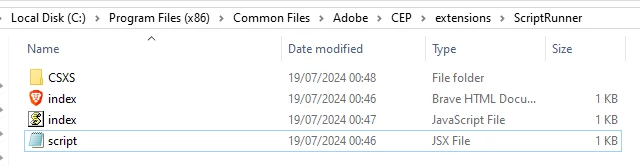
and indesign shows me this
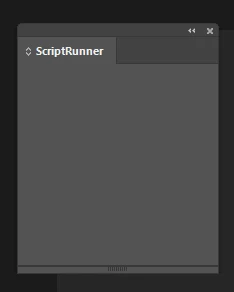
it should be showing this - only when I made a change I have lost the button... not too sure why
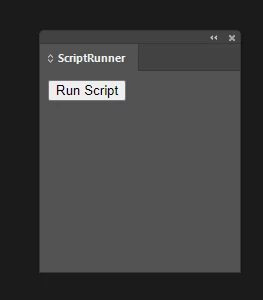
Anyhow here is the problem
1) - the button is not showing
2) when the button was showing it failed to run the script
I am currently just copying the files to the CEP extentsions folder.
Below are the are the code files.
Any ideas on how to make a script run from a button would be of massive help!
Best,
Smyth.
index.html
<!DOCTYPE html>
<html>
<head>
    <meta charset="utf-8">
    <title>Script Runner</title>
</head>
<body>
    <button id="runScript">Run Script</button>
    <script src="index.js"></script>
</body>
</html>
index.js
var csInterface = new CSInterface();
console.log('CSInterface loaded');

document.getElementById('runScript').addEventListener('click', function() {
    console.log('Button clicked');
    var script = "app.doScript(File('C:/Program Files (x86)/Common Files/Adobe/CEP/extensions/ScriptRunner/script.jsx'))";
    console.log('Script to run: ' + script);
    csInterface.evalScript(script, function(result) {
        console.log('Script executed with result: ' + result);
    });
});
manifest.xml
<?xml version="1.0" encoding="UTF-8"?>
<ExtensionManifest Version="7.0" ExtensionBundleId="com.example.ScriptRunner" ExtensionBundleVersion="1.0.0"
 	ExtensionBundleName="ScriptRunner" xmlns:xsi="http://www.w3.org/2001/XMLSchema-instance">
 <ExtensionList>
 	<Extension Id="com.example.ScriptRunner" Version="1.0" />
 </ExtensionList>
 <ExecutionEnvironment>
 	<HostList>
 		<Host Name="IDSN" Version="[11.0,20.0]"/>
 	</HostList>
 	<LocaleList>
 		<Locale Code="All" />
 	</LocaleList>
 	<RequiredRuntimeList>
 		<RequiredRuntime Name="CSXS" Version="7.0" />
 	</RequiredRuntimeList>
 </ExecutionEnvironment>
 <DispatchInfoList>
 	<Extension Id="com.example.ScriptRunner">
 		<DispatchInfo >
 			<Resources>
 				<MainPath>./index.html</MainPath>
 				<ScriptPath>./index.js</ScriptPath>
 			</Resources>
 			<Lifecycle>
 				<AutoVisible>true</AutoVisible>
 			</Lifecycle>
 			<UI>
 				<Type>Panel</Type>
 				<Menu>ScriptRunner</Menu>
 				<Geometry>
 					<Size>
 						<Height>200</Height>
 						<Width>200</Width>
 					</Size>
 				</Geometry>
 			</UI>
 		</DispatchInfo>
 	</Extension>
 </DispatchInfoList>
</ExtensionManifest>
And the indesign script script.jsx - which works if run from the panel.
// Create a new document
var myDocument = app.documents.add();

// Add a text frame to the first page
var myPage = myDocument.pages.item(0);
var myTextFrame = myPage.textFrames.add();

// Set the position and size of the text frame
myTextFrame.geometricBounds = ["6mm", "6mm", "60mm", "190mm"];

// Add some text to the text frame
myTextFrame.contents = "Hello, InDesign! This is a script-generated text.";

// Create a new color
var myColor = myDocument.colors.add({
    name: "ScriptBlue",
    model: ColorModel.PROCESS,
    colorValue: [100, 50, 0, 0] // CMYK values
});

// Apply the color to the text
myTextFrame.texts[0].fillColor = myColor;

// Set the font size
myTextFrame.texts[0].pointSize = 18;

alert("Script completed successfully!");
 AdChoices