Participating Frequently
July 27, 2023
Answered

Apply color other than black to QR Code from datamerge

  • July 27, 2023
  • 8 replies
  • 3653 views

Hello!

I have a ticket that has a QR code on it that the customer wants in their color (blue). When using datamerge, the QR codes are colored black. The DB has 25,000 records. Anyone have a Javascript to accomplish this? 


Thanks in advance!


Bud

Correct answer m1b

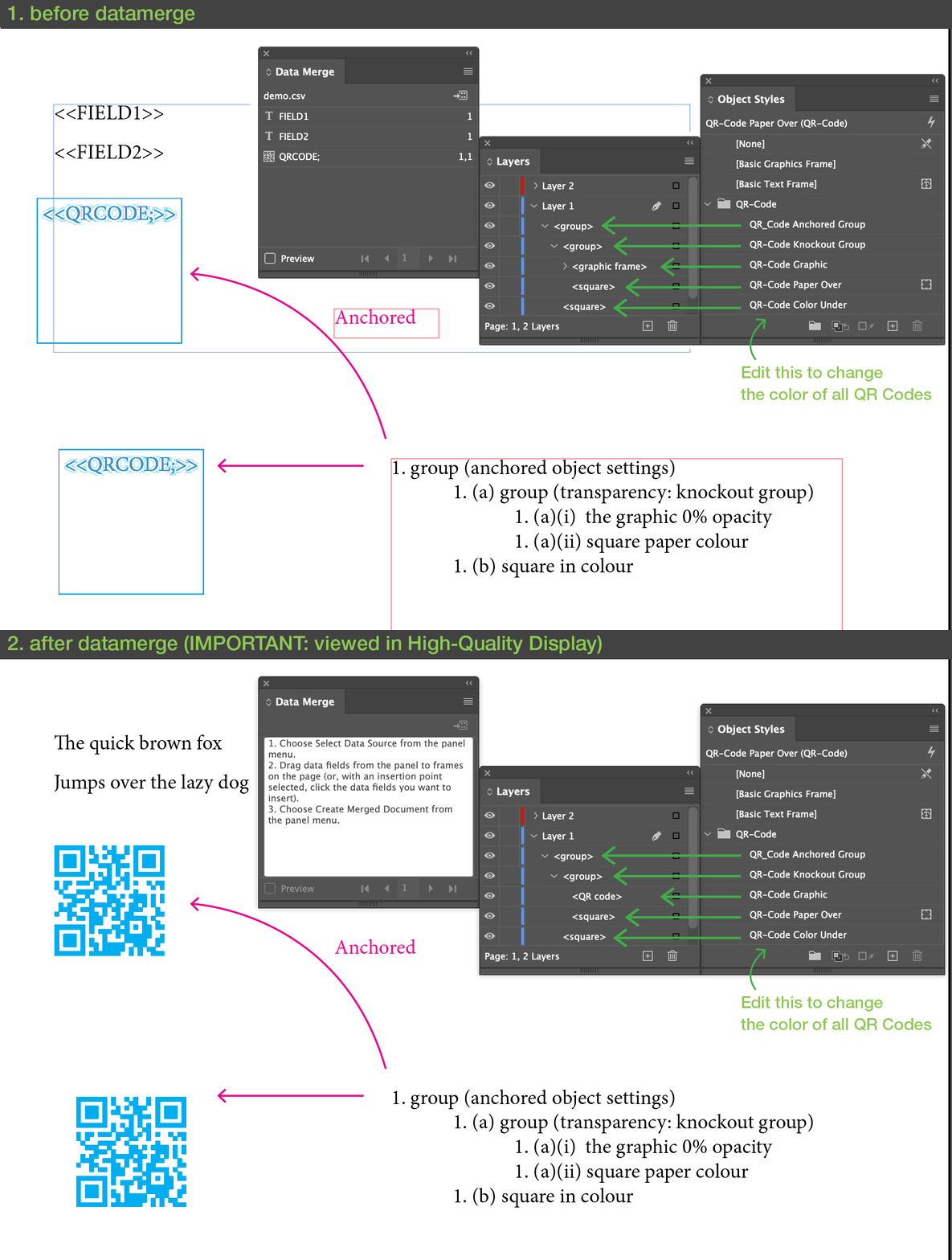
I had a look into this just now, @budatlitho, and it isn't as easy as it should be. Even using a script to set the color after merging is difficult. I think the most practical way is to use this masking technique to apply the color. It seems complicated, but once you understand what it's doing you can work with it fairly easily in most cases. I've made a demo .indd and a .csv which I've attached to this post if you want to see how I set it up. I used an Object Style for each component of the technique. Have a look at this graphic—it shows the object styles I made and which page item they apply to, before and after merging. I've made an anchored in text version as well as a normal version just for the demo. Note that you can only see the result when viewing the document in High Quality Display mode.

- Mark
 

8 replies

Peter Villevoye
Community Expert
Community Expert
November 1, 2025

So I checked if this flaw is still present in the brave new version of Adobe InDesign 2026, but too bad... it isn't. And the QR dialogue still initiates with the least used Text setting (in stead of the commonly used URL). So it has been left untouched – again. 


I tried all kinds of hacks, by setting up a colored QR code, using some bogus address first, and coloring it. But you can't delete the bogus address afterwards to use the code as a placeholder for datamerge, because the OK button requires some initial content. Then I treid deleting the whole QR image from the frame, but then the datamerge process creates a brand new code in black again...

And Object Styles can't access the typical Fill color of the QR code either.


So it's still a matter of scripting, afterwards. 

Robert at ID-Tasker
Legend
July 29, 2023

It looks like .... it can be done ... directly from an ObjectStyle ...


Have not tested on DataMerge - just created QR code from some text and applied ObjectStyle ...


m1b
Community Expert
Community Expert
July 28, 2023

Hi all, I went to vote for the bug report of this issue and couldn't find one, so I created one.

If you would like this fixed, please vote here. Thanks.

- Mark

FRIdNGE
Inspiring
July 29, 2023

Mark,


I don't consider this matter as a "bug"! Just an unfortunate annoyance (simply fixable).


(^/)

Community Expert
July 29, 2023

Hm yes. It's more a "missing feature" than a bug.

So look into the Feature Request part of InDesign UserVoice.

Nevertheless I voted for fixing the "bug".


This feature request goes in that direction even if it does not mention QR codes explicitely:


Dynamic Color Swatches with Data-Merge
"Make the Swatches dynamic with Data-Merge so that you can enter a Colorcode in the Excel document and it changes the Swatch with the same name or something like that."
robinochsner, October 12, 2018
https://indesign.uservoice.com/forums/601021-adobe-indesign-feature-requests/suggestions/35702356-dynamic-color-swatches-with-data-merge


Two articles by Colin Flashman at CreativePro (formerly in InDesign Secrets) :


Creating Colored QR Codes During a Data Merge
Colin Flashman, May 28, 2018
https://creativepro.com/creating-colored-qr-codes-during-a-data-merge/


Applying Any CMYK Color During a Data Merge
Colin Flashman, June 7, 2018
https://creativepro.com/applying-any-cmyk-color-during-a-data-merge/


( Just notes for myself. )


Regards,
Uwe Laubender
( Adobe Community Expert )

Community Expert
July 28, 2023

Hi together,

what can be done was already discussed at length a couple of years ago in this very forum.

I'll come back to this thread later with a link or two.


The idea to use the black QR code with another object on top and an effect to color the code is the best one, I think.

Unless you want to write a script that creates all codes from scratch using the information of the black code. You'd have to pull this out of the XML of a InDesign snippet *.idms file.


Regards,
Uwe Laubender
( Adobe Community Expert )

m1b
Community Expert
Community Expert
July 28, 2023

Hi Uwe, did you get a chance to try my script? I think it's an interesting approach.

- Mark

Robert at ID-Tasker
Legend
July 28, 2023

Yes, nice one. 


But why not create codes from scratch from the text AFTER DataMerge is done? 


m1b
Community Expert
Community Expert
July 28, 2023

Hi @budatlitho, I had another idea! I've written a script that converts the "datamerge" qr-codes into linked .eps files (sorry they have to be .eps for technical reasons) saved into the same folder as the document. I have no idea how well this will do with 25,000 qr-codes though—it might be very slow—but the resulting document might ultimately be neater than doing it the masking way. Not sure. Also the script can re-color the linked qr-codes, even after they've been colored once. If you use it, et me know how it goes, and report any bugs back here. 🙂

- Mark


/**
 * Convert QR Codes to Linked EPS files.
 * and sets the CMYK color breakdown.
 * Will save into folder 'QR Codes' in same folder
 * as document.
 * @author m1b
 * @discussion https://community.adobe.com/t5/indesign-discussions/apply-color-other-than-black-to-qr-code-from-datamerge/m-p/13967947
 */
function main() {

    var settings = {
        colorValue: [100, 0, 0, 0],
        qrCodeFolderName: 'QR Codes',
    },

        doc = app.activeDocument,
        graphics = doc.allGraphics,
        colorValue = prompt('Enter CMYK color values for QR Codes:', settings.colorValue.join(','));

    if (colorValue == null)
        return;
    else
        colorValue = colorValue.split(',');

    if (colorValue && colorValue.length !== 4)
        colorValue = undefined;

    for (var i = 0; i < graphics.length; i++)
        graphics[i] = convertQRCodeToEPSFile(doc, graphics[i], settings.qrCodeFolderName, colorValue);

};
app.doScript(main, ScriptLanguage.JAVASCRIPT, undefined, UndoModes.ENTIRE_SCRIPT, 'Convert QR Codes to Linked EPS');


/**
 * Converts an embedded QR Code into a linked
 * EPS file, with optional CMYK Color change.
 * @author m1b
 * @version 2023-07-28
 * @param {Document} doc - an Indesign Document.
 * @param {EPS} graphic - an Indesign EPS graphic.
 * @param {Array<Number>} [colorValue] - array of CMYK values.
 * @returns {EPS} - this should replace the old graphic
 */
function convertQRCodeToEPSFile(doc, graphic, folderName, colorValue) {

    app.scriptPreferences.measurementUnit = MeasurementUnits.POINTS;

    if (
        typeof graphic.exportFile !== 'function'
        || !/QR Code[^\/:]+/.test(graphic.itemLink.filePath)
    )
        // not a qr-code
        return;

    var b = graphic.geometricBounds,
        frame = graphic.parent,
        exported = false,

        // temporary document with just the qr code
        tmp = app.documents.add(
            {
                documentPreferences:
                {
                    createPrimaryTextFrame: false,
                    facingPages: false,
                    intent: DocumentIntentOptions.PRINT_INTENT,
                    pageOrientation: PageOrientation.PORTRAIT,
                    pagesPerDocument: 1,
                    pageHeight: b[2] - b[0],
                    pageWidth: b[3] - b[1],
                    startPageNumber: 1,
                },
            }
        );
    app.activeWindow.viewDisplaySetting = ViewDisplaySettings.OPTIMIZED;

    var g = graphic.duplicate(tmp.layers[0]);
    g.move([0, 0]);

    // where to export
    var exportPath = doc.filePath + '/' + folderName + '/';

    // create the folder if necessary
    if (!Folder(exportPath).exists)
        Folder(exportPath).create();

    app.epsExportPreferences.properties = {
        dataFormat: DataFormat.ASCII,
        epsColor: EPSColorSpace.CMYK,
        epsSpreads: false,
        fontEmbedding: FontEmbedding.NONE,
        pageRange: PageRange.SELECTED_ITEMS,
        preview: PreviewTypes.NONE,
    };

    exportPath += graphic.itemLink.name.replace(/\.eps$/, '') + '.eps';

    var f = File(exportPath);

    try {

        if (!f.exists) {

            exported = true;

            // export as eps
            g.exportFile(ExportFormat.EPS_TYPE, f);

        }

        if (!f.exists)
            throw Error('export failed');

        if (colorValue !== undefined) {

            // get the color as needed for eps formatting
            var c = [
                Number(colorValue[0]) / 100,
                Number(colorValue[1]) / 100,
                Number(colorValue[2]) / 100,
                Number(colorValue[3]) / 100,
            ];

            // edit the exported file and
            // change the color values
            f.open("r");
            var content = f.read();
            f.close();
            f.open("w");
            content = content.replace(/\n([\d\.]+\s){4}cmyk\n/, '\n' + c.join(' ') + ' cmyk\n');
            f.write(content);
            f.close();

        }

        // link to the new qr code eps
        graphic.itemLink.relink(f);

        // need new reference
        graphic = frame.graphics[0];

        // update graphic
        if (graphic.itemLink.status == LinkStatus.LINK_OUT_OF_DATE)
            graphic.itemLink.update();

    } catch (error) {
        alert('Error exporting qr code to "' + exportPath + '". (' + error.message + ')');
    }

    finally {
        // clean up
        tmp.close(SaveOptions.NO);
    }

    return graphic;

};
m1b
Community Expert
m1bCommunity ExpertCorrect answer
Community Expert
July 28, 2023

I had a look into this just now, @budatlitho, and it isn't as easy as it should be. Even using a script to set the color after merging is difficult. I think the most practical way is to use this masking technique to apply the color. It seems complicated, but once you understand what it's doing you can work with it fairly easily in most cases. I've made a demo .indd and a .csv which I've attached to this post if you want to see how I set it up. I used an Object Style for each component of the technique. Have a look at this graphic—it shows the object styles I made and which page item they apply to, before and after merging. I've made an anchored in text version as well as a normal version just for the demo. Note that you can only see the result when viewing the document in High Quality Display mode.

- Mark

 

Robert at ID-Tasker
Legend
July 28, 2023

So it's not possible to set color to the QR code DataMerge field, right? 


Then maybe it would be much easier to leave code as text - and then use createPlainTextQRCode() to convert it into the QR code?


One of the params is qrCodeSwatch. 


James Gifford—NitroPress
Legend
July 28, 2023

Hey @James Gifford—NitroPress, that sounds interesting... but what's a color swap exactly? Swapping plates? Or inks? I don't follow.


Seriously vague, seat-of-the-pants, hand-waving idea. I was thinking of various ways to export and then place on a different color layer, etc. Not sure any of my Rube Goldberg ideas would work.


It still seems like a script to edit each code and reassign the color swatch is the most... efficient approach.

Robert at ID-Tasker
Legend
July 27, 2023

Can't check right now - but maybe ObjectStyle can help? 


James Gifford—NitroPress
Legend
July 27, 2023

Nope. QR codes are a special object of some kind, so you can't manipulate them with styles, etc. Tried that. 🙂


But a script to search -> edit -> set color to [swatch] should work fine, if the hooks for that exist. You can change the color without re-entering or changing the actual code.

James Gifford—NitroPress
Legend
July 27, 2023

If datamerge offers no hook to set color (and somehow, I'd be unsurprised if that was the case), it might be simpler to use a script to edit all generated codes and set their color.

