



Answered
Apply object style to text frames in Array of Pages
Hi Experts, I dont know what the problem of this script , when it run in document without section(s) it run correctly but when i add section it cannot identify page (1,2,3) so page (1,2,3) became (7,8,9), see the screen shot here as example :
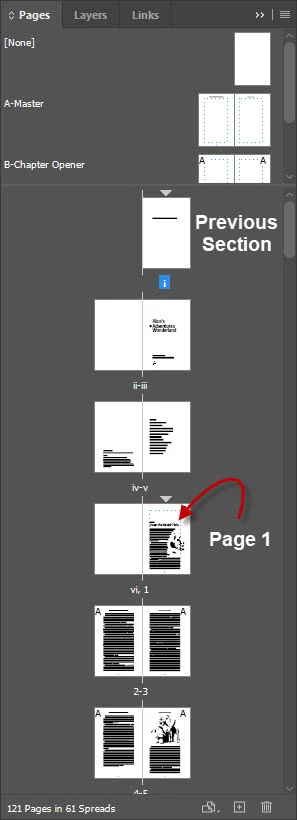
here is the script :
var myDoc = app.documents[0];
var myDocPages = myDoc.pages.everyItem().getElements();
var TargetPagesArray = [1,2,3];

//Loop in Pages
for(var n =  myDocPages.length-1; n >= 0; n--){
    if (checkPage(TargetPagesArray, n+1)) {
        $.writeln(n);
        //Now Assign to Desired Frames
        var allTargeTextFrames = myDoc.pages[n].textFrames.everyItem().getElements();
            // Check for text frames if locked and apply Object Style:
            for( var i = 0; i<allTargeTextFrames.length; i++ ){
                 if(allTargeTextFrames[i].locked == true){//Prevent Apply to Locked TextFrames
                    var locked = "locked"; //Dont Apply to Locked TextFrames!
                    }else{
            allTargeTextFrames[i].applyObjectStyle(myDoc.objectStyles.item("Test"));
            }
        }
    }
}

//First Check if Page is Existed  in the Array Function - from Rob Day
function checkPage(PagesArray, obj) {
    for (var i = 0; i < PagesArray.length; i++) {
        if (PagesArray[i] === obj) {
            return true;
        }
    }
    return false;
}
to check if the page is already exist before continue, i used the function of @rob day discussed here :
https://community.adobe.com/t5/indesign-discussions/remove-pages-in-an-array/m-p/11758331#M410798
so please help! and thanks in advance
 AdChoices