Magnetik85
Known Participant
February 3, 2023
Answered

Automate menu creation in several sections

  • February 3, 2023
  • 2 replies
  • 1008 views

Hello community,


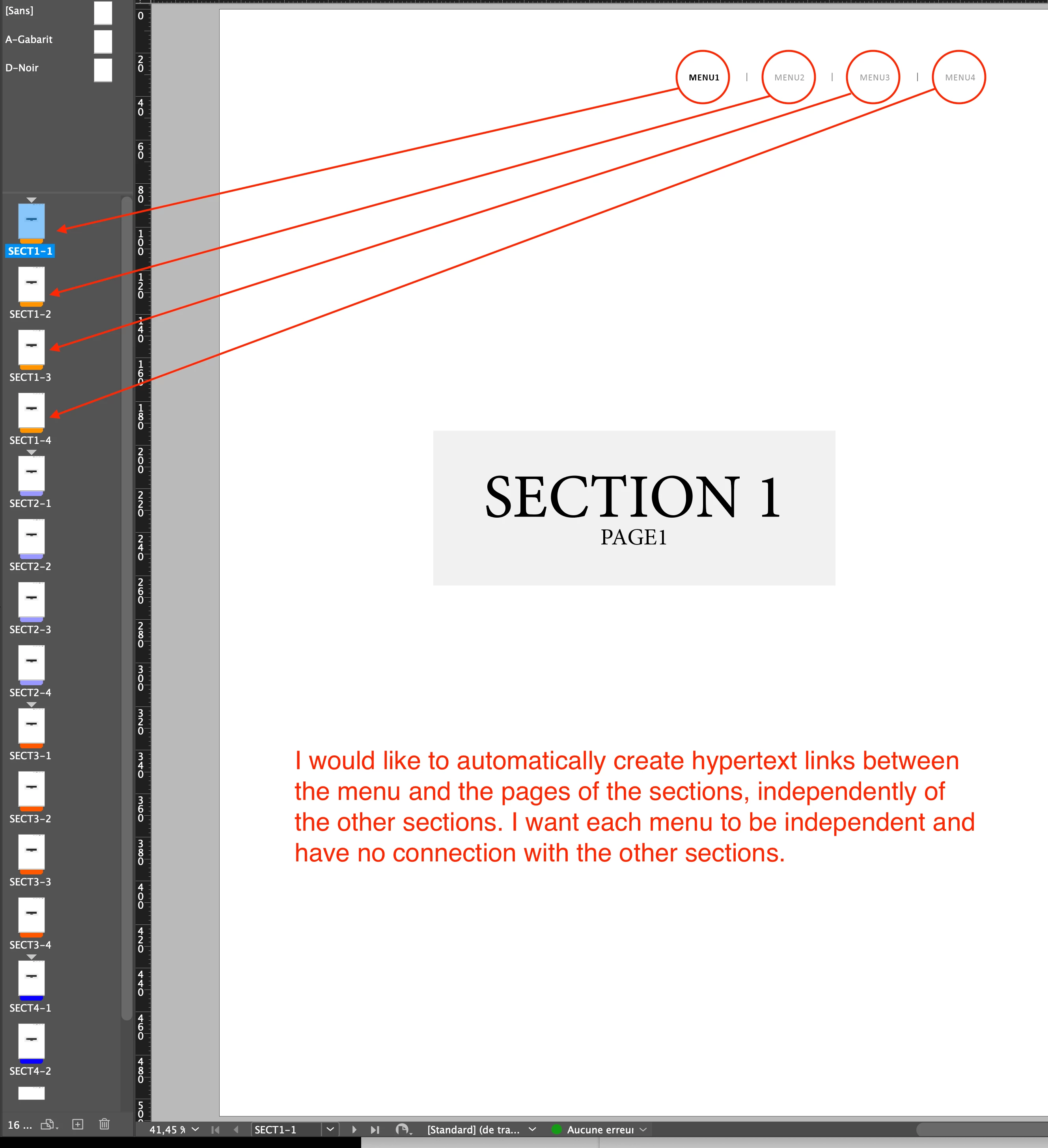
I am working on a document in which I have several sections and in each of them is composed of 4 pages.

Example :
Section 1 → SECT1-1, SECT1-2, SECT1-3, SECT1-4.
Section 2 → SECT2-1, SECT2-2, SECT2-3, SECT2-4.
Section 3 → SECT3-1, SECT3-2, SECT3-3, SECT3-4
And so on.


In each of the pages, I have a menu that I want to make work so that each text is connected thanks to a page hypertext link to the page of the corresponding section. (see screenshot)


Can you tell me if this is doable with a script or if there is another way to make this menu work independently for each of the sections?


For the test I share the test document with you to better understand what I want to do.


Thank you in advance for your answers.

This topic has been closed for replies.
Correct answer m1b

Hi @Magnetik85, using your test document, I've written a script to do what you need, I think. However, you need to apply an Object Style to all the "menu" text frames so the script can find the menus (assigning an object style to these kinds of elements isn't a bad practice anyway, for other reasons). When you run the script, it will find all menu text frames, iterate over the table cells therein, and remove any existing hyperlinks and add the new hyperlinks. It was a fairly quick script so might not do enough error checking but, for me, it works fine on your test file.

- Mark


/**
 * Create hyperlinks to document pages
 * by searching for "menus" table cells
 * in textFrames with applied object style.
 * @author m1b
 * @version 2023-02-06
 * @discussion https://community.adobe.com/t5/indesign-discussions/automate-menu-creation-in-several-sections/m-p/13551412
 */
var settings = {

    menuObjectStyleName: 'Menus',
    pageNameTemplate: '#SECTION_PREFIX##PAGE_NAME#',
    hyperlinkNameTemplate: 'From #SECTION_PREFIX##PAGE_NAME# to #SECTION_PREFIX##PAGE_NAME#',
    matchOldHyperlinks: /^From .*/,

};

function main() {

    var doc = app.activeDocument,
        menusObjectStyle = doc.objectStyles.itemByName(settings.menuObjectStyleName),
        counter = 0,
        menuTextFrames = [];

    if (menusObjectStyle.isValid) {
        // find the menus text frames
        app.findObjectPreferences = NothingEnum.NOTHING;
        app.findObjectPreferences.appliedObjectStyles = settings.menuObjectStyleName;
        menuTextFrames = doc.findObject();
    }

    if (menuTextFrames.length == 0) {
        alert('No menus found in document.');
        return;
    }

    // remove any hyperlinks created previous by this script
    for (var i = doc.hyperlinks.length - 1; i >= 0; i--)
        if (settings.matchOldHyperlinks.test(doc.hyperlinks[i].name))
            doc.hyperlinks[i].remove();

    menuTextFramesLoop:
    for (var i = 0; i < menuTextFrames.length; i++) {

        var menuTableCells = menuTextFrames[i].tables[0].cells,
            sectionPrefix = menuTextFrames[i].parentPage.appliedSection.sectionPrefix,
            pageNameTemplate = settings.pageNameTemplate.replace('#SECTION_PREFIX#', sectionPrefix),
            hyperlinkNameTemplate = settings.hyperlinkNameTemplate
                .replace('#SECTION_PREFIX#', sectionPrefix)
                .replace('#SECTION_PREFIX#', sectionPrefix),
            sourcePageName = menuTextFrames[i].parentPage.name;

        cellsLoop:
        for (var j = 0; j < menuTableCells.length; j++) {

            var cell = menuTableCells[j],
                pageName = String(j + 1),
                destinationPageName = pageNameTemplate.replace('#PAGE_NAME#', pageName),
                hyperlinkName = hyperlinkNameTemplate
                    .replace('#PAGE_NAME#', sourcePageName)
                    .replace('#PAGE_NAME#', pageName);

            // get the page
            var destinationPage = doc.pages.itemByName(destinationPageName);

            if (!destinationPage.isValid) {
                alert('There is no page named "' + destinationPageName + '". Script will abort.');
                return;
            }

            // remove hyperlink if already exists
            if (doc.hyperlinks.itemByName(hyperlinkName).isValid)
                doc.hyperlinks.itemByName(hyperlinkName).remove();

            // remove hyperlinkSources from cell
            var existingHyperlinkSources = cell.texts[0].findHyperlinks();
            for (var k = existingHyperlinkSources.length - 1; k >= 0; k--)
                existingHyperlinkSources[k].remove();

            // set up new hyperlink
            var hyperlinkTextSource = doc.hyperlinkTextSources.add(cell.texts[0]),
                hyperlinkDestination = makeHyperlinkPageDestination(doc, destinationPage, hyperlinkName),
                hyperlink = makeHyperlink(hyperlinkTextSource, hyperlinkDestination, hyperlinkName);

            counter++;

        }

    }

    alert('Added ' + counter + ' hyperlinks.');

    // finished


    /**
     * Returns a hyperlink by name or makes a new one.
     * @param {Text} sourceText - an Indesign text object.
     * @param {HyperlinkDestination} destination - an Indesign hyperlink destination object.
     * @param {String} [name] - the name for the hyperlink.
     * @returns {Hyperlink}
     */
    function makeHyperlink(sourceText, destination, name) {

        if (doc.hyperlinks.itemByName(name).isValid)
            return doc.hyperlinks.itemByName(name);
        else
            return doc.hyperlinks.add(sourceText, destination, { name: name });

    };


    /**
     * Returns a hyperlinkPageDestination
     * by name or makes a new one.
     * @param {Document} doc - an Indesign Document. 
     * @param {Page} page - the destination page.
     * @param {String} [name] - the name for the hyperlinkPageDestination.
     * @returns {HyperlinkPageDestination}
     */
    function makeHyperlinkPageDestination(doc, page, name) {

        if (doc.hyperlinkPageDestinations.itemByName(name).isValid)
            return doc.hyperlinkPageDestinations.itemByName(name);
        else
            return doc.hyperlinkPageDestinations.add(page, { name: name, hidden: false });

    };


}; // end main

app.doScript(main, ScriptLanguage.JAVASCRIPT, undefined, UndoModes.ENTIRE_SCRIPT, 'Add Menu Hyperlinks');

Edit: fixed bugs in code.

 

2 replies

m1b
m1bCorrect answer
Community Expert
February 4, 2023

Hi @Magnetik85, using your test document, I've written a script to do what you need, I think. However, you need to apply an Object Style to all the "menu" text frames so the script can find the menus (assigning an object style to these kinds of elements isn't a bad practice anyway, for other reasons). When you run the script, it will find all menu text frames, iterate over the table cells therein, and remove any existing hyperlinks and add the new hyperlinks. It was a fairly quick script so might not do enough error checking but, for me, it works fine on your test file.

- Mark


/**
 * Create hyperlinks to document pages
 * by searching for "menus" table cells
 * in textFrames with applied object style.
 * @author m1b
 * @version 2023-02-06
 * @discussion https://community.adobe.com/t5/indesign-discussions/automate-menu-creation-in-several-sections/m-p/13551412
 */
var settings = {

    menuObjectStyleName: 'Menus',
    pageNameTemplate: '#SECTION_PREFIX##PAGE_NAME#',
    hyperlinkNameTemplate: 'From #SECTION_PREFIX##PAGE_NAME# to #SECTION_PREFIX##PAGE_NAME#',
    matchOldHyperlinks: /^From .*/,

};

function main() {

    var doc = app.activeDocument,
        menusObjectStyle = doc.objectStyles.itemByName(settings.menuObjectStyleName),
        counter = 0,
        menuTextFrames = [];

    if (menusObjectStyle.isValid) {
        // find the menus text frames
        app.findObjectPreferences = NothingEnum.NOTHING;
        app.findObjectPreferences.appliedObjectStyles = settings.menuObjectStyleName;
        menuTextFrames = doc.findObject();
    }

    if (menuTextFrames.length == 0) {
        alert('No menus found in document.');
        return;
    }

    // remove any hyperlinks created previous by this script
    for (var i = doc.hyperlinks.length - 1; i >= 0; i--)
        if (settings.matchOldHyperlinks.test(doc.hyperlinks[i].name))
            doc.hyperlinks[i].remove();

    menuTextFramesLoop:
    for (var i = 0; i < menuTextFrames.length; i++) {

        var menuTableCells = menuTextFrames[i].tables[0].cells,
            sectionPrefix = menuTextFrames[i].parentPage.appliedSection.sectionPrefix,
            pageNameTemplate = settings.pageNameTemplate.replace('#SECTION_PREFIX#', sectionPrefix),
            hyperlinkNameTemplate = settings.hyperlinkNameTemplate
                .replace('#SECTION_PREFIX#', sectionPrefix)
                .replace('#SECTION_PREFIX#', sectionPrefix),
            sourcePageName = menuTextFrames[i].parentPage.name;

        cellsLoop:
        for (var j = 0; j < menuTableCells.length; j++) {

            var cell = menuTableCells[j],
                pageName = String(j + 1),
                destinationPageName = pageNameTemplate.replace('#PAGE_NAME#', pageName),
                hyperlinkName = hyperlinkNameTemplate
                    .replace('#PAGE_NAME#', sourcePageName)
                    .replace('#PAGE_NAME#', pageName);

            // get the page
            var destinationPage = doc.pages.itemByName(destinationPageName);

            if (!destinationPage.isValid) {
                alert('There is no page named "' + destinationPageName + '". Script will abort.');
                return;
            }

            // remove hyperlink if already exists
            if (doc.hyperlinks.itemByName(hyperlinkName).isValid)
                doc.hyperlinks.itemByName(hyperlinkName).remove();

            // remove hyperlinkSources from cell
            var existingHyperlinkSources = cell.texts[0].findHyperlinks();
            for (var k = existingHyperlinkSources.length - 1; k >= 0; k--)
                existingHyperlinkSources[k].remove();

            // set up new hyperlink
            var hyperlinkTextSource = doc.hyperlinkTextSources.add(cell.texts[0]),
                hyperlinkDestination = makeHyperlinkPageDestination(doc, destinationPage, hyperlinkName),
                hyperlink = makeHyperlink(hyperlinkTextSource, hyperlinkDestination, hyperlinkName);

            counter++;

        }

    }

    alert('Added ' + counter + ' hyperlinks.');

    // finished


    /**
     * Returns a hyperlink by name or makes a new one.
     * @param {Text} sourceText - an Indesign text object.
     * @param {HyperlinkDestination} destination - an Indesign hyperlink destination object.
     * @param {String} [name] - the name for the hyperlink.
     * @returns {Hyperlink}
     */
    function makeHyperlink(sourceText, destination, name) {

        if (doc.hyperlinks.itemByName(name).isValid)
            return doc.hyperlinks.itemByName(name);
        else
            return doc.hyperlinks.add(sourceText, destination, { name: name });

    };


    /**
     * Returns a hyperlinkPageDestination
     * by name or makes a new one.
     * @param {Document} doc - an Indesign Document. 
     * @param {Page} page - the destination page.
     * @param {String} [name] - the name for the hyperlinkPageDestination.
     * @returns {HyperlinkPageDestination}
     */
    function makeHyperlinkPageDestination(doc, page, name) {

        if (doc.hyperlinkPageDestinations.itemByName(name).isValid)
            return doc.hyperlinkPageDestinations.itemByName(name);
        else
            return doc.hyperlinkPageDestinations.add(page, { name: name, hidden: false });

    };


}; // end main

app.doScript(main, ScriptLanguage.JAVASCRIPT, undefined, UndoModes.ENTIRE_SCRIPT, 'Add Menu Hyperlinks');

Edit: fixed bugs in code.

 

Magnetik85
Known Participant
February 5, 2023

Thank you very much for the code you made.

I just saw your answer just now by connecting to the community since I did not receive any email notification.


So I created the "Menus" object style and I got the alert telling me that 64 links were created after the execution of the script but when I go to see the list of my hyperlinks, I don't I only see 16 and these only work on page 4 of each section and the first 3 pages have no links.


Have you encountered this problem on your side where it generated all the links on all the pages?


Magnetik85
Known Participant
February 5, 2023

when I right-click on the menus of the first 3 pages, I have no way to add a hypertext link manually, while on the 4th page, I have the possibility of modifying the hypertext link that has been created with your script.

Magnetik85
Known Participant
February 3, 2023

Here's the file if you want to understand more about what I'm looking to do.