


Blake Howard Nashville
New Participant
August 22, 2023
Answered

Automated Image Layout

  • August 22, 2023
  • 5 replies
  • 2451 views

I have a couple dozen photos (identical size and aspect ratio) that I want to drop into indesign and have them laid out in rows and columns to fill however many pages I need in order to print them all.

I've figured out how to manually create grids or place these image files. But this is a task I will be repeating a couple times a month and I'm trying to automate it. 

What is this process even called? Collating? Can someone point me in the right direction - so far most of the tutorials I've found have to do with changing text layouts and such between business cards or something similar. 

Thank you in advance for the help.
Correct answer Barb Binder

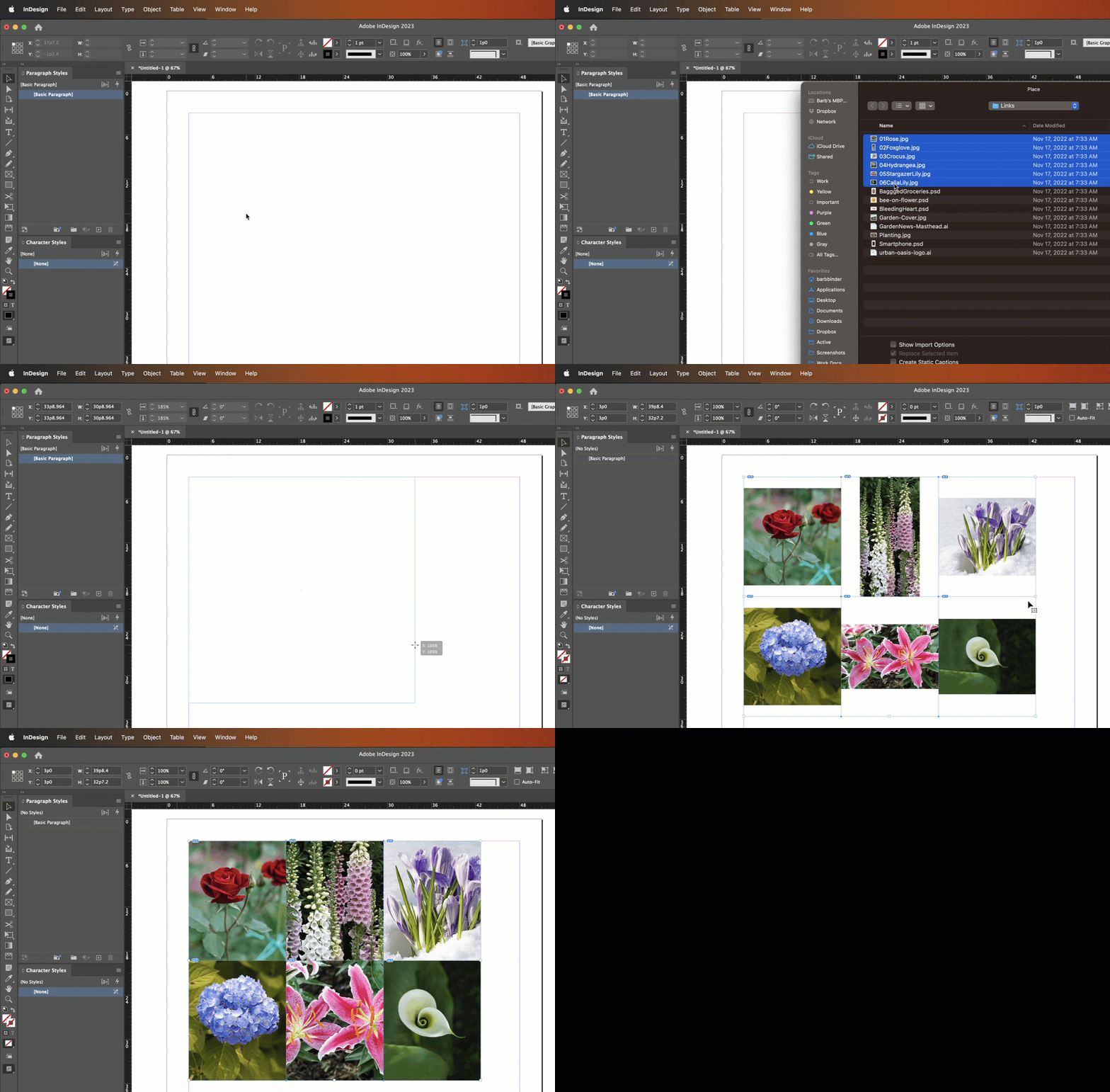
And do you know about Gridify? You can quickly add multiple images into a grid by loading multiple images, drawing out a frame and dividing the frame into rows and columns with the arrow keys.


~Barb


5 replies

Barb Binder
Community Expert
May 23, 2025

No! It's built into InDesign, @KarenNava. Just use File > Place to load multiple images and then drag out a large rectangle—and without releasing the mouse key—use the arrow keys to add rows and columns.


~Barb

~Barb at Rocky Mountain Training
Barb Binder
Community Expert
August 23, 2023

Glad that will work for you!


Two tips:

  1. The distance between the frames is controlled by the gutter value for the columns. In my example, I only have one column, but I change the gutter value to zero so that the frames would touch, as I saw in your screenshot.
  2. The other tip is to draw out ruler guides to mark the edges of the group so that you can stretch the rectangle to match the guides.


~Barb

~Barb at Rocky Mountain Training
New Participant
May 23, 2025

Where do you get Gridify? Is it a plug in?

Barb Binder
Barb BinderCorrect answer
Community Expert
August 23, 2023

And do you know about Gridify? You can quickly add multiple images into a grid by loading multiple images, drawing out a frame and dividing the frame into rows and columns with the arrow keys.


~Barb


~Barb at Rocky Mountain Training
Blake Howard Nashville
New Participant
August 23, 2023

This is exactly what I was looking for! Thank you so very much. Now I just need to figure out how to set specific dimensions for these rather than eyeballing a %

Community Expert
August 22, 2023

You can streamline some of this to speed up your production. Check out the Content Collector and Content Placer tools to load up multiple pieces of content and place them on InDesign's Content Conveyor to stick them into your layout like you're walking down the supermarket aisle and sticking them in your shopping cart.


You can learn more about InDesign's Content Conveyor features through this link. Short of finding a custom script tailored to your needs, this might be just the thing you're looking for.


Hope this helps,


Randy

jmlevy
Community Expert
August 22, 2023

You could use the ImageCatalog script which is part of the installed scripts with InDesign. But the layout will be more basic than your example…