


Participant
May 28, 2017
Question

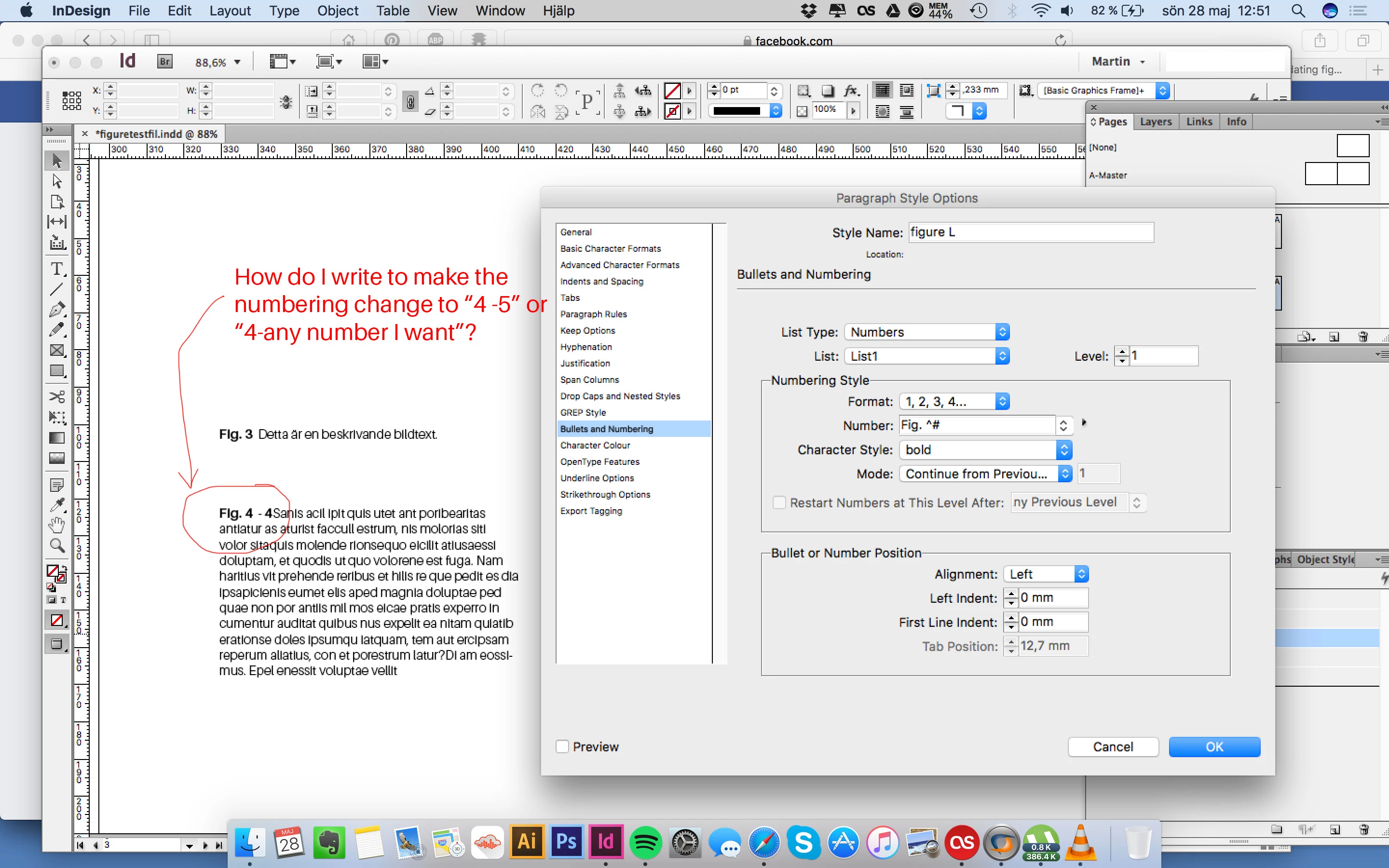
Automatic Figure Numbering, possible to create a span like "Fig. X - Y"?

  • May 28, 2017
  • 2 replies
  • 11073 views

Hello,

I watched this tutorial and learned that you could create automatic figure numbering.

InDesign tutorial: Automatically updating figure references for books | lynda.com - YouTube

I'm currently writing my thesis and I have chapters where I have lots of images and have chosen

to use spans to free space and avoid the spreads from become messy looking.

I would like to:

1. be able to create a paragraph style that increases the numbering by 1, like "Fig. 1-2"

2. be able to create a paragraph style that increases the numbering by a freely chosen number, like "Fig. 7-10"

is this possible to do in indesign?

Best Regards

- Martin
This topic has been closed for replies.

2 replies

vinny38
Legend
May 30, 2017

Hi

Can you be more specific about the logical of your request?

Do you mean that you'll have sometimes a very logical ordered list like :


1
1.1
1.2
2
2.1
2.2
2.3
3

And that sometimes, you want something like this:


1
1.1
1.5
2
2.1
2.7
2.6
3

Also, can you send a screenshot in Normal mode with all infos ON + threading visible in order to see the structure of your doc (primary frames, threaded frames, unthreaded frames...)

Participant
May 30, 2017

Hi Vinny,

Thanks for taking the time to reply. To clarify, I'm writing my master thesis (146 pages) and I estimate that it holds

around 230 photos and 20 tables/graphs. I would say that 100 of the photos, meaning I don't have to list them in my index of figures.

My initial thought was to have the numbering go from "1-250" – However, dividing them into chapters might seem like a user-friendly idea. But right now, I'm most concerned if there is a way to get automatic numbering to work for me at all?

Here are some additional screenshots.

My figure-texts all have separate text boxes. There is no threading (if threading means that the boxes are connected and the text is able to flow between different frames).

The Problem as I see it, is that that I have chosen to create multiple figure-paragraph styles and when you do automatic figure numbering, indesign only allow for one style to being used (please correct me if I'm wrong).

An example of the order I wish to create:

Fig. 1

Fig. 2

Fig. 3

Fig. 4

Fig. 5-6

Fig. 7-8

Fig. 9-10

Fig. 11

Fig. 12

Fig. 13

Fig. 14-16

Fig. 17-19

Fig. 20-22

Fig. 23

Fig. 24

Fig. 25

This image shows the span of numbers. Including the brand-logos the numbering should go like: "Fig. 1-4", "Fig. 5-8", "Fig. 9-12" etc.

I have 8 paragraph styles that's used for the Figure-texts (seen in the bottom right corner of this image)

Here is a view where the frames are showing. They are not connected to each other.

I also have a few spreads where I wrote several figures after each other, in the same boxes. If numbers could be inserted in the right order and automatically updated - that would be great. But in case this is impossible I guess I have to re-work these spreads and plan the texts differently.

Obi-wan Kenobi
Legend
May 30, 2017

Just for comment! [ Maybe Vinny will wanna play! …  ]

Of course, if not found, I'll give later the way to do it!

Characteristics [anchorings recommended]:

• Total auto-numbering

• One condition

• One regex

… Totally automatic!

Column 1: Auto-numbering, before the regex!

Column 2: Auto-numbering, after the regex!

Column 3: Auto-numbering, after the regex, I've just deleted the first line => the Fig. numbers have been automatically updated!

MTFBWY!

(^/)

Steve Werner
Community Expert
Community Expert
May 29, 2017

Moving to InDesign forum