


Inspiring
March 28, 2019
Answered

Automatically Style Tables depending on their table style

  • March 28, 2019
  • 1 reply
  • 4028 views

Hi,

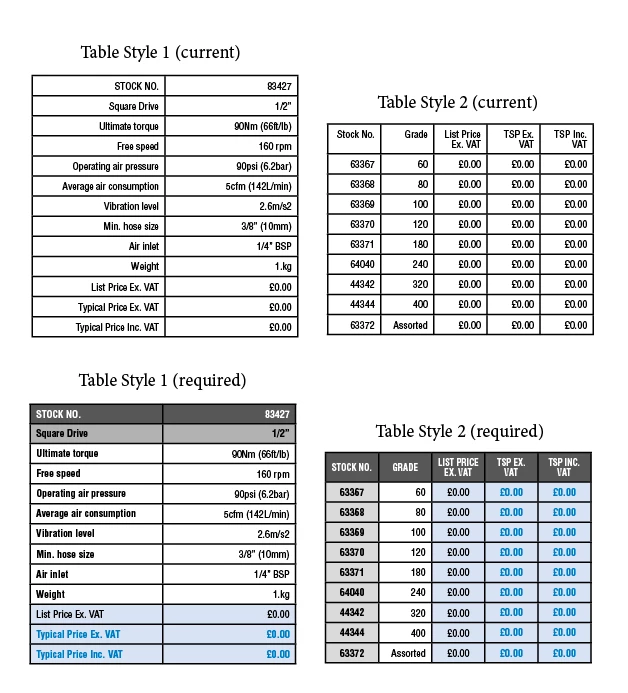
I have some very large documents with hundreds of tables, with two different table styles allocated (ie, some tables have "Table Style One" and some have "Table Style Two"). My issue is, whilst I have the two different table styles correctly assigned as required, I need to add much more complex cell styles to make them appear as I would like (see required look of tables attached at the bottom of this message).

Via Javascript/Extend Script, I would like to be able to 1) Target all tables in active document and clear Cell Style Overrides 2) 'Loop' through the active document and 'If' the table has "Table Style One" applied, then apply certain cell styles to the first row, second row, last row, second-to-last row and third-to-last row, 'Or' 'If' the table has "Table Style One" applied, the apply certain cell styles to the first row, the first column (excluding the first row), the last column (excluding the first row), the second-to-last column (excluding the first row) and third-to-last column (excluding the first row).

Here's where I am so far (it clears the cell style overrides ok, but that's all I've got so far, it's a work-in-progress!)...

Any help at all would be GREATLY appreciated.

Thanks

// This script assumes an Indesign Document is active (open), clears Cell Style Overrides in the active document, then if the table has a table style of "TableStyleOne", applies certain cells styles to its rows and columns, if the table has a table style of "TableStyleTwo", then it applies different cell styles to its rows and columns.

var allStories = app.activeDocument.stories.everyItem();

// Remove overrides from all cells

try {

    allStories.tables.everyItem().cells.everyItem().clearCellStyleOverrides(true);

}

// If no tables exist, display alert box "No table exist!"

catch (err) {

    alert ("No tables exist!");

}

// Once overrides have been cleared, display alert box "Cell Style Overrrides have been cleared!"

alert ("Cell Style Overrrides have been cleared!");

// Declare (define) variables for the two different table

var myTableStyleOne = allStories.tables.everyItem().; // THIS ISN'T FINISHED!!!

var myTableStyleTwo = allStories.tables.everyItem().; // THIS ISN'T FINISHED!!!

// Create the if/else statements (If this is true, do this, if not, do this instead) 
This topic has been closed for replies.
Correct answer davidh27380473

Hi Manan,

Thanks so much again for the code you provided. I have had a look at it, and with the help of a colleague in IT (who, unlike me, actually knows Javascript!), we've come up with the code below. It can be adapted to add another function if someone wanted more than two tables (ie, they could copy the code for TableStyleTwo, paste it below, rename it and change the cell styles to match what they required).

It works like an absolute dream!

Cheers,

Dave.

//get all the 'stories' in the document

var documentStories = app.activeDocument.stories.everyItem();

// Remove overrides from all cells

try {

  documentStories.tables.everyItem().cells.everyItem().clearCellStyleOverrides(true);

}

// If no tables exist, display alert box "No table exist!"

catch (err) {

  alert ("No tables exist!");

}

//get all of the tables from within the stories

var allTables = documentStories.tables.everyItem().getElements();

//loop through all the tables and run the getStyle function on each individual table.

for(var i = 0; i < allTables.length; i++){

  getStyle(allTables);

};

//function to get the tables current style and determine which callback to run for override styles

function getStyle(table){

  //switch is basically an if statement, check table.appliedTableStyle.name (if it is equal to 'table style one' run the table style one function etc)

  switch(table.appliedTableStyle.name){

    case 'Table Style One':

      tableStyleOne(table);

    break;

    case 'Table Style Two':

      tableStyleTwo(table);

    break;

  }

}

//apply override styles

function tableStyleOne(table){

  //get all of the rows in the table

  var rows = table.rows;

  //loop through all of the rows

  for(var i = 0; i< rows.length; i++){

    //get the current row

    var thisRow = rows;

    //get all of the columns in the current row

    var rowCols = thisRow.cells.everyItem().getElements();

    //if we are on loop 1

    if(i == 0){

      //apply left style (cell index 0)

      rowCols[0].cells.everyItem().appliedCellStyle = app.documents[0].cellStyles.itemByName("STOCK NO. left");

      //apply right style (cell index 1)

      rowCols[1].cells.everyItem().appliedCellStyle = app.documents[0].cellStyles.itemByName("STOCK NO. right");

    }

    //if we are on the last or second to last loop

    else if(i == (rows.length - 1) || i == (rows.length - 2)){

      //apply left style (cell index 0)

      rowCols[0].cells.everyItem().appliedCellStyle = app.documents[0].cellStyles.itemByName("Typical Price Left");

      //apply right style (cell index 1)

      rowCols[1].cells.everyItem().appliedCellStyle = app.documents[0].cellStyles.itemByName("Typical Price Right");

    }

    //if we are on the third to last loop

    else if(i == (rows.length - 3)){

      rowCols[0].cells.everyItem().appliedCellStyle = app.documents[0].cellStyles.itemByName("List Price Left");

      rowCols[1].cells.everyItem().appliedCellStyle = app.documents[0].cellStyles.itemByName("List Price Right");

    }

    else{

        //apply this style the other times

        rowCols[0].cells.everyItem().appliedCellStyle = app.documents[0].cellStyles.itemByName("Generic Table Left");

        rowCols[1].cells.everyItem().appliedCellStyle = app.documents[0].cellStyles.itemByName("Generic Table");

    }

  }

}

//apply override styles

function tableStyleTwo(table){

  //get all of the rows in the table

  var rows = table.rows;

  //get all of the columns in the table

  var columns = table.columns;

  //loop through the table columns

  for(var i = 0; i< columns.length; i++){

    //get the current column

    var col = columns;

    //if we are on the first column

    if(i == 0){

      //apply style to first column

      col.cells.everyItem().appliedCellStyle = app.documents[0].cellStyles.itemByName("Table Table Stock No. Cell");

    }

    //if we are on the last or second to last column

    else if(i == (columns.length - 1) || i == (columns.length - 2)){

      //apply style.

      col.cells.everyItem().appliedCellStyle = app.documents[0].cellStyles.itemByName("Table Table Typical Price Cell");

    }

    //if we are on the 3rd to last column

    else if(i == (columns.length - 3)){

      //apply style

      col.cells.everyItem().appliedCellStyle = app.documents[0].cellStyles.itemByName("Table Table List Price Cell");

    }

    else{

      //apply this to all other columns

      col.cells.everyItem().appliedCellStyle = app.documents[0].cellStyles.itemByName("Generic Table Centre");

    }

  }

  //after looping through the columns, set the header style to override (row index 0)

  rows[0].cells.everyItem().appliedCellStyle = app.documents[0].cellStyles.itemByName("STOCK NO. header (table table)");

}

1 reply

Community Expert
March 28, 2019

Hi David,

Look at the following code, you can use the template given below to tweak it for your needs. This will iterate all the tables at the upper level not the embedded ones. One you get to the table you can check what is the table style applied over it and then also you can iterate over the rows, columns and cells of rows and columns

var tb =app.activeDocument.stories.everyItem().tables.everyItem().getElements()

for(var i = 0; i < tb.length; i++)

{

    if(tb.appliedTableStyle.name == "Table Style One")

    {

          var noOfRows = tb.rows.length //No of rows

          //You can target rows using subcript like i taget the cell of first row

          tb.rows[0].cells.everyItem().appliedCellStyle = app.documents[0].cellStyles.itemByName("CS1")

          var lastColumn = tb.columns[-1] //Using -1 as subscript we can target the last item of the collection

    }

}

Look into the object model for more details on the methods and properties that you can use

https://www.indesignjs.de/extendscriptAPI/indesign-latest/#Table.html

https://www.indesignjs.de/extendscriptAPI/indesign-latest/index.html#Rows.html

https://www.indesignjs.de/extendscriptAPI/indesign-latest/index.html#Columns.html

-Manan

Inspiring
March 28, 2019

Wow!, thanks Manan, that was quick! I will try and adapt that and let you know how it goes

Community Expert
March 28, 2019

Hi David,

also see into this script by Marc Autret:

Re: How to break link to cell/table style in a selection

Regards,
Uwe