


stewart tower
Known Participant
April 22, 2022
Answered

Baseline grid across spreads

  • April 22, 2022
  • 3 replies
  • 3017 views

I'm updating an existing document that requires a change to the leading. The previous document had a 13 pt leading; the new document will be 11 pt. Align to baseline grid was set at 13.

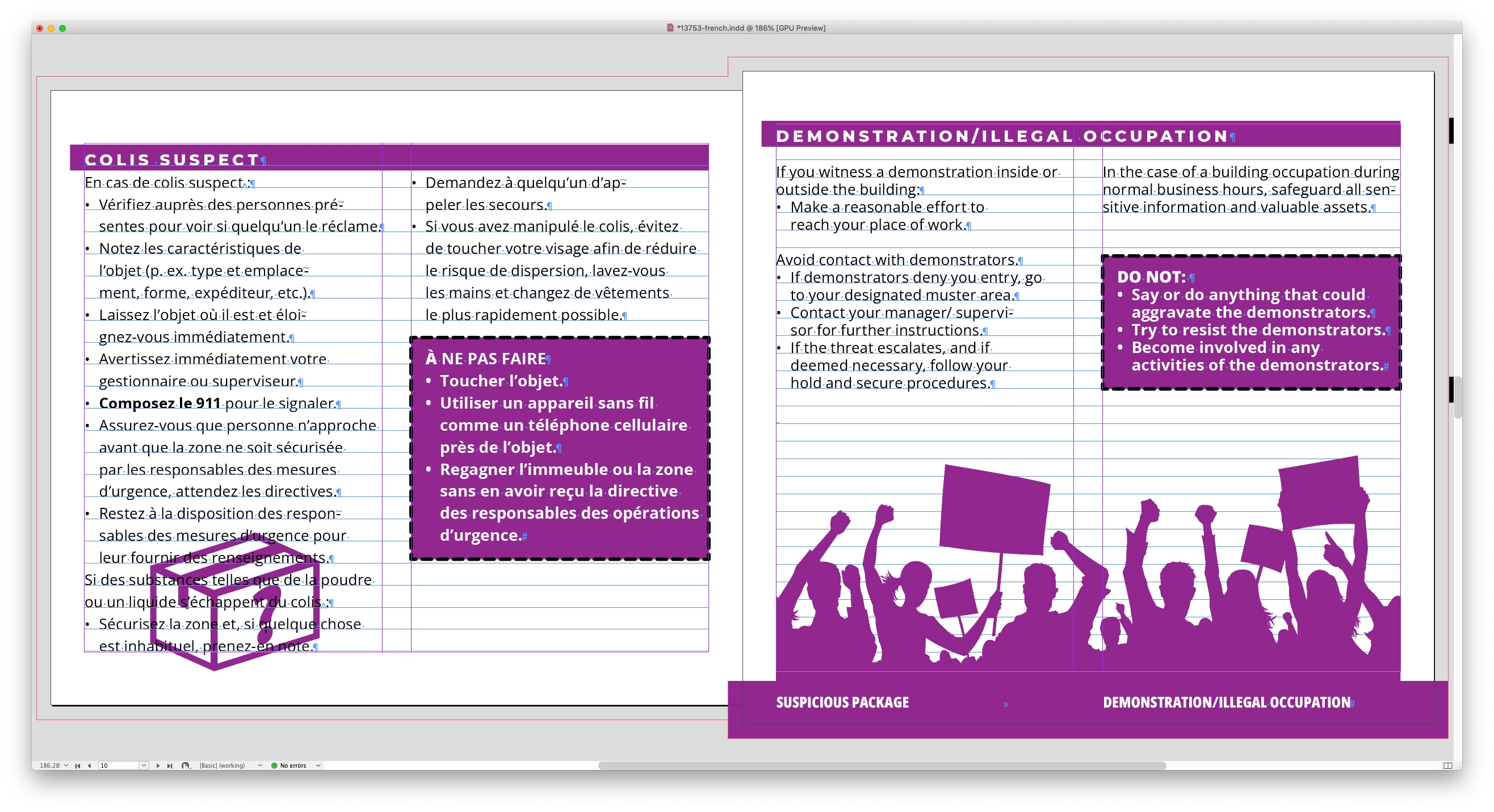
When I change the leading and baseline grid to 11 pt for the new document, only the right facing pages change. The left facing pages are still at 13 pt.

As near as I can tell, there is no setting altar the baseline grid from page to page.

Am I missing something?

Thanks.

MacBook Pro running Mojave. InDesign CC 16.4
Correct answer James Gifford—NitroPress

There are two different baseline grid settings. One, in Preferences, is a system default (really should be a doc default!).


Then, each text frame can have a custom baseline grid set and turned on and off. This includes both of the facing pages text frames on the Parent pages. Get in the habit of selecting both whenever you make any changes (unless you very specifically want to make a verso/recto change only)


Sounds like you changed only one Parent page frame. Change the other to match.


And kudos for using the baseline grid. 🙂


3 replies

stewart tower
Known Participant
April 25, 2022

I ended up going through the document, selecting every text box and disabling the custom baseline option (only 21 pages so didn't take long). For whatever reason, all the left pages had a text box with a custom baseline setting. I've always thought that the baseline setting in preferences should be a doc level setting. The script kept giving me a variable error but I'm not familiar enough with scripting to know where the issue is. I would appreciate having the script since we also produce a lot of long documents.

Thank you everyone for the advice. I love these forums.

Cheers...

rob day
Braniac
April 25, 2022

I've always thought that the baseline setting in preferences should be a doc level setting


It is. Frame specific baseline grids were introduced with CS2 and are set independently from the document’s baseline grid. Frame grids can also be specified with an Object Style.


When you compile a JavaScript you have to use a code editor or a plain text application, so the problem could have happened with your copy and paste.


Here’s is a compiled version, which you can copy into your scripts folder and run from the scripts panel (Applications⁩ ▸ ⁨Adobe InDesign 20XX⁩ ▸ ⁨Scripts⁩ ▸ ⁨Scripts Panel⁩). If this throws an error post a screen capture of the error dialog:


https://shared-assets.adobe.com/link/b7be05da-ad92-4218-52dd-42d99bf699d2


James Gifford—NitroPress
Braniac
April 25, 2022

The baseline grid settings could be moved out of Preferences and into the Layout menu, but that wouldn’t change much—there still needs to be a way of setting the initial baseline setting for new documents (all docs closed), and a way to change the setting for a specific document (the active open document).


The baseline grid concept would only be opaque if you don’t know anything about typesetting. In that case terms like leading, tracking, kerning, justification, etc. might be equally confounding.


I won't clutter up the forum any further; I just think baseline grids belong on a per-document basis, grouped with indents and spacing, and not off in a corner with (basically) UI setup. A default setting, set with 'no object selected' as with nearly all style elements is fine, but it should work as the default fonts, etc. do, and be accessible in the same part of the UI. I think more users would be aware of them and their use in formal typesetting if they weren't so... marginalized.


Back to something productive.


rob day
Braniac
April 23, 2022

Hi @stewart tower , also your baseline grid preferences cascade from the application to the individual text frames.


If you close all documents, set the baseline grid to 11pts, the baseline grid for all new docs will be 11pt. If you open an existing document and set its baseline grid preference, the change will only apply to that document.


For individual text frames, if you open Object>Text Frame Options with nothing selected, and turn on Use Custom Baseline Grid, all new text frames you create will have the custom grid applied. If you select a text frame, open Text Frame Options, and set a different custom baseline grid it will only apply to that frame.


For an existing document there might be a complex mix of baseline grids, which could be made uniform via scripting. This script would turn off all the active document’s custom baseline grids and set the document’s grid to 11pt:


var d=app.activeDocument;  
d.gridPreferences.baselineDivision = "11pts";
d.baselineFrameGridOptions.useCustomBaselineFrameGrid = false;

var mbl = d.masterSpreads.everyItem().textFrames.everyItem().baselineFrameGridOptions
for (var i = 0; i < mbl.length; i++){
    mbl[i].useCustomBaselineFrameGrid = false;
};   

var tf = d.textFrames.everyItem().baselineFrameGridOptions;
for (var j = 0; j < tf.length; j++){
    tf[j].useCustomBaselineFrameGrid = false;
};


James Gifford—NitroPress
Braniac
April 22, 2022

There are two different baseline grid settings. One, in Preferences, is a system default (really should be a doc default!).


Then, each text frame can have a custom baseline grid set and turned on and off. This includes both of the facing pages text frames on the Parent pages. Get in the habit of selecting both whenever you make any changes (unless you very specifically want to make a verso/recto change only)


Sounds like you changed only one Parent page frame. Change the other to match.


And kudos for using the baseline grid. 🙂


stewart tower
Known Participant
April 22, 2022

So this document has 10 master pages (it's a flip book with staggered pages).

Do I have to set the baseline for each master page? The whole document applied the new baseline to the right pages only when I set the baseline grid in Preferences. I would not have had any masters selected.

James Gifford—NitroPress
Braniac
April 22, 2022

It's one or the other.


If you set the master baseline grid (under Preferences | Grids), it will set the spacing for all pages... UNLESS any text frame has a custom baseline grid set (Text Frame Options | Baseline Options). If you want to use just one baseline setting, select all text frames in the document pages and make sure Use Custom Baseline Grid is unchecked. OR you could select all document frames and make sure they have the baseline grid set the way you want, and are checked on.


In either case, best to also go to the frames on all Parent pages and make sure they are set the same way (all on/all off). That way, new pages will share the custom setting or default to the single master setting.


Yes, it's a feature that could use some tweaking. 🙂