

Participating Frequently
May 8, 2014
Answered

binding in indesign

  • May 8, 2014
  • 4 replies
  • 23780 views

how can I change the binding in indesign CC from right sided to left sided?

    This topic has been closed for replies.
    Correct answer Willi Adelberger

    If you need right binding, it is not only the binding you will need. You will need both, LTR and RTL text on level of Story, Paragraph, Word, Character, Numbers seperately.

    Since the Cloud you have access to InDesign in several languages. InDesign is a strictly plugin based program. That means, if you, say English-Hebrew, English-Arab, English-International and some Asia versions and a German version install, you will get all theses language features due to the plugins additional. (It would not work in Illustrator.)

    If several versions are installed on the same place, InDesign will always start the language version of your Operating System. I have here German, so it will start in German. (I could force to start it in a different language, either by installing it only in that language, or by changing the language settings in the OS or with some tools, like Tinker Tools Systems which can force a program to a different installed language.)

    But because I have installed InDesign on my computer in several languages, German, English International, English with Hebrew support and English with Arabic support, I have these additional functionality, more menus, more fonts, etc.

    Here is for example the new document dialog, which adds a binding button:
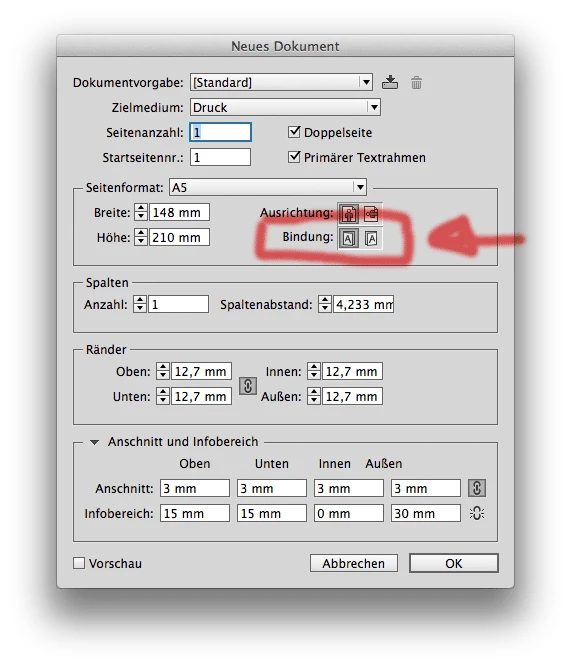
    To install a program in a different language, you have to got to the Creative Cloud Application, CC.app (named THOR), go to the preferences and choose the language of the applications, then install them, then change the language again, install them again, it will be installed on the very same place.

    4 replies

    Participating Frequently
    January 15, 2018

    I have the same problem and it's ridiculous that the original question from 2014 has not been answered yet.

    NOW! I want someone to explain to me in simple English where the buttons are in Indesign CC that allow you to select binding location from the Right or Left.

    Community Expert
    January 15, 2018

    Hi Michael,

    to see the control for binding in the UI you need the MENA version of InDesign installed to your system.

    Willi has it right in his answer #18.

    See also this:

    Find and install Hebrew or Arabic editions of InDesign CC or Illustrator CC

    Regards,
    Uwe

    Participating Frequently
    January 15, 2018

    I'm still not happy that I have to install another version of InDesign just to get this very basic operation but I accept the answer.

    Thank you for your help.

    Willi Adelberger
    Willi AdelbergerCorrect answer
    Community Expert
    May 9, 2014

    If you need right binding, it is not only the binding you will need. You will need both, LTR and RTL text on level of Story, Paragraph, Word, Character, Numbers seperately.

    Since the Cloud you have access to InDesign in several languages. InDesign is a strictly plugin based program. That means, if you, say English-Hebrew, English-Arab, English-International and some Asia versions and a German version install, you will get all theses language features due to the plugins additional. (It would not work in Illustrator.)

    If several versions are installed on the same place, InDesign will always start the language version of your Operating System. I have here German, so it will start in German. (I could force to start it in a different language, either by installing it only in that language, or by changing the language settings in the OS or with some tools, like Tinker Tools Systems which can force a program to a different installed language.)

    But because I have installed InDesign on my computer in several languages, German, English International, English with Hebrew support and English with Arabic support, I have these additional functionality, more menus, more fonts, etc.

    Here is for example the new document dialog, which adds a binding button:

    To install a program in a different language, you have to got to the Creative Cloud Application, CC.app (named THOR), go to the preferences and choose the language of the applications, then install them, then change the language again, install them again, it will be installed on the very same place.

    Community Expert
    May 8, 2014

    @sepidehkhazai – in ALL InDesign versions CS5 and above you can change the page binding of a document by ExtendScript (JavaScript) with the following line of code:

    Set page binding of active document Right-To-Left:

    app.documents[0].documentPreferences.pageBinding = PageBindingOptions.RIGHT_TO_LEFT;

    Set page bindingof active document Left-To-Right:

    app.documents[0].documentPreferences.pageBinding = PageBindingOptions.LEFT_TO_RIGHT;

    Here an ordinary A4 document in my German InDesign CS6 where I changed the binding direction to Right-To-Left:

    Uwe

    Peter Spier
    Community Expert
    May 8, 2014

    I believe that's an option under Document Setup in those versions of ID that support right-to-left text.

    Participating Frequently
    May 8, 2014

    Thanks for response.

    No there is not anything.... Is not the text thr problem is the binding side.

    I am designing a booklet and i need the binding of the pages be at left side.

    Sent from my iPhone

    Peter Spier
    Community Expert
    May 8, 2014

    Did you try Uwe's script?

    The binding direction controls only whether odd numbered pages are on the left or right side of the spine. Binding is always in the center of the the two-page spread.