The issue I'm focused on is not the export; it's preflighting: using preflight conditions to easily find images placed as CMYK and correct them to RGB, since experts are now saying that InDesign's conversion from RGB to CMYK for print production is the best way to go (rather than converting in, say, Photoshop). Since preflight can't distinguish between the CMYK black that bitmap uses and actual CMYK images (using 4 colors), preflighting for this condition is pointless. If InDesign had an option to use an RGB black as the default black, the issue would be solved. So it's not an issue to be solved, apparently, at this point; it's just a limitation for using Preflght.
If InDesign had an option to use an RGB black as the default black, the issue would be solved. So it's not an issue to be solved, apparently, at this point; it's just a limitation for using Preflght. |
It does: Document Setup>Intent set to Web or Mobile will convert default [Black] and other CMYK swatches to RGB.
But I think you are taking the RGB advice too literally. In the case of 1-bit Black and White images that you want to print as black on press, assigning an RGB black to the bitmap means the image will print as 4-color. The conversion of RGB black will be to the CMYK profile’s maximum black point. So for default SWOP the conversion will be something like this, which could easily cause a registration nightmare on press for 1-bit line art. Similarly you would never want to use an RGB black for small text:
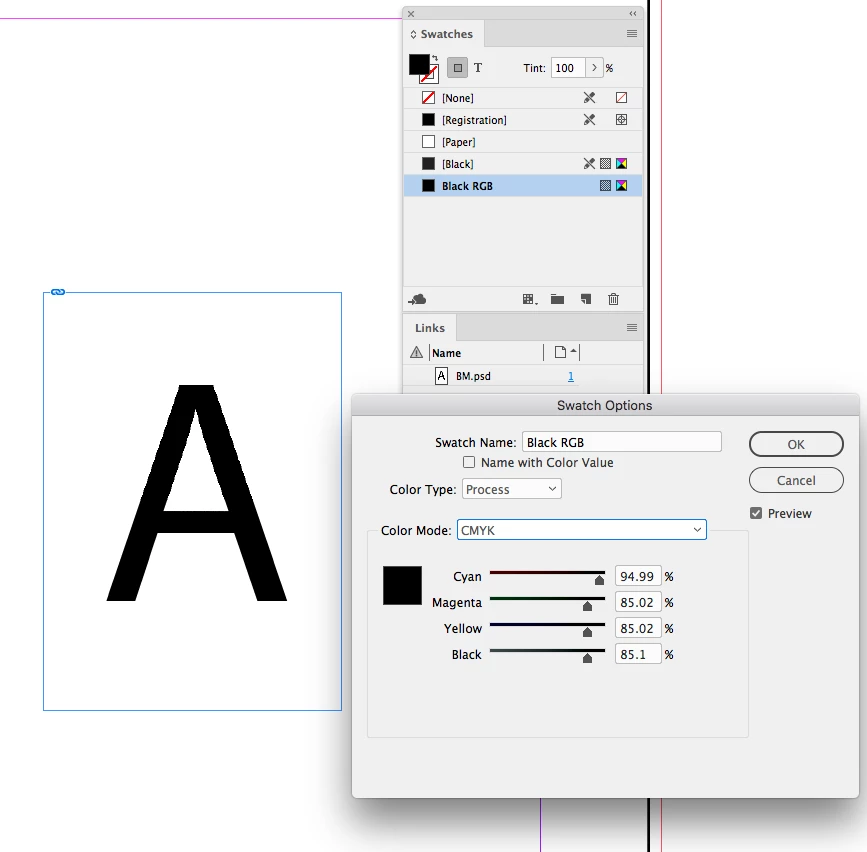
Also once an image is converted to CMYK converting it back to RGB has little or no benefit because the damage has been done. At that point you might as well allow a CMYK-to-CMYK conversion in the RIP.
Placing RGB is more of a convenience than a necessity—it allows you to wait until the final press destination is known before making a device dependent conversion. If the placed CMYK file was converted using the correct press profile, there would be zero need to go back to RGB.




 AdChoices