


Black Bar suddenly appears in bottom of text boxes, placed word file
I placed a microsoft word file into a new indesign document for the purposes of laying out a book. Everything seemed to be fine until a large horizontal black box started to appear at the bottom of each new continued flowing text box, obscuring the text in that area. It moves if i adjust the bottom end point of the text box; I thought at first it would just affect one box and was a glitch to do with the word file. so i simply stretched the text box beyond the page edge to hide it from being on the actual spread... however when i continued creating new text boxes on subsequent pages, this black bar now appears in every one!
For context, this is a brand new 2021 macbook pro running the latest version of indesign. very few items are installed on it yet so i dont think this is a clearing space issue as other posts suggest... nor is it to do with a previous bug that caused vertical black bars to appear when variable font was in use; that bug was fixed on a later indesign release and anyway this black bar is horizontal.
any insight as so whats going on?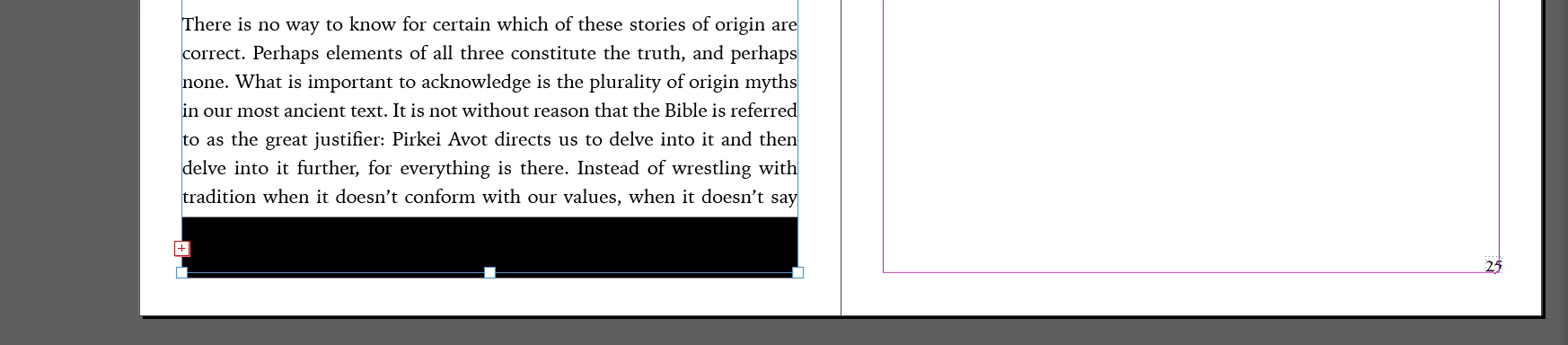
 AdChoices