


Participating Frequently
July 15, 2024
Question

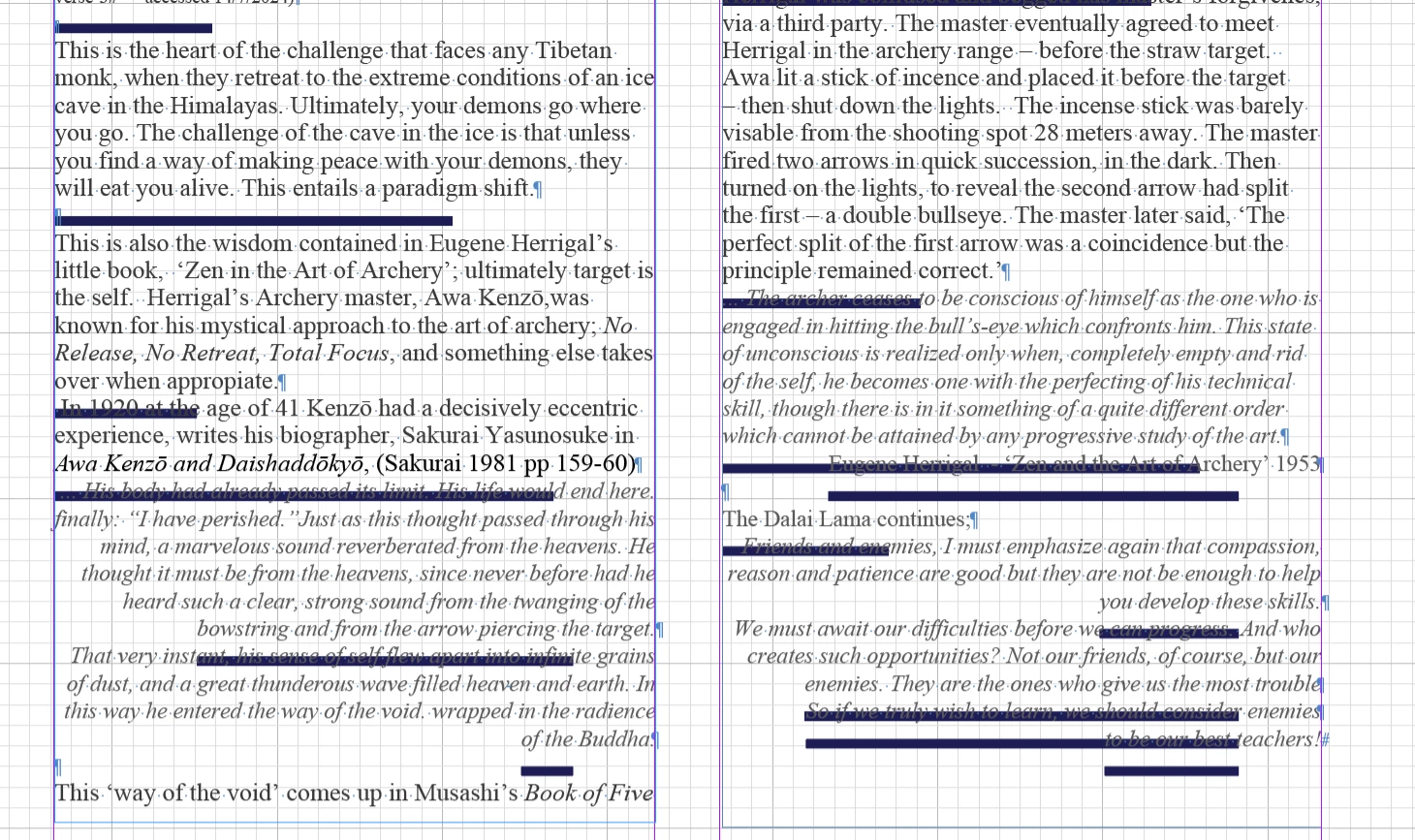
Black Lines through text - on return command?

  • July 15, 2024
  • 6 replies
  • 3404 views

I have a 2019 Apple Macbook pro - with Sonoma OS 

and Adobe InDesign 2024 

I've been working on a book - with 6 chapters  

it is only in the 6th chapter that I've begun to get these black lines appearing through my text - 

they seem to be generated when I press the 'return' key?

Can anybody help?

What Have I done wrong and

How can I get back to normal ? - Gary 
 

This topic has been closed for replies.

6 replies

James Gifford—NitroPress
Brainiac
July 16, 2024

Also, this is kind of lost in the passing (mentioned but not emphasized): if it's not a cryptic setting, as suggested, and the file is corrupted, the first thing to try is an export to IDML, then open that file and save as INDD under a new name. That "purge" often fixes frustrating little document faults like this one, which could have been caused by any bump in the editing or import path. (Both Derek and Robert mentioned this, but only briefly, and I don't see where it was tried.)

DrGs AAuthor
Participating Frequently
July 18, 2024

Thanks James - I am a bit green here so forgive my ignorance - but I'm just putting it into IDML format right now - and then back to INDD  - So Ill let you know how it goes - Gary 

DrGs AAuthor
Participating Frequently
July 18, 2024

Hi James & Robert - I have just copied the file into IDML and re saved as INDD (under a new title) as suggested but it has made no difference - 

I think I'm just going to rebuild that chapter - but I'll have to get to it after I have finished the rest of the book. Thanks for your advice and just being there - apppreciated  - Gary

Robert at ID-Tasker
Brainiac
July 15, 2024

My bet is on problems with graphics acceleration - @DrGs A can you turn it off or on in the preferences?


BobLevine
Community Expert
July 15, 2024

Did this text come from a Google Doc? I've seen this kind of thing with Google Docs saved as Word and then placed into InDesign.

DrGs AAuthor
Participating Frequently
July 18, 2024

Hi Bob - I think it must have come in with some import - the most obvious point was when I copied the URL for some website and dropped it in as an endnote reference.  But I can't say for sure

It is not a matter of a paragraph option - since I have looked very carefully through all those options and they are all switch off. 


There has been a consistent suggestion that I copy it into an IDML format then back into to INDD format - I am familiar with the template process INDT - but I'm not sure about the IDML ?

Robert at ID-Tasker
Brainiac
July 18, 2024
quote

There has been a consistent suggestion that I copy it into an IDML format then back into to INDD format - I am familiar with the template process INDT - but I'm not sure about the IDML ?


By @DrGs A


We call it IDMLing - export your INDD file as IDML, open, save with a new name.


leo.r
Community Expert
July 15, 2024

While it doesn't look like this, I still wonder if you have a paragraph border specified somewhere in your paragraph styles?

James Gifford—NitroPress
Brainiac
July 15, 2024

Looking closely at the example, I'd say this. It's even on the blank paragraph lines.


Although I can't quite figure out what settings are producing the varying line lengths.


OP: Check Paragraph Rules, Underlines, Strikethrough and Paragraph Borders. If none of those are set to decorate the text, you may have a corrupted doc.


It's also poor practice to use blank paragraphs for spacing. Look into paragraph spacing while you're sifting through the paragraph style menus. 🙂

Brad @ Roaring Mouse
Community Expert
July 16, 2024

Good observation, although I can't figure out why it's not consistent on the empty paragraph. But I'm betting that wooden nickel on this —


@DrGs A , you say you've been forward and back through the paragraph style, and I don't have a clear picture of your skill level, so forgive me if this is obvious-stupid-novice, but: did you check the Rule Below settings that don't appear until you switch from Rule Above to Rule Below in the Pararagraph Rules menu?


It's a whole second menu hidden by that drop-down choice, and I think NP is right that the glitch (via setting or document corruption) is tied to a rule-below issue.


You guys are on the right track. There is definitely a Paragraph Rule applied based on the width of the text that has a defined indent at right.


"Good observation, although I can't figure out why it's not consistent on the empty paragraph"

It doesn't show on the empty paragarph as there is no text to apply the indented paragarph rule to. As soon as you add text long enough, the rule line will start showing.


Robert at ID-Tasker
Brainiac
July 15, 2024

@DrGs A 


What are the exact versions of OS and InDesign? 


DrGs AAuthor
Participating Frequently
July 16, 2024

Cheers Robert - 

I think I'm going to have to copy out all the infected text out of that chapter and re-format it all again? 

It not as big a job as it migth seem 

Details of In design and Mac Book pro as requested below - G 


rob day
Community Expert
July 16, 2024

Hi @DrGs A , Can you share the file saved as an IDML?

Derek Cross
Community Expert
July 15, 2024

Presumaby you've tried resetting the InDesign Preferences?
And also consider saving the document as an IDML to clear out the crud that builds up.

DrGs AAuthor
Participating Frequently
July 16, 2024

Thanks Derek -

I have checked and rechecked the  Paragraph Styles options  but nothing I can see there seems to make any difference.

Looking at the Preferences at the moment - but to be honest I'm not really familiar enough with the options to locate the trouble spots - most of the settings seem OK?  - Gary