



Formation Creative
Participating Frequently
June 3, 2022
Answered

Bounding box larger than placed image in InDesign

  • June 3, 2022
  • 2 replies
  • 2007 views

Hi there, In InDesign, when I go File > Place, then click and drag to create a box for the image to be placed into (rather than just clicking on the page to let the image drop in at actual size), the image loads in a lot smaller than the bounding box. This only happens on my Mac, not my PC. I'm running V17.2.1 Adobe InDesign

Any ideas about what might be happening? It's become a little annoying. 
This topic has been closed for replies.
Correct answer jmlevy

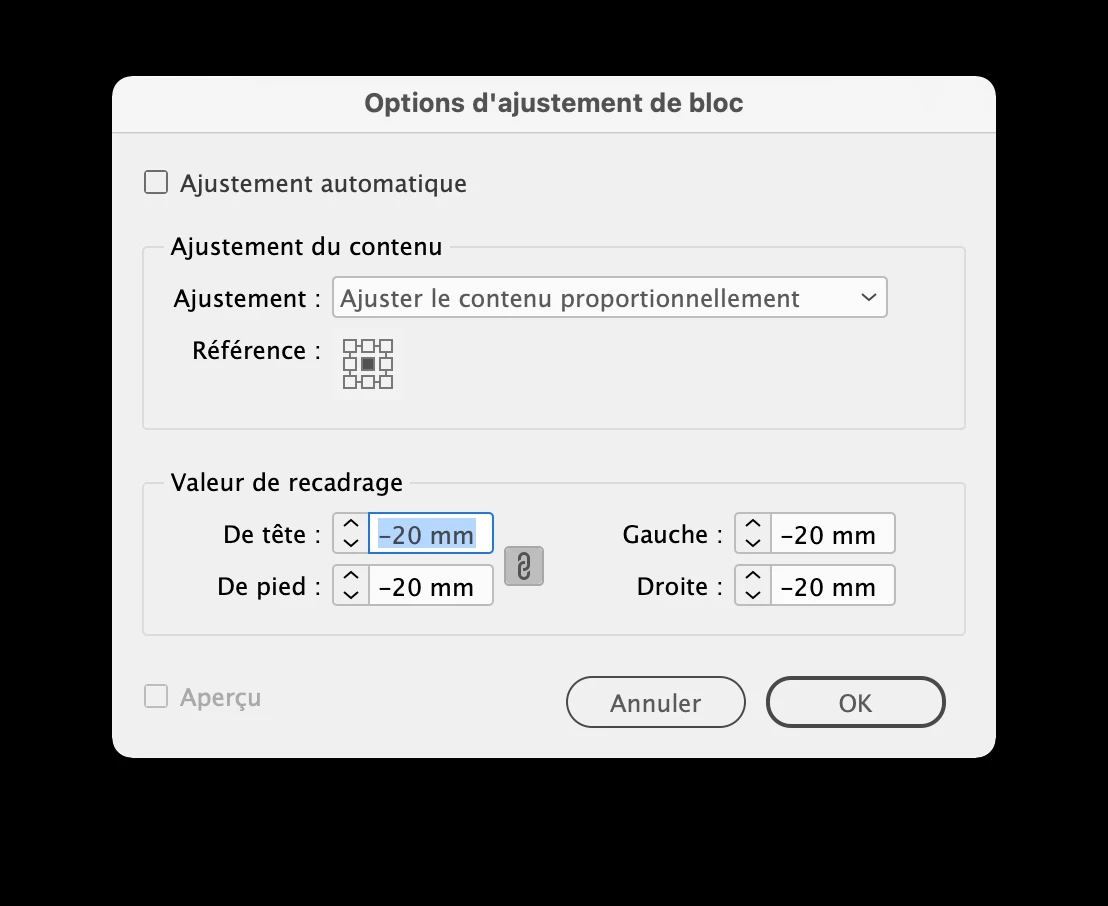
Without any frame selected, go to the object menu > fitting > frame fitting options and check if you have not a negative inset like this

2 replies

jmlevy
Community Expert
jmlevyCommunity ExpertCorrect answer
Community Expert
June 3, 2022

Without any frame selected, go to the object menu > fitting > frame fitting options and check if you have not a negative inset like this

Formation Creative
Participating Frequently
June 4, 2022

Thank you @jmlevy that was exactly the problem. I have no idea how I set that. 

Legend!

Formation Creative
Participating Frequently
June 3, 2022

Further to this, when I double click the corner of the bounding box, it snaps to the edges of the actual image, so it knows the size of the image.