


Inspiring
September 22, 2020
Question

[BUG][2020][JS] Missing Adobe fonts during script

  • September 22, 2020
  • 5 replies
  • 1198 views

Hi,

Since Indesign 2020, the auto-activation feature of missing Adobe Fonts is added. This works almost perfect when opening files manually, but when running a script, it is a nightmare.
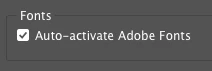


There are 2 major issues currently present when using scripting:

1. The script doesn't pause after the document is opened, to allow fonts to be activated. The font activation process runs asynchronously. The script continues after opening the file. All font activation operations are ignored.

2. During the script execution, any font activation is ignored UNTIL THE SCRIPT IS FINISHED! Building delay's or adding additional font validation into the script to check if the fonts are loaded properly, is completely useless. Closing and reopening the Indesign file during script execution is also useless and doesn't work.

 

    app.scriptPreferences.userInteractionLevel = UserInteractionLevels.NEVER_INTERACT;
    app.open("/demo/Test.indd");
 
 
    $.sleep(200000);
    // The notification appeared confirming the font activation
    // Preview is still bad
    // Font is still missing!!!!
    myDoc.close(SaveOptions.NO);  
    app.scriptPreferences.userInteractionLevel = UserInteractionLevels.INTERACT_WITH_ALL;
    alert('Done ...');


How do we successfully integrate font activation in a script?


Thanx 


tm

This topic has been closed for replies.

5 replies

tmmlsAuthor
Inspiring
October 15, 2020

Anyone having any thoughts on this issue? 

Brainiac
October 15, 2020

Hi Tim,

In the link\post below it's stated "when Auto-activate Adobe Fonts is enabled the activation of missing fonts runs as a Background Task.

https://helpx.adobe.com/mena_en/indesign/user-guide.html/mena_en/indesign/using/using-fonts.ug.html

The InDesign ExtendScript API has not yet been updated to include "Auto-activate Adobe Fonts" under BackgroundTask(s) from what I can see.


Regards,

Mike


tmmlsAuthor
Inspiring
October 16, 2020

Hi Mike,


Thanks for your feedback. Lets hope this feature will be added to the API asap. I really miss this feature. 


Thanx

Community Expert
September 24, 2020

Hi tmmls,

can you post a script with minimum code where you see both issues?

Also a document where the script should be run at. With some text where fonts are applied one can only activate through the Adobe Fonts service. Best use Dropbox or a similar service and provide the download link.


The script should do something reasonable where the missing fonts play a role.


Thanks,
Uwe Laubender

( ACP )

tmmlsAuthor
Inspiring
September 28, 2020

Hi Uwe,


Below the script. The script creates PDF-files for all Indesign files in a specific folder. To test the issue, you can use any document which contains missing Adobe Type fonts. Before testing, make sure auto font activation in Indesign 2020 is active. The PDF-files are generated with the wrong fonts ...


//**************************************************
//
// 2008-2020 © Written by Tim Melis 
// 
// This script will create PDF-files for 
// all Indesign files in specific folder
// 
//**************************************************


// Displaying window to choose source folder
var mySourceFolder = Folder.selectDialog("Select the folder containing the Indesign files");

// Displaying window to choose destination folder
var myDestinationFolder = Folder.selectDialog("Select the PDF target location!");

// Ask for PDF preset
var myPreset = askForPreset();

// If a source folder is selected
if (mySourceFolder != null) {

	// If a destination folder is selected{
	if (myDestinationFolder != null) {

		// Retreive list of Indesign files
		myFiles = mySourceFolder.getFiles("*.indd");

		// For every file in the folder
		for (var j = 0; myFiles.length > j; j++) {

			// process single file
			processFile(myFiles[j], myDestinationFolder, myPreset);

		}
	}
}

alert("Done ...");


// **************************************************
// Additional functions
// **************************************************
// --------------------------------------------------
// Ask for PDF preset
// --------------------------------------------------
function askForPreset() {
	var myList = getPDFpresetList();

	myDlg = new Window('dialog', 'Select a PDF preset!');
	myDlg.orientation = 'column';
	myDlg.alignment = 'right';
	myDlg.DDgroup = myDlg.add('group');
	myDlg.DDgroup.orientation = 'row';
	myDlg.DDgroup.add('statictext', undefined, "Export PDF presets:");
	myDlg.DDgroup.DD = myDlg.DDgroup.add('dropdownlist', undefined, undefined, { items: myList })
	myDlg.DDgroup.DD.selection = 0;
	myDlg.closeBtn = myDlg.add('button', undefined, 'OK');
	myDlg.closeBtn.onClick = function () {
		this.parent.close();
	}
	result = myDlg.show();

	var myName = myDlg.DDgroup.DD.selection.text;

	var myPreset = getPresetbyName(myName);

	return myPreset;
}

// --------------------------------------------------
// Get list of all presets
// --------------------------------------------------
function getPDFpresetList() {
	var myList = new Array();

	for (var i = 0; i < app.pdfExportPresets.count(); i++) {
		myList.push(app.pdfExportPresets.item(i).name);
	}

	return myList;
}

// --------------------------------------------------
// Get preset by name
// --------------------------------------------------
function getPresetbyName(_myPresetName) {
	for (var i = 0; i < app.pdfExportPresets.count(); i++) {
		myPreset = app.pdfExportPresets.item(i);

		if (myPreset.name == _myPresetName) {
			var myFinalPreset = myPreset;
			break;
		}
	}

	return myFinalPreset;
}


// --------------------------------------------------
// Get preset by name
// --------------------------------------------------
function processFile(_myFile, _destinationFolder, _myPreset) {

	// opening the file
	app.open(myFiles[j]);

	// FONT ISSSUE ! MISSING FONTS

	// Retreive filename
	var fileName = app.activeDocument.name.replace(".indd", "");

	// Get PDF folder path
	var pdfFilePath = _destinationFolder + "/" + fileName + ".pdf";

	// Export to PDF
	app.activeDocument.exportFile(ExportFormat.pdfType, File(pdfFilePath), false, _myPreset);

	// Closing the file
	app.activeDocument.close();

}


tmmlsAuthor
Inspiring
September 24, 2020

Hi Peter and Uwe,


Unfortunately the new additions to the code have no effect...


tm

Community Expert
September 23, 2020

And maybe also this:

// DOM documentation says:
// Forces a check for new fonts in the various Fonts folders.
app.updateFonts();

and perhaps this, but I am not sure if this applies to the process of auto activating fonts:

app.waitForAllTasks();


Hm. Maybe you could also add an idleTask that allows your script to start after some seconds when the document is idle?

Just some suggestions. I did not fo any research on all this yet.


FWIW: Don't think, that $.sleep will get you somewhere.


Regards,
Uwe Laubender

( ACP )

Community Expert
September 23, 2020

Maybe try 

app.fontSyncPreferences.autoActivateFont = true;