dhood_UX
New Participant
March 20, 2020
Answered

Bullets and Numbering Control Panel Not Available

  • March 20, 2020
  • 3 replies
  • 8494 views

When using InDesign on Mac, I have access to Bullets and Numbering within the Control Panel. When using InDesign on Windows, Bullets and Numbering is not included in the Control Panel -- the one on the side.


I have reviewed each of the Workspace options, but no matter what I do, I can't get the Bullets and Numbering portion of the panel to display.


What can I do? This slows down my work efforts.

This topic has been closed for replies.
Correct answer jane-e

Here's a screen shot from the oldest version I have (CS5.5).
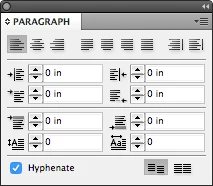
Do you have third-party software that is causing this?


It does help to see the screen shot for CS5.5, Migintosh, thank you,


DHood,

The newer versions use a workspace called "Essentials with three panels. If you switch to "Essentials Classic", you will get panels similar to older versions of InDesign. I start with the workspace called "Advanced" and modify it.

The panel you are showing is the Properties panel and the name should be at the top.
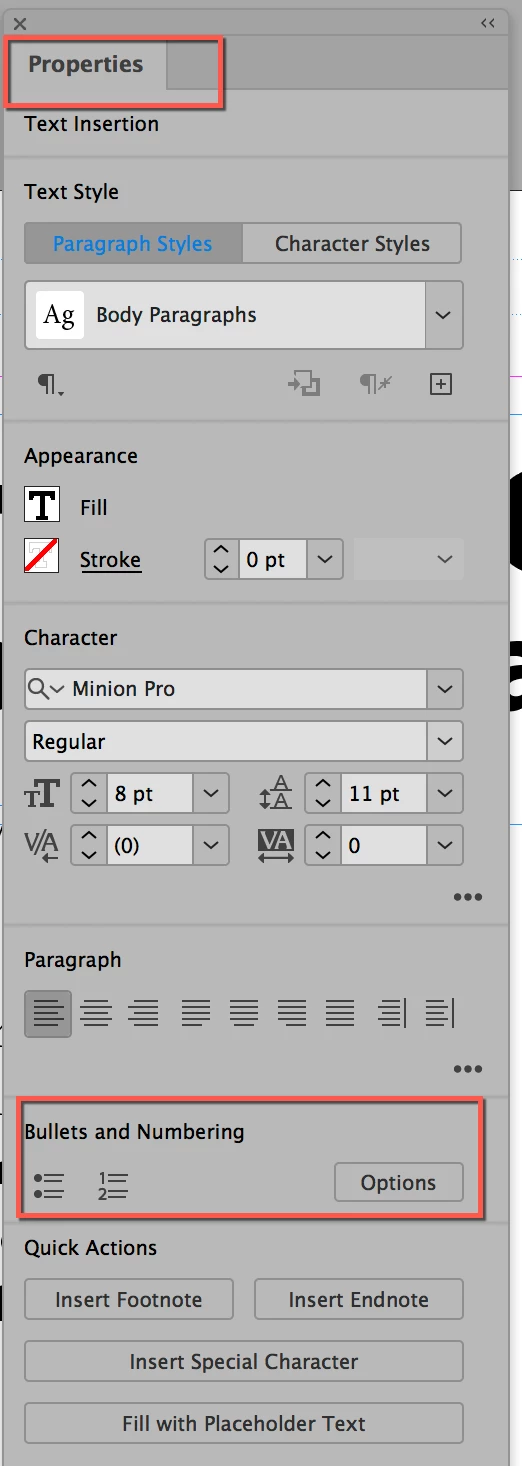
 

If you go to Window menu > Workspace > Advanced, it will include the Control panel. There are two icons on the left. The "A" is the Character panel, and the pilcrow (red box) is the Paragraph panel. All panels can be opened from the Window menu. I also drew a red box around the bullets and numbers. I would do it this way.

 

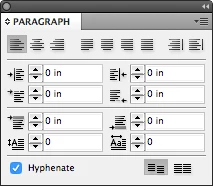
This is Migintosh's screen shot from CS5. It does not have Bullets and Numbering. The buttons in the lower right are for the baseline shift. You will find B&N if you click the menu in the upper right.
 

While I agree that styles are the way to go, I use overrides, then update my style, so I use the Control panel. And styles are not what you are asking about. You are asking how to do Bullets and Numbers.


You can use the Advanced Workspace or turn on the Control panel from the Window menu, then use the Paragraph section of the panel.


But they are not in the Paragraph panel of CS5.5 as buttons, nor in the versions I looked in. If you can find another screen shot that displays them, I'll look again.


I hope this helps. And thanks for speaking up when someone marked the wrong reply as being correct. You get to decide.


~ Jane



3 replies

Known Participant
March 8, 2023

It's 2023 and I am having this same issue HOWEVER, your solutions do not work. There is no "Control Panel" option under Window >  Workspace >Advanced. There is NO option for creating bullets anywhere on any of the panels. This is entirely frustrating, this should be included on the Paragraph panel automatically and not hidden somewhere in some obsolete area.  Applying bullets should not be this difficult, but here I am, two hours into Googling how to do this with no attainable solutions. 


WHERE DID YOU HIDE THE BULLETS AND NUMBERING PANEL NOW, ADOBE?! 

BobLevine
Community Expert
March 8, 2023

The bullets and numbering options are in multiple places including the paragraph panel, the paragraph styles panel, the control panel (if you have text selected and paragraph selected in the panel).

You can turn on the Control Panel the Window > Control command.

New Participant
December 18, 2022


First you have to click on the paragraph then you will get the options of bullet and numeric point


jane-e
Community Expert
March 20, 2020

Hi

Can you show a screen shot? Usually if a set of controls isn't showing, it's because of the monitor size or your resolution. You can turn off other controls using the menu for the Control panel and it should show up.


Also, to confirm: you have an insertion point with the Paragraph settings (pilcrow) selected in the Control panel, correct?


As work arounds you could use the Paragraph panel or Quick Apply (Ctrl+Enter), but lets look at fixing this first.


~ Jane

dhood_UX
dhood_UXAuthor
New Participant
March 20, 2020

Here's the Paragraph panel. This is where I'm used to seeing the Bullets and Numbering options, at the bottom of this panel. I don't want to change the way I work (decreases efficiency), so I'm hoping not to use the panel at the top of the page or any shortcuts. Thx! I appreciate any insights. 


Willi Adelberger
Community Expert
March 20, 2020

You should not do it with this panel, much better is to do this task with a Paragraph Style (which can be saved for future use for you and your co-workers in a CC Library) together with a dedicated character style. 


But in this panel you find it in the Panel Menu, the 4 stripes at the top right is the menu and there you find bullets and numbers.

