

Answered
Bullets and Numbering Question
Please check the below image
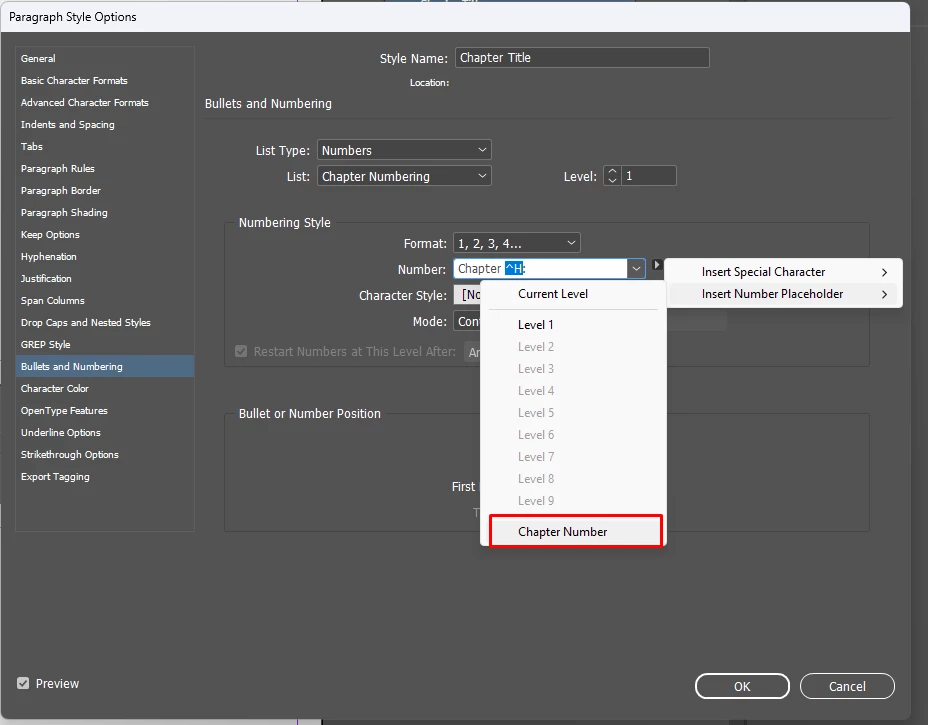
I'm using this style for my document chapter number. But when I apply the style, it always comes Chapter 1 only. How to get Chapter 2, 3 etc...? Can any one help me please?

Please check the below image
I'm using this style for my document chapter number. But when I apply the style, it always comes Chapter 1 only. How to get Chapter 2, 3 etc...? Can any one help me please?
The Chapter Number special character refers to the Chapter number assigned in the Numbering And Section Options dialog accessible from the Pages Panel. It's used in conjunction with the Book feature where each dcoument included in the book can have a chapter number, burt no document can have more than one.
It sounds like you have a single document you are breaking into chapters usimng this pasragraph style to designate the start of each chapter, so you shoud use the ordinary default number plasceholder ^# with your "Chapter" prefix typed in as you currently show in the screen capture.
Already have an account? Login
Enter your E-mail address. We'll send you an e-mail with instructions to reset your password.
 AdChoices