Inspiring
April 13, 2025
Answered

Can I create a list of specific font styles without manually selecting them?

  • April 13, 2025
  • 2 replies
  • 1882 views

Hello,
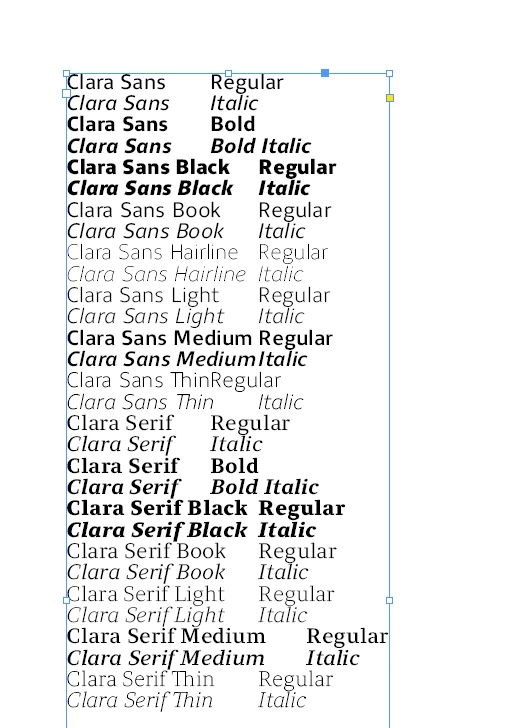
I'm doing a specimen and I need to write out all of the styles of one font.
I have Sans Regular, Italic, Bold, Medium etc. and I need to write them and then individually select them and change them to the style its refering to.

Is there any other way to do this? For example like selecting the font and "Write out and style the family of selected font" option?

It's taking way too long...
Thanks!

Correct answer Le Kozis

In conclusion:

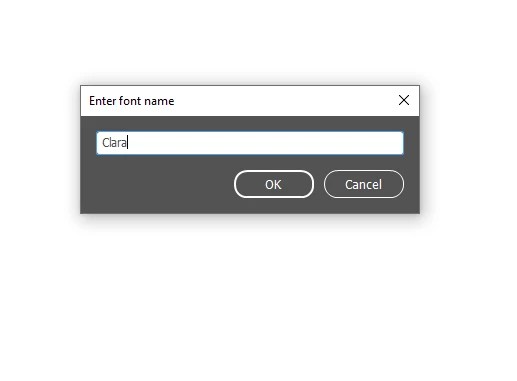
If you wanted to try this, this is the script from https://yourscriptdoctor.com/displaying-font-family-members/ but put in javascript. You can make your own script from this and it works wonders!
How to install texts scripts here: 
https://creativepro.com/how-to-install-a-script-in-indesign-that-you-found-in-a-forum-or-blog-post/ 

try {
    var userFont = getFontName();
    var doc = app.activeDocument;
    var defaultStyle = doc.textDefaults.appliedParagraphStyle;
    defaultStyle.pointSize = 10;
    defaultStyle.leading = 16;

    // Find fonts matching input
    var fontList = [];
    var fonts = app.fonts.everyItem().getElements();
    for (var i = 0; i < fonts.length; i++) {
        if (fonts[i].name.toLowerCase().indexOf(userFont.toLowerCase()) !== -1) {
            fontList.push(fonts[i].name);
        }
    }

    if (fontList.length === 0) {
        throw "No fonts found containing \"" + userFont + "\"";
    }

    if (app.selection.length === 0 || !(app.selection[0] instanceof TextFrame)) {
        throw "Requires text frame selection in InDesign document";
    }

    var selItem = app.selection[0];
    var str = "";

    for (var i = 0; i < fontList.length; i++) {
        str += fontList[i] + "\r";
    }

    selItem.contents = str;

    var paras = selItem.paragraphs;
    for (var i = 0; i < paras.length; i++) {
        var fontName = paras[i].contents.replace(/\r$/, ""); // remove line break
        try {
            paras[i].appliedFont = fontName;
            paras[i].pointSize = 16;
        } catch (e) {
            // Fallback: skip applying font if not available
            $.writeln("Could not apply font: " + fontName);
        }
    }

} catch (err) {
    alert("Error: " + err);
}


// Prompt user for font name
function getFontName() {
    var w = new Window("dialog", "Enter font name");
    w.orientation = "column";
    w.alignChildren = "fill";

    var input = w.add("edittext", undefined, "");
    input.characters = 30;

    var btnGroup = w.add("group");
    btnGroup.alignment = "right";
    var okBtn = btnGroup.add("button", undefined, "OK");
    var cancelBtn = btnGroup.add("button", undefined, "Cancel");

    okBtn.onClick = function () {
        if (input.text === "") {
            alert("Requires font name");
            return;
        }
        w.close(1);
    };
    cancelBtn.onClick = function () {
        w.close(0);
    };

    if (w.show() === 1) {
        return input.text;
    } else {
        throw "User cancelled input.";
    }
}


 

2 replies

Le KozisAuthorCorrect answer
Inspiring
April 13, 2025

In conclusion:

If you wanted to try this, this is the script from https://yourscriptdoctor.com/displaying-font-family-members/ but put in javascript. You can make your own script from this and it works wonders!
How to install texts scripts here: 
https://creativepro.com/how-to-install-a-script-in-indesign-that-you-found-in-a-forum-or-blog-post/ 

try {
    var userFont = getFontName();
    var doc = app.activeDocument;
    var defaultStyle = doc.textDefaults.appliedParagraphStyle;
    defaultStyle.pointSize = 10;
    defaultStyle.leading = 16;

    // Find fonts matching input
    var fontList = [];
    var fonts = app.fonts.everyItem().getElements();
    for (var i = 0; i < fonts.length; i++) {
        if (fonts[i].name.toLowerCase().indexOf(userFont.toLowerCase()) !== -1) {
            fontList.push(fonts[i].name);
        }
    }

    if (fontList.length === 0) {
        throw "No fonts found containing \"" + userFont + "\"";
    }

    if (app.selection.length === 0 || !(app.selection[0] instanceof TextFrame)) {
        throw "Requires text frame selection in InDesign document";
    }

    var selItem = app.selection[0];
    var str = "";

    for (var i = 0; i < fontList.length; i++) {
        str += fontList[i] + "\r";
    }

    selItem.contents = str;

    var paras = selItem.paragraphs;
    for (var i = 0; i < paras.length; i++) {
        var fontName = paras[i].contents.replace(/\r$/, ""); // remove line break
        try {
            paras[i].appliedFont = fontName;
            paras[i].pointSize = 16;
        } catch (e) {
            // Fallback: skip applying font if not available
            $.writeln("Could not apply font: " + fontName);
        }
    }

} catch (err) {
    alert("Error: " + err);
}


// Prompt user for font name
function getFontName() {
    var w = new Window("dialog", "Enter font name");
    w.orientation = "column";
    w.alignChildren = "fill";

    var input = w.add("edittext", undefined, "");
    input.characters = 30;

    var btnGroup = w.add("group");
    btnGroup.alignment = "right";
    var okBtn = btnGroup.add("button", undefined, "OK");
    var cancelBtn = btnGroup.add("button", undefined, "Cancel");

    okBtn.onClick = function () {
        if (input.text === "") {
            alert("Requires font name");
            return;
        }
        w.close(1);
    };
    cancelBtn.onClick = function () {
        w.close(0);
    };

    if (w.show() === 1) {
        return input.text;
    } else {
        throw "User cancelled input.";
    }
}



Community Expert
April 13, 2025

I was looking at this all day - finaly got it working

var sel = app.selection[0];

if (!sel || !sel.hasOwnProperty("paragraphs")) {
    alert("Please select text that lists font styles like 'Regular', 'Bold', etc.");
} else {
    var paras = sel.paragraphs;
    var notFound = [];

    // Function to apply the font style
    function applyFontStyle(styleName, fontFamily) {
        try {
            // Create the font name by combining family and style
            var fontKey = fontFamily + "\t" + styleName;
            var fontObj = app.fonts.itemByName(fontKey);

            // Check if the font is valid and apply
            if (fontObj.isValid) {
                return fontObj;
            } else {
                return null;
            }
        } catch (e) {
            return null;
        }
    }

    // List of font style names (expand this list with all known style names)
    var fontStyles = [
        "Regular", "Bold", "Italic", "Medium", "Light", "ExtraBold", "SemiBold",
        "Display", "Caption", "Condensed", "Subhead", "Bold Condensed", "Italic Caption",
        "Medium Italic", "SemiBold Caption", "Bold Italic", "Medium Display", "Italic Subhead"
    ];

    // Loop through the selected paragraphs and apply fonts
    for (var i = 0; i < paras.length; i++) {
        var paraText = paras[i].contents; // Get the text content of the paragraph

        // Check if the content is one of the known font styles
        var styleName = null;
        for (var j = 0; j < fontStyles.length; j++) {
            if (paraText.indexOf(fontStyles[j]) !== -1) {
                styleName = fontStyles[j];
                break; // If a match is found, stop checking further
            }
        }

        // Apply the font if a style was found
        if (styleName) {
            var fontFamily = paras[i].appliedFont.fontFamily; // Get the font family of the paragraph
            var appliedFont = applyFontStyle(styleName, fontFamily); // Get the font object for the style

            if (appliedFont) {
                paras[i].appliedFont = appliedFont; // Apply the font to the text
            } else {
                notFound.push(styleName); // Track styles not found
            }
        } else {
            notFound.push("No style match for: " + paraText); // Track paragraphs without a style match
        }
    }

    // Feedback for any styles that couldn't be applied
    if (notFound.length > 0) {
        alert("Couldn't apply these styles or matches:\n" + notFound.join("\n"));
    } else {
        alert("All styles applied successfully!");
    }
}
Community Expert
April 13, 2025

As you're writing out the text anyway - you just need to apply the font style to the list - and it should work. 


Once you have the main ones setup it should be automated enough. 


I'm working on automating the style list based on the selection but gotta go work on something else. 

Robert at ID-Tasker
Legend
April 13, 2025

There are websites that list all styles of a font family.


Le KozisAuthor
Inspiring
April 13, 2025

Yes, I copied the names of the styles. But I want them to be in the style they're named.
Now i'm selecting each text and making it the style it's named. But The font has 43 styles and it's taking too long.

Robert at ID-Tasker
Legend
April 13, 2025