


ashimg23377171
Inspiring
January 25, 2018
Answered

Can we insert current date in InDesign

  • January 25, 2018
  • 3 replies
  • 30379 views

Hello

I am working on a document where I wish to insert the current date. I was exploring text variables. But I can't spot any option for inserting the current date.
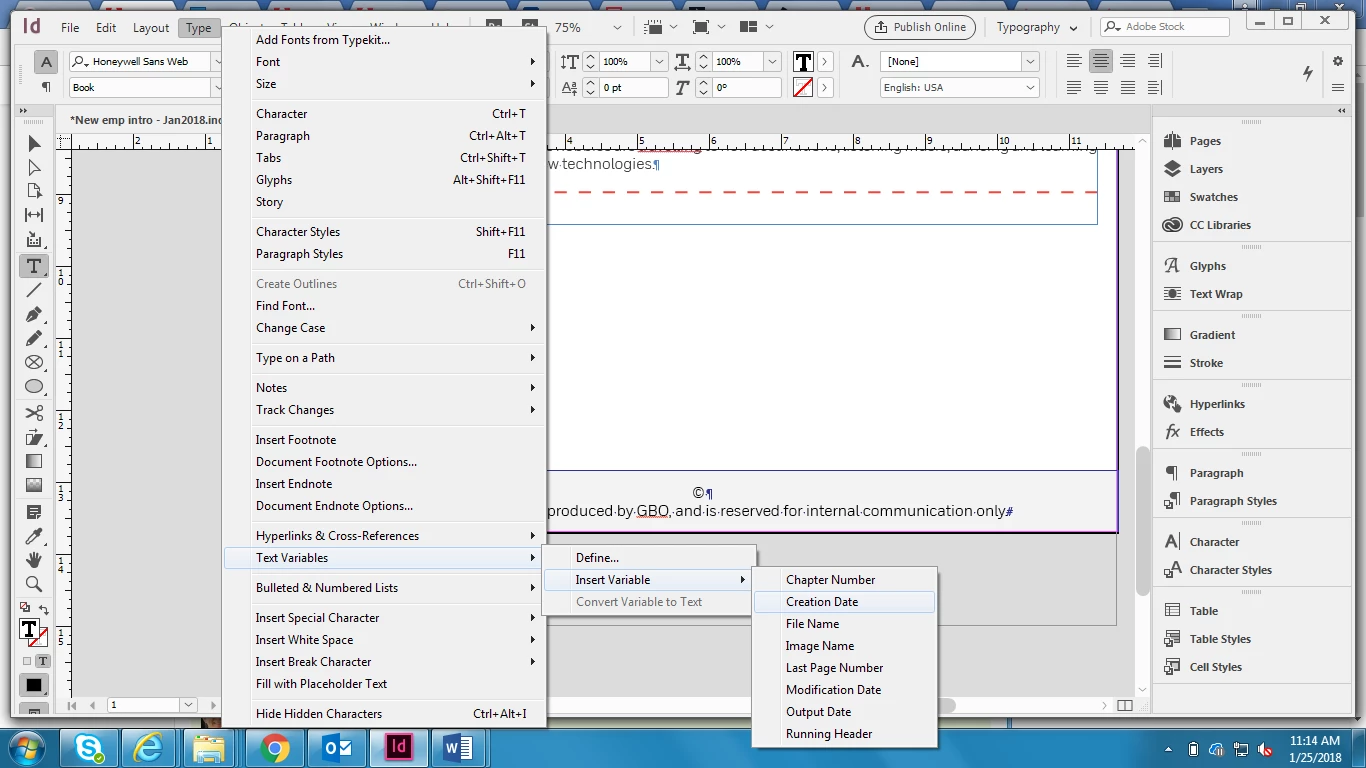
Any guidance on how to carry this out would be appreciated.

Thanks

    Correct answer amaarora

    Hi,

    Try Create and edit text variables in InDesign  again.

    Type>Text Variables>Modification or Output Date

    You can modify the variable by editing it

    Modification Date inserts the date or time the document was last saved to disk; Output Date inserts the date or time the document starts a print job, exports to PDF, or packages the document. You can insert text before and after the date, and you can modify the date format for all date variables.

    -Aman

    3 replies

    Barb Binder
    Community Expert
    Community Expert
    June 6, 2024

    Hi @Kyle25599063f0ik:


    It sounds like you would like to have access to a variable that would pick up the insertion date and not change? Variable Date at Insertion or similar? That's not really a variable—variables are used for content that will change—but on that note, neither is the creation date variable so maybe that logic will help you on your quest to get this added.


    In any event, this is the Community Forum, staffed by volunteers who are experts with the software. We are users like you, and our job is to explain how features work. Adobe has a different site for feature requests and bug reports: please log all feature requests here: https://indesign.uservoice.com/. Feature requests pick up steam based on votes—if enough people care about a particular request and vote for it, then Adobe evaluates it for inclusion in a future release. 


    In the meantime, this is likely something that can be easily scripted, even if it is never added to a future release. You might want to start a new post here with this as the question (since you tacked onto an old post and the OP marked their question as answered). Be sure to add the scripting tag so that those with the skills to help will see it.


    Note: sometimes they charge for the service and other times they don't. I suspect it depends on the complexity of the task and how long it takes them to complete it.


    ~Barb

    ~Barb at Rocky Mountain Training
    Participating Frequently
    December 16, 2020

    This was helpful. I created a new modification variable with a new name to use in letters (with no doc open). The new name appears in the edit menu, but not in the insert variable list when I go to use it in a new document. Is there a way to make it "stick"?

    Participating Frequently
    December 16, 2020

    Update to previous post: It disappeared from the edit menu now. I'd like to make it something that's available all the time.


    amaarora
    Community Manager
    amaaroraCommunity ManagerCorrect answer
    Community Manager
    January 25, 2018

    Hi,

    Try Create and edit text variables in InDesign  again.

    Type>Text Variables>Modification or Output Date

    You can modify the variable by editing it

    Modification Date inserts the date or time the document was last saved to disk; Output Date inserts the date or time the document starts a print job, exports to PDF, or packages the document. You can insert text before and after the date, and you can modify the date format for all date variables.

    -Aman

    ashimg23377171
    Inspiring
    January 25, 2018

    ah... got it... .thanks a lot, Aman. really appreciate your guidance here.

    Thanks