


Inspiring
November 7, 2017
Answered

Cant move pages between documents (ID2018)

  • November 7, 2017
  • 2 replies
  • 2920 views

Not sure if anyone else has had this problem but I am running into a problem when trying to copy pages between InDesign documents.

I have the two documents open but, when I select pages to 'move', I can see the other document as an option in the drop down but can't select it. It will only allow me to move pages within the same document.

Is this a problem or am I just being an idiot somehow?

Cheers....Scotty
This topic has been closed for replies.
Correct answer amaarora

Guys,

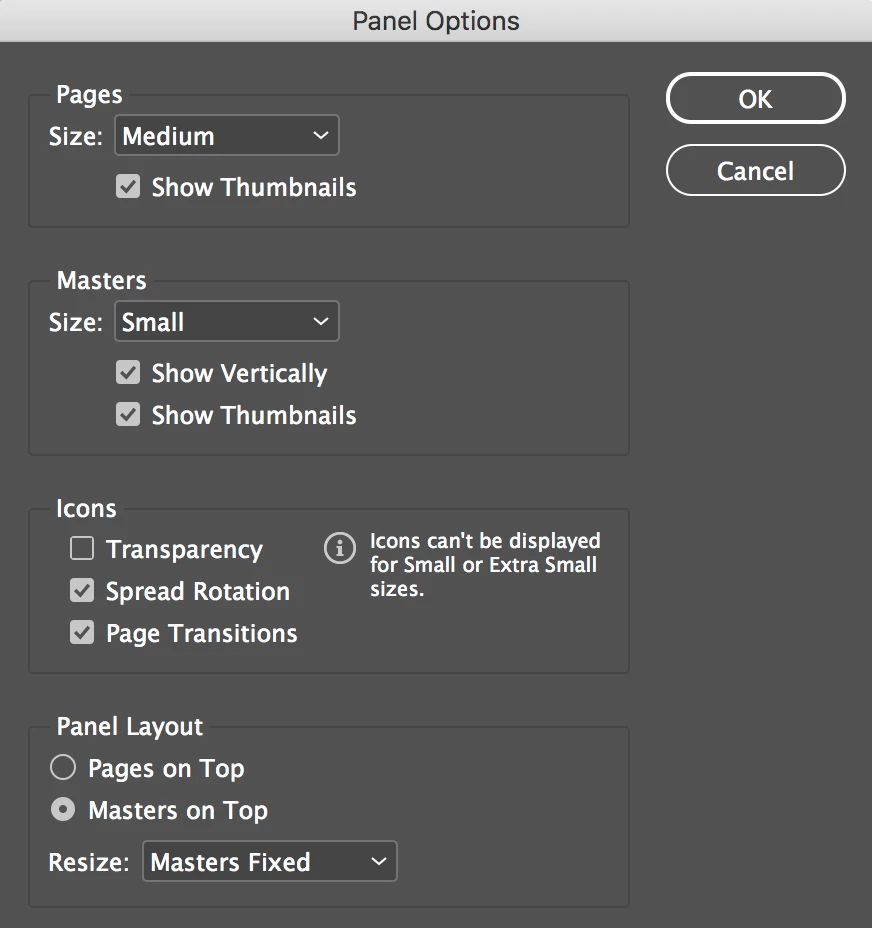
I'm not sure if this is related but I also can't change the options in the drop-down menus in the Panel Options box. I can see the options but can't select any of them.

Hope this helps.

Cheers.....Scotty


Hi,

Please try to manually clean both your cache and preferences by going to the folder locations. Also clean your trash after that. Troubleshooting 101: Replace, or "trash" your InDesign preferences

-Aman

2 replies

Scott Citron
Braniac
November 7, 2017

Works fine for me. Are you on a Mac or PC?

Inspiring
November 7, 2017

MAC

amaarora
Community Manager
Community Manager
November 7, 2017

Hi,

How are the below two options set in the pages panel?

Can you try create two blank documents with default settings and then try to move pages?

-Aman

Inspiring
November 7, 2017

Aman,

I have tried two new blank documents. Attempted to move page from Untitled-1 to Untitled-2 but same problem. When I try to select 'Untitled-2' I can't. It simply remains as 'Current Document'.

Cheers....Scotty

Inspiring
November 8, 2017

Hi,

Please try to manually clean both your cache and preferences by going to the folder locations. Also clean your trash after that. Troubleshooting 101: Replace, or "trash" your InDesign preferences

-Aman


Aman,

thanks for the advice. Clearing the cache and preferences has done the trick.

All seems to be working fine now.

Cheers....Scotty