


Inspiring
February 25, 2015
Answered

CC Libraries - unable to connect to server

  • February 25, 2015
  • 12 replies
  • 26012 views

Hello all,

Libraries that I create in InDesign (2014.2) do not sync with Creative Cloud. And also the other way around, when I create a library on the CC website, the library does not show up in my Libraries panel in InDesign.

According to the screenshot below I am unable to connect to the server, but I am able to access the CC website from this computer.

Any thoughts or work arounds?
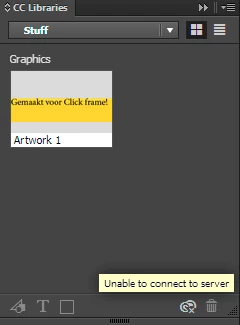
This topic has been closed for replies.
Correct answer Alex Affonso

For others who are suffering from this problem, where are you located? I'm trying to determine if it might be a problem with some of Adobe's servers since most of us don't experience it.


It seems it's all back to normal again. I didn't do anything else, just waited for a solution. It should be something with Adobe's servers indeed. All working now and my libraries are finally synchronizing again both in Photoshop CC 2014.2.2, Illustrator CC 2014.1.1 and InDesign CC 2014.2.

12 replies

New Participant
May 13, 2019

I'm having this "Libraries won't sync" issue with no help from logging out and in, or from the Adobe support staff. This has got to be on Adobe's end, right? Like if its this common of a problem they should be sorting it out, right?

New Participant
March 27, 2019

Same problem here.

Steve Werner
Community Expert
March 28, 2019

Try the suggestions mentioned in the thread above. Especially logging out and logging in to your Adobe ID using the Creative Cloud desktop app (menu bar on Mac or task bar in Windows).

New Participant
May 16, 2017

This is not working AGAIN! I have updated CC 2017 and nothing...

Adobe - WHY keep offering features for them to totally hinder your workflow..?

Please sort this out...

NOT ANSWERED

New Participant
June 3, 2017

Do you have some AV software? In my case, Kaspersky was the problem

TheSide
New Participant
October 7, 2016

I am having the same problem. Started before I upgraded to CC2015.5 - but using the adobe workaround of ctrl-alt-r to reset the desktop cloud program seemed to work.

Now, after an upgrade to CC2015.5, I have tried all the different workarounds listed by Adobe and still I cannot access the libraries. Very frustrating as I upgraded today and thought this may solve the issues I was having yesterday.

Can anyone help ?

K

New Participant
January 4, 2017

I've tried all of the work arounds and still get the error too...

New Participant
September 22, 2016

I had the same problem, tried to log out and log in and then it started to work again!

truthtelevision
New Participant
August 21, 2016

i spent hours trying to solve this problem searching for a solution and i think i found mine....other than making sure you have the latest update of windows or IOS and I saw this thing on my account where it says select your region. I chose United States and then everything worked. I guess the servers were going crazy trying to find a server and once I put my settings to US they found the US servers.

johngury
Participating Frequently
October 22, 2015

I'm getting the same unable to connect message and x cc icon now with PS CC 15 AI  etc. Previously all working w/o problems with the no changes in networking, firewalls and so on.

Steve Werner
Community Expert
October 22, 2015

You can try going to the Creative Cloud app > Gear icon > Preferences and try Signing out and Signing In. Also make sure that File Syncing is turned on.

If that doesn't work, ask in the Creative Cloud forum (link above).

johngury
Participating Frequently
October 22, 2015

Taaa,dah. Thanks, that worked. I did the CC app panel gear icon sign out, closed all CC apps, then started PS CC and got the relicense sign which kicked it back to normal. Took a while to resync as it had been out for a week or more.

New Participant
June 1, 2015

Mine is still not fixed.

Steve Werner
Community Expert
June 1, 2015

Try posting in the Creative Cloud forum. You're more likely to get help from the tech people there.

AdobeCreative Cloud

Beeblebum
New Participant
May 26, 2015

I'm from the Netherlands and I have the same issue. It's been two days now, and my CC libraries still are unable to connect to the server. I have also tried some of the suggestions from other posts, but to no avail.

Hope this issue gets fixed soon!

New Participant
May 26, 2015

Me too. Same issue on a MacBook Pro and MacPro from two different network places.