


CMSPS
New Participant
May 15, 2020
Answered

Centering words in the text box (PDF interactive)

  • May 15, 2020
  • 2 replies
  • 25230 views

Does anybody knows how to center text in the interactive text box?

Correct answer Luke Jennings3

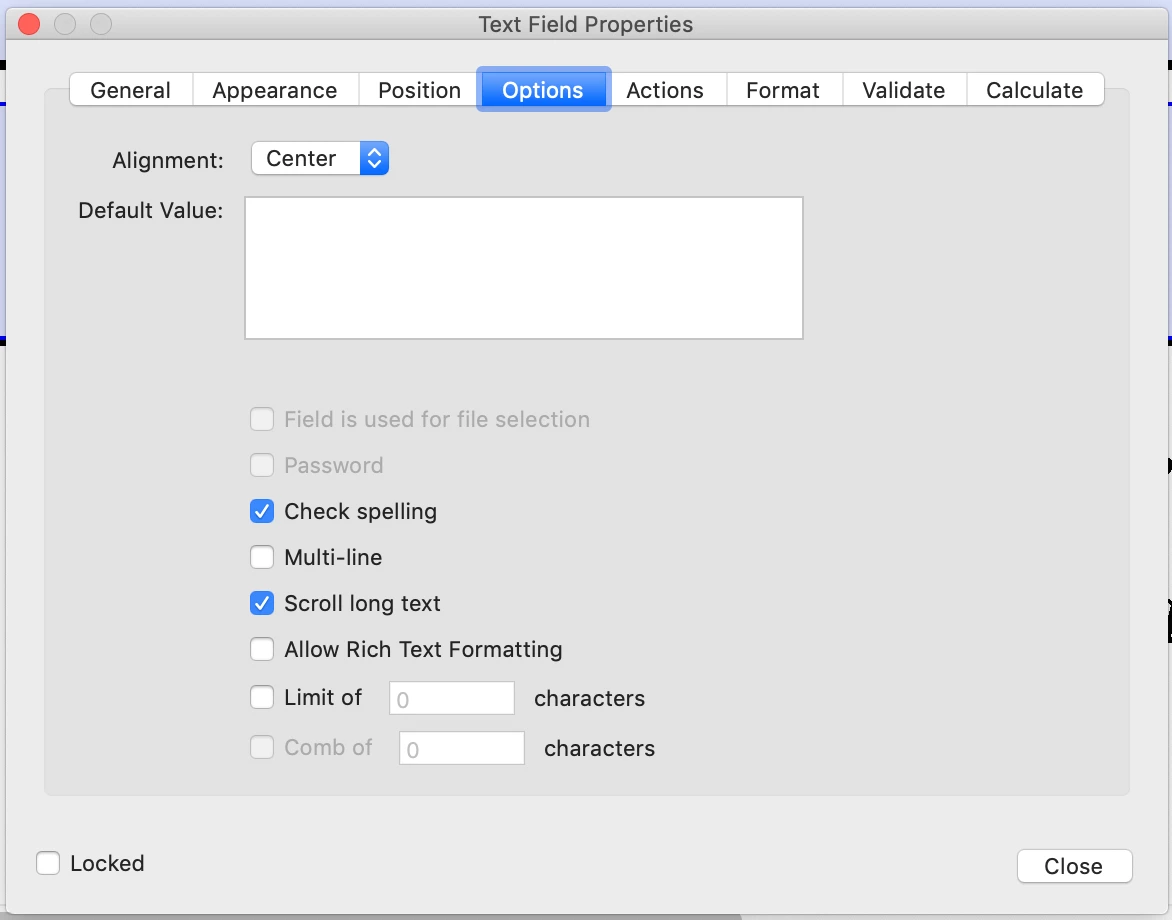
Open the form in Acrobat and go to Tools> Prepare forms. Select the form field you want to edit and right click it to bring up the Field Properties. Under Options, choose Alignment: Center.
2 replies

Derek Cross
Community Expert
May 15, 2020

As TaW mentioned, after you've created the form in InDesign and exported as an Interactive PDF you can open the resulting PDF in Acrobat Pro (assuming you have it) and there you can edit the fields – changing the font, the size, colour and alignment (and other things too).

Luke Jennings3
Luke Jennings3Correct answer
Community Expert
May 15, 2020

Open the form in Acrobat and go to Tools> Prepare forms. Select the form field you want to edit and right click it to bring up the Field Properties. Under Options, choose Alignment: Center.

New Participant
April 27, 2021

Just to add my 2 cents: this is onle for Text Fields only and not other options like drop down menus which is sort of odd. I can center everything but those interactive fields in Acrobat. Wish that would be fixed as I have some fields that are not centered and others that are. 

TᴀW
Brainiac
May 15, 2020

It can't be done natively in InDesign. That's a setting that's only available in Acrobat.

If you want to do it in InDesign, you would need my (not free) add-on: https://www.id-extras.com/products/formmagic/

(Actually, for short 1-page forms, there is a free version, so check it out!)

HTH,

Ariel