


Known Participant
May 10, 2020
Answered

Change language of index (Cross References)

  • May 10, 2020
  • 2 replies
  • 1185 views

Indexing newbie, second question for the day


I am using Adobe ME because I work in English and Hebrew. My cross references ("see", "see also") are coming up in Hebrew instead of English. It's not just the style as it's actually translated the word for "see".


How can I change this so that it indexes in English?
Correct answer Peter Kahrel

[This topic came up in another topic -- five years later]


For the record, there is some confusion here about the notion 'cross-reference'. The OP asked how to change the index cross-reference labels See and See also. Two suggestions are about text cross-references (set in the Cross-references panel), two others, about the index labels. No solution was provided.


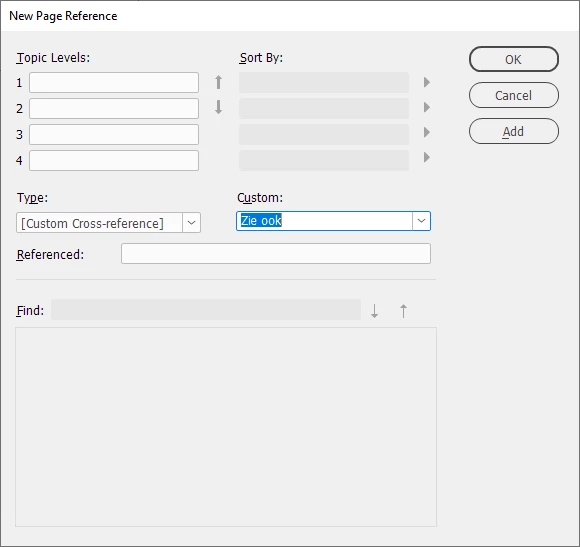
The only way to change the language the cross-reference labels is to select [Custom cross-reference] in the Type dropdown, then enter the label's name in the Custom field. If I were to produce a Dutch index in my English InDesign, I'd enter Zie or Zie ook there:


2 replies

Peter KahrelCommunity ExpertCorrect answer
Community Expert
April 9, 2025

[This topic came up in another topic -- five years later]


For the record, there is some confusion here about the notion 'cross-reference'. The OP asked how to change the index cross-reference labels See and See also. Two suggestions are about text cross-references (set in the Cross-references panel), two others, about the index labels. No solution was provided.


The only way to change the language the cross-reference labels is to select [Custom cross-reference] in the Type dropdown, then enter the label's name in the Custom field. If I were to produce a Dutch index in my English InDesign, I'd enter Zie or Zie ook there:


Barb Binder
Community Expert
Community Expert
May 10, 2020

Use Window > Type & Tables > Cross-References > Panel menu > Define Cross-Reference Formats

~Barb

~Barb at Rocky Mountain Training
RuthKAuthor
Known Participant
May 11, 2020

Thanks very much for this, sorry to be stupid, but I can only see from here how to define the variable and style, but not the language?

JFPublishers
Known Participant
July 12, 2022

You are not stupid. I see the same problem. It's the translated "see" and "see also" that does not seem to have a preference language setting.


In case anyone is still dealing with this...when you click "insert cross reference" then click the pencil to edit it, you can rewrite the names of the CRs there. And in the script box just change any added text to your language (type "on Page" instead of "a la pagina" or whatever). Don't mess with the code parts (like </paratext>" ) just change the part added between/after the reference html/xml code into your language. You can also change the names of the formats on left by just typing over it in the top box. Click save each time then "okay" when you're done. I did it on my style source doc (in my .indb book) and those were added to all my book docs' cross reference formats after I synced both styles and cross references. I now have to manually switch all the old ones in Spanish to the English ones added by my sync. But at least now I know to check that FIRST if I ever use a template from stock again (which I will not lol).