



M.Hasanin
Inspiring
April 22, 2021
Answered

Change Specific Paragraph Style to Nothing and Delete All Empty Frames

  • April 22, 2021
  • 3 replies
  • 881 views

Hi Experts, 

I have a problem, i'm trying to simulate the situation of using find/change like this :
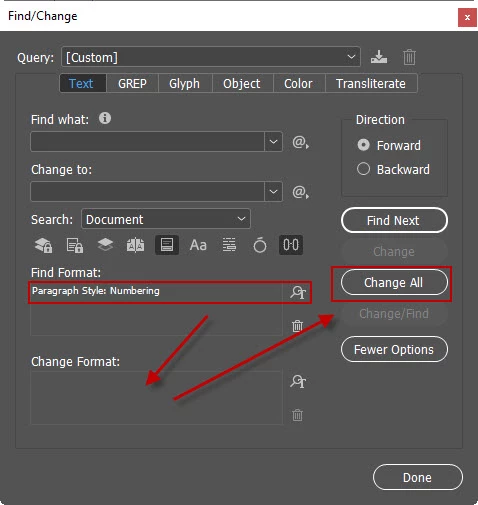
So if i use the Above method it will find the Paragraph Style (Numbering) and Delete All Text inside its frames, this is good trick to get rid of all text applied (paragraph styles) then i use the following code to delete all empty frames :

//Delete All Empty Text Frames
var myStories = app.activeDocument.stories.everyItem().getElements();
for (i = myStories.length - 1; i >= 0; i--){
    var myTextFrames = myStories[i].textContainers;
    for (j = myTextFrames.length - 1; j >= 0; j--)    {
        if (myTextFrames[j].contents == ""){
            myTextFrames[j].remove();
        }
    }
}

but what i need to do is to Simulate all the Process with only JavaScript, so it will to get rid from all the text and frames with one hit,  here is my try :

//Change Paragraph Styles from Desired to Nothing and Delete Empty Frames
var allPars = app.activeDocument.textFrames.everyItem().paragraphs.everyItem().getElements();
alert(allPars.length);
for (var i = 0; i < allPars.length; i++) {
   if (allPars[i].appliedParagraphStyle.name == "Numbering") {
      allPars[i].appliedParagraphStyle = "";
   }
}

//Delete All Empty Text Frames
var myStories = app.activeDocument.stories.everyItem().getElements();
for (i = myStories.length - 1; i >= 0; i--){
    var myTextFrames = myStories[i].textContainers;
    for (j = myTextFrames.length - 1; j >= 0; j--)    {
        if (myTextFrames[j].contents == ""){
            myTextFrames[j].remove();
        }
    }
}

but i get ther error code : 30477
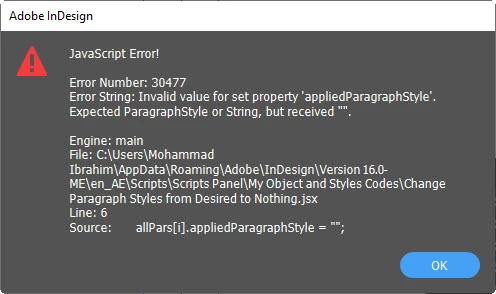
 so please help if this can be done ?

Thanks in Advance

Best Regards

M.Hasanain

This topic has been closed for replies.
Correct answer Manan Joshi

As @brian_p_dts mentioned the error is pretty descriptive and tells all. To give you a hint, what does the "Nothing" paragraph style(you mentioned in your code) that you are trying to apply mean? Can you apply this paragraph style using the InDesign UI, if so then is it named ""? if yes then how do you find it in the UI?

Coming to another point if you are trying to simulate the find/change functionality you can use it straightaway in your code, no need to iterate paragraphs etc. An prospective alternate solution to your problem is given below

app.findTextPreferences = app.changeTextPreferences = null
app.findTextPreferences.appliedParagraphStyle = app.documents[0].paragraphStyles.itemByName("Numbering")
app.changeTextPreferences.changeTo = ""
var match = app.documents[0].changeText()
app.findTextPreferences = app.changeTextPreferences = null
for(var i = 0; i < match.length; i++)
{
	var tf = match[i].parentTextFrames
	if(tf[0].contents == "") tf[0].remove()
}

However do try to fix the code that you were writing to understand what you were missing, i gave you plenty of hints to move in the direction of the solution

-Manan

3 replies

Sunil Yadav
Brainiac
April 22, 2021

Hi,


Change this below line

allPars[i].appliedParagraphStyle = "";

with this below line

allPars[i].appliedParagraphStyle = app.documents[0].paragraphStyles[0];

Best

Sunil

M.Hasanin
M.HasaninAuthor
Inspiring
April 22, 2021

Hi and Thank you Sunil , I tried your Solution but the text become very small and no paragraph style applied to it, and ofcourse the text and frames still exists because no empty text frames.

Regards

M.Hasanain

BestMohammad Hasanin
Sunil Yadav
Brainiac
April 26, 2021

Anyway, you found your solution for that issue.

Good to know that.


Sunil

Manan JoshiCorrect answer
Adobe Expert
April 22, 2021

As @brian_p_dts mentioned the error is pretty descriptive and tells all. To give you a hint, what does the "Nothing" paragraph style(you mentioned in your code) that you are trying to apply mean? Can you apply this paragraph style using the InDesign UI, if so then is it named ""? if yes then how do you find it in the UI?

Coming to another point if you are trying to simulate the find/change functionality you can use it straightaway in your code, no need to iterate paragraphs etc. An prospective alternate solution to your problem is given below

app.findTextPreferences = app.changeTextPreferences = null
app.findTextPreferences.appliedParagraphStyle = app.documents[0].paragraphStyles.itemByName("Numbering")
app.changeTextPreferences.changeTo = ""
var match = app.documents[0].changeText()
app.findTextPreferences = app.changeTextPreferences = null
for(var i = 0; i < match.length; i++)
{
	var tf = match[i].parentTextFrames
	if(tf[0].contents == "") tf[0].remove()
}

However do try to fix the code that you were writing to understand what you were missing, i gave you plenty of hints to move in the direction of the solution

-Manan

M.Hasanin
M.HasaninAuthor
Inspiring
April 22, 2021

Thank you a lot, it works, you are right i have to think straightaway in my code!

Regards

M.Hasanain

BestMohammad Hasanin
brian_p_dts
Adobe Expert
April 22, 2021

My friend, rather than coming to these boards to debug for you at first sign of a problem, I think you should invest some energy and time into learning to debug yourself. What solutions have you tried to solve this error yourself? The error is pretty descriptive and should provide a good starting point on what you should try to change in the problem line. 

M.Hasanin
M.HasaninAuthor
Inspiring
April 22, 2021

Thank Mr.brian311, actually I tried hard!, i read the erorr and it said Expected Paragrah Style or String but received "" , but if we go back to the find/change window in change format there are nothing in Change Format!, so my question was how to simulate nothing in Change Format within the code.

Regards

M.Hasanain

BestMohammad Hasanin