

lunarboy73
Inspiring
April 15, 2011
Answered

Change the page in a placed PDF?

  • April 15, 2011
  • 6 replies
  • 45611 views

Is there an easy way to change the page in a placed PDF? Something along the lines of Object Layer Options?

Thanks.

Correct answer JR Boulay

Hi.

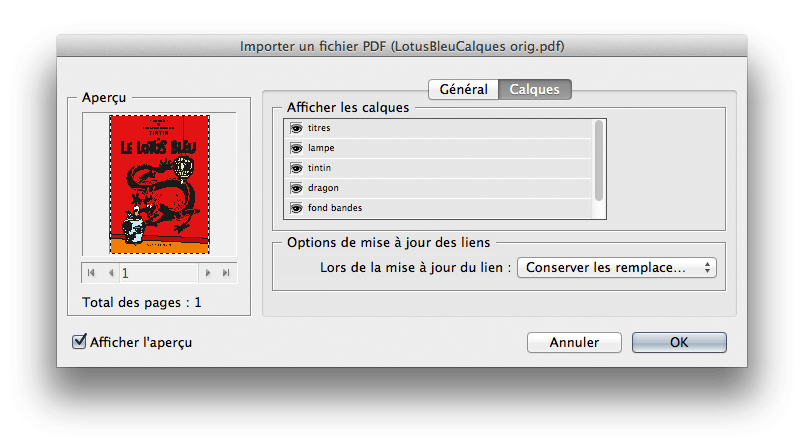
You should try my  PDFoptions Editor, it's a free script (in English and French) for InDesign (Direct download link removed by moderator)

See its home page (in French, Google translate is your friend) : http://abracadabrapdf.net/utilitaires/utilitaires-indesign/indesign-pdfoptions-editor/

Clic the red button to download.

It can:

- edit the page,

- edit the background color (white/transparent),

- edit layers visibility.
hybrid-import-INDD.png

pdfoptionsFR.png

6 replies

Community Expert
November 4, 2019

FWIW: John's two-line ExtendScript ( JavaScript ) script is working as well.


Regards,
Uwe Laubender

( ACP )

Participating Frequently
October 31, 2019

JR Boulay has the correct answer. SO MUCH QUICKER.

Merci beaucoup!

JR Boulay
Community Expert
August 29, 2015

It don't matter.

Acrobate du PDF, InDesigner et Photoshopographe
JR Boulay
Community Expert
August 27, 2015

(Direct download link removed by moderator)

???

Acrobate du PDF, InDesigner et Photoshopographe
Peter Spier
Community Expert
August 27, 2015

Apparently one of the other moderators felt the link was spam.

JR Boulay
Community Expert
August 28, 2015

I'm an ACP, he should read my history first…

Acrobate du PDF, InDesigner et Photoshopographe
JR Boulay
JR BoulayCorrect answer
Community Expert
August 20, 2015

Hi.

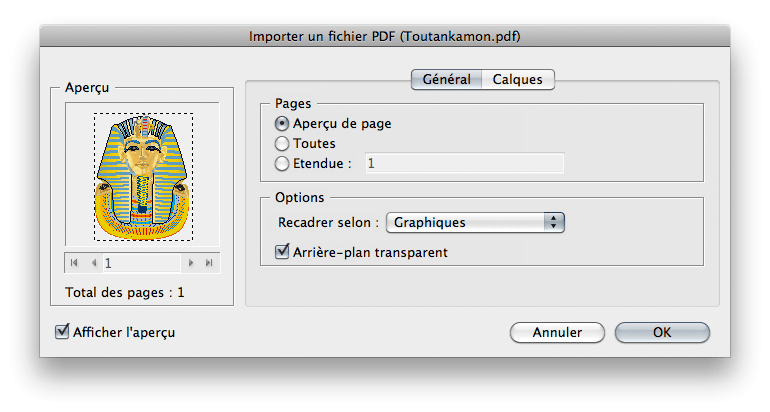
You should try my  PDFoptions Editor, it's a free script (in English and French) for InDesign (Direct download link removed by moderator)

See its home page (in French, Google translate is your friend) : http://abracadabrapdf.net/utilitaires/utilitaires-indesign/indesign-pdfoptions-editor/

Clic the red button to download.

It can:

- edit the page,

- edit the background color (white/transparent),

- edit layers visibility.
hybrid-import-INDD.png

pdfoptionsFR.png

Acrobate du PDF, InDesigner et Photoshopographe
New Participant
November 14, 2023

Hello.

I can´t find the link to download the plugin. When I download it, it opens a PDF with no link.


I appreciate the help

Participating Frequently
November 14, 2023

I think the newest Acrobat reader breaks the download link which used to be (visible) within the PDF document.

Hit the Bookmarks tab (second icon down on the right column margin) and hit the red "Extract PDFoptions editor" link - you'll be asked where to extract the .jsx file to ( - follow the Installation instructions in the PDF page)

Peter Spier
Community Expert
April 15, 2011

Re-link, but this time show import options and choose the correct page.

lunarboy73
Inspiring
April 15, 2011

Thanks, Peter!

I know I can do that. Unfortunately that can be quite cumbersome if I have a large multi-page PDF, and/or a long list of links in a folder.

There's nothing you know of that's easier to do?

Peter Spier
Community Expert
April 15, 2011

No