


winterm
Braniac
January 14, 2014
Answered

Cleaning up (not only) text frames, Pt. 2

  • January 14, 2014
  • 2 replies
  • 1679 views

Hi to all here,

Please consider this as a sequel to pretty old, 'answered' and lenghty thread http://forums.adobe.com/thread/920269?tstart=0.

cdflash compiled a nice script there:

https://dl.dropboxusercontent.com/u/55743036/emptyframeremover.jsx

it does the trick... most of the times.

I just found it worth to add try/catch wrapper to lines 16-24, because:

start new doc, create empty (no fill, outline, etc.) graphic/unassigned frame(s), run script. You'll get this error:
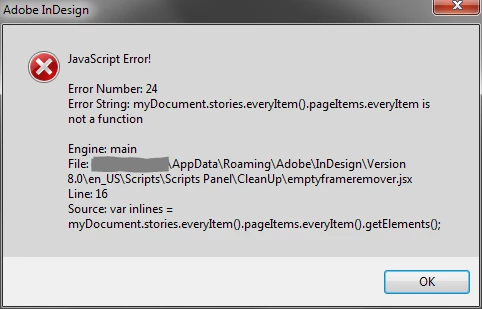
If there is at least one text frame in a doc (empty or not, doesn't matter), script works as expected. If not, you better have lines 16-24 wrapped, it won't hurt anyway.

Now the bad news:

Recently, working on a real-world document (not a test!) I stumbled on a case like this:
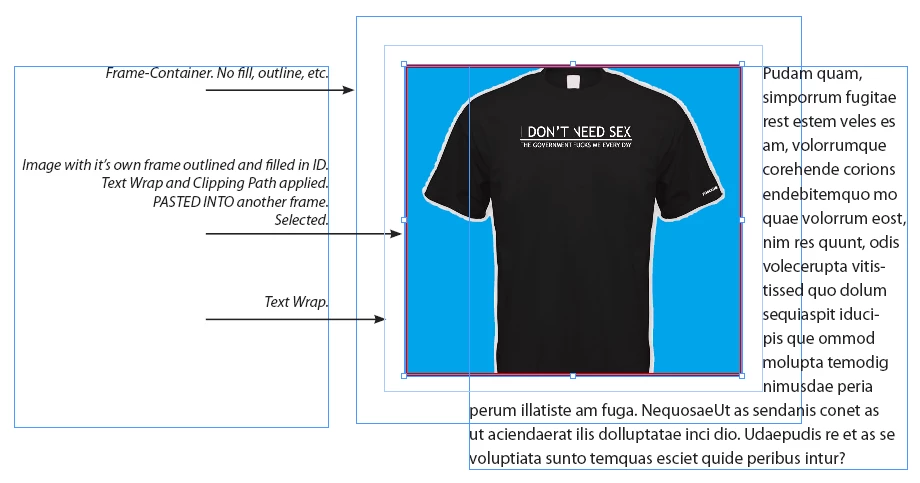
So: if you paste into empty (no fill, outline, etc.) box image with it's own frame, or any native ID object, the script will happily remove the whole thing. No good. It shouldn't be touched at all.

Yeah, such design most often could serve as a good sample of a bad workflow, but... isn't that what is all this buzz about?

As far as I understand (not much), this piece of code should be modified:

var myGraphicFrames = app.activeDocument.rectangles;

for (i=myGraphicFrames.length-1; i>=0; i--) {

var stroke = myGraphicFrames.strokeWeight;

var color = myGraphicFrames.fillColor.name;

var tpath = myGraphicFrames.textPaths.length;

var wrap = myGraphicFrames.textWrapPreferences.textWrapMode;

    if (myGraphicFrames.graphics.length < 1 && stroke == "0" && color == "None" && wrap === TextWrapModes.NONE && tpath == 0)

        myGraphicFrames.remove();

}

and the trick further repeated twice...

---

... Colin, are you still eager for the party?

This topic has been closed for replies.
Correct answer Laubender

Laubender wrote:

But this provokes the question: what if that pageItem is empty?

I think, in uncertain situations objects in question better should be left alone... otherwise we risk throw out the baby with the bath water...


@Winterm – in that case the question is already answered.

Just remove:

myGraphicFrames.graphics.length < 1

and write instead:

myGraphicFrames.pageItems.length === 0

That would test for pageItems inside myGraphicFrame.
Regardless of type.

Uwe

2 replies

Braniac
January 14, 2014

Ah. I know why it would fail.

The rectangle (you name it "Graphic Container") has an object added with "Copy"+"Paste Inside".
So the test of emptyness of a graphic frame is not sufficient.

(At least) one test is missing:

if(myGraphicFrame.pageItems.length !== 0){ /*do nothing*/ };

We should test on the pageItems length of every frame.
Not only of the  length of the graphics objects of a frame.

Uwe

Braniac
January 14, 2014

But this provokes the question: what if that pageItem is empty?
Should we consider its parent frame empty?

Yeah. I know…
Endless questions and recursiveness go together.

Uwe

winterm
wintermAuthor
Braniac
January 14, 2014

well, actually that's not exactly 'real-world' sample... I don't think it's good idea to publish here commercial materials, even a screenshots. I just recreated situation from the 'real'.

I see, you went far enough in your thoughts already, however, there's an idml:

https://www.mediafire.com/?vjqacu9m399tp32

and yes, the problem is about objects, pasted into...

it happens, and shouldn't be ignored, I think.

Braniac
January 14, 2014

@Winterm – hah!
Finally a real-world example…

For testing reasons I think we need an IDML, an InDesign file or at least a snippet (IDMS) file.

Can you share a download?
Or at least send me a zipped IDML via mail.
Just send me a personal message before.

Uwe