Known Participant
November 14, 2016
Answered

Clicking in the font name in the Character Formatting Controls and then using my arrow keys to scroll isn't working right. It's only using a few at the top.

  • November 14, 2016
  • 3 replies
  • 1718 views

A lot of the time, I like to select a word or words and click in the font name box and then use my arrow keys to scroll through my font list so that it previews the font on screen. However, with CC, there is a group of fonts at the top of my font list that it tends to jump to that section. Even if I select a font that starts with an "S", and then start using my up and down arrow keys to start from there to scroll through my font list, it will jump back to the very top of the font list into that group. Any way to get rid of that group up top that it wants to keep jumping too? I need it to work like it did in IDCS5.5

    This topic has been closed for replies.
    Correct answer Barb Binder

    Correct. I usually will just start typing the name of a font I want if I know the name to get to it. However, sometimes I don't know what font I want to use for something so I will open the list, click on some random font which changes my highlighted text to that font. I then click once in the font name box and want to start choosing different fonts from the location of the font I chose by using the up or down arrow keys on my keyboard. However, selecting a font appears to be throwing it into the favorites box above that line and then when I use my down arrow key it starts choosing fonts in the "favorites" until it gets to the beginning of my font list and going from there. I don't want to start looking at fonts from my favorites and into the A's, I want to choose on say Eurostile and then when I hit the down arrow key, I want the next font in my font list to show up which in my case is Eurostile Extended. I don't want to start up in my favorites and scroll down and keep hitting favorites.... know what I mean?


    know what I mean?

    I think maybe I'm getting closer!

    Like Steve said, mine is working the way you describe with the arrow keys. I pick a font, tap the down arrow key and it moves on down.

    However, selecting a font appears to be throwing it into the favorites box above that line and then when I use my down arrow key it starts choosing fonts in the "favorites" until it gets to the beginning of my font list and going from there.

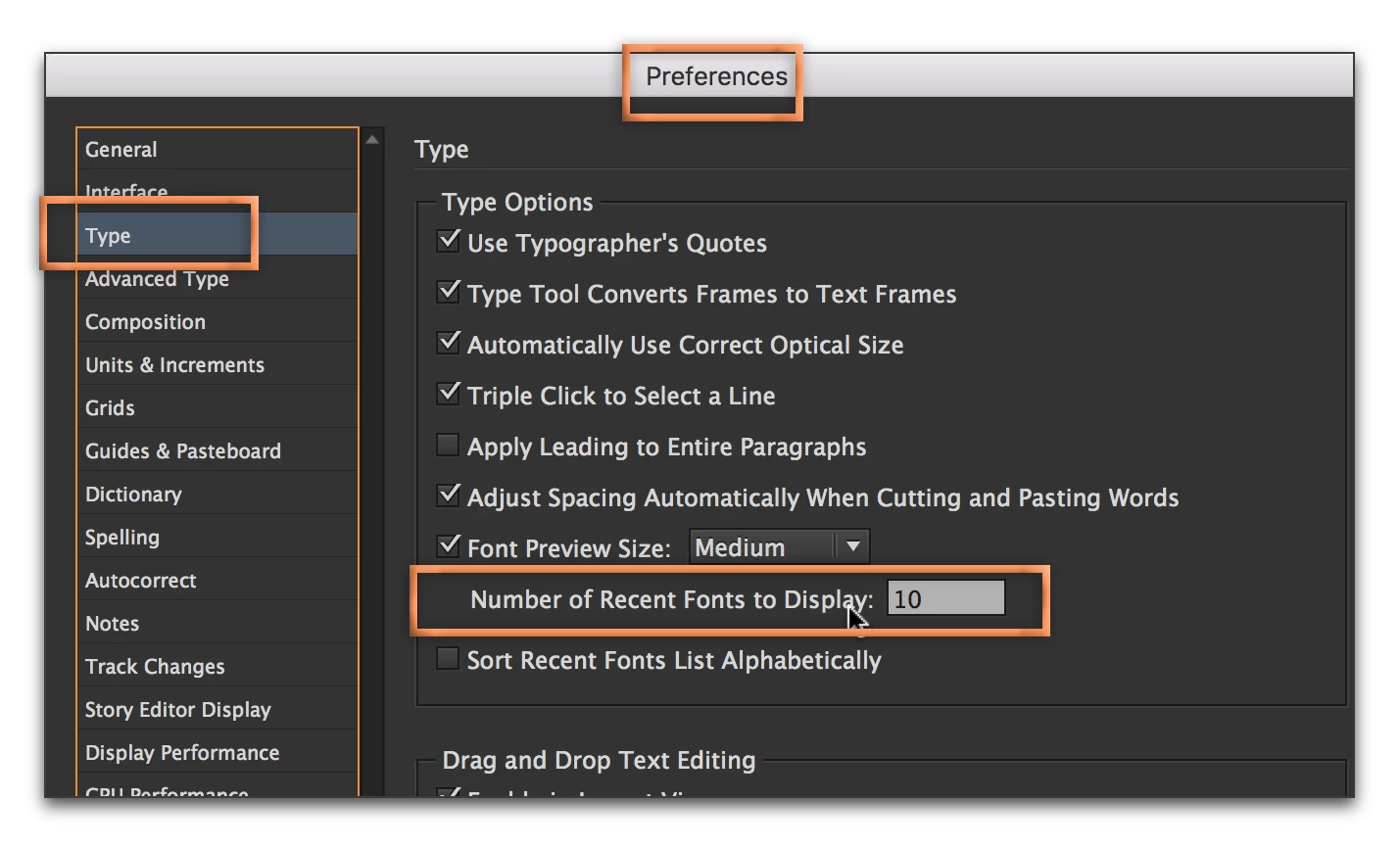
    I think there is still confusion about the top of the list: it's recent fonts and not favorites. If it is getting in the way, you can set the recent fonts to 0 and then maybe, just maybe, you too will have the behavior you are seeking. Come back and tell us!

    3 replies

    Known Participant
    November 14, 2016

    Crud, now ID won't open at all after I went and renamed my SaveData and Default files

    Barb Binder
    Community Expert
    Community Expert
    November 14, 2016

    Ok... worst situation is that you delete them, but first did you give them the correct names? And are you Mac or Windows?

    ~Barb at Rocky Mountain Training
    Barb Binder
    Community Expert
    Community Expert
    November 14, 2016

    The exact names are:

    • InDesign Defaults
    • InDesign SavedData
    ~Barb at Rocky Mountain Training
    Known Participant
    November 14, 2016

    Ok. Here's the problem. I renamed my save data file and the other file manually. Started ID back up opened a file. I clicked on the drop down arrow for my font list and selected Eurostile. I then clicked in the font name box and used my down arrow key on my keyboard and instead of starting with Eurostile as the starting font in the list, it jumped back to the top of my fonts list (in the A's) and started scrolling. Also, whenever I select a font from my font list by choosing it out of the list (instead of scrolling to it using my arrow keys) it gets added to the top of my font list like a "favorite" or something. I need it to NOT do that.

    Barb Binder
    Community Expert
    Community Expert
    November 14, 2016

    The quickest way IMHO to select a font is not to even open the list—just click and type in the first few characters. For example, eur for Eurostile:

    As for the font list in general:

    The star in front of the font name is used to mark a favorite. The star on the top row is used to filter down to just showing the ones you already marked as a favorite. Recent fonts appear above the black line. Once you choose a font, it will be in the recent fonts list at the top.

    ~Barb at Rocky Mountain Training
    Barb Binder
    Community Expert
    Barb BinderCommunity ExpertCorrect answer
    Community Expert
    November 14, 2016

    Correct. I usually will just start typing the name of a font I want if I know the name to get to it. However, sometimes I don't know what font I want to use for something so I will open the list, click on some random font which changes my highlighted text to that font. I then click once in the font name box and want to start choosing different fonts from the location of the font I chose by using the up or down arrow keys on my keyboard. However, selecting a font appears to be throwing it into the favorites box above that line and then when I use my down arrow key it starts choosing fonts in the "favorites" until it gets to the beginning of my font list and going from there. I don't want to start looking at fonts from my favorites and into the A's, I want to choose on say Eurostile and then when I hit the down arrow key, I want the next font in my font list to show up which in my case is Eurostile Extended. I don't want to start up in my favorites and scroll down and keep hitting favorites.... know what I mean?


    know what I mean?

    I think maybe I'm getting closer!

    Like Steve said, mine is working the way you describe with the arrow keys. I pick a font, tap the down arrow key and it moves on down.

    However, selecting a font appears to be throwing it into the favorites box above that line and then when I use my down arrow key it starts choosing fonts in the "favorites" until it gets to the beginning of my font list and going from there.

    I think there is still confusion about the top of the list: it's recent fonts and not favorites. If it is getting in the way, you can set the recent fonts to 0 and then maybe, just maybe, you too will have the behavior you are seeking. Come back and tell us!

    ~Barb at Rocky Mountain Training
    Steve Werner
    Community Expert
    Community Expert
    November 14, 2016

    Version of InDesign (exact)? Operating system?

    Known Participant
    November 14, 2016

    12.0.0.81 Build. OS X 10.11.5

    Steve Werner
    Community Expert
    Community Expert
    November 14, 2016

    Working for me in OS X 10.12.1 and 12.0.0.81 build.

    Try restoring your InDesign preferences:

    Trash, Replace, Reset, or Restore the application Preferences
