Participating Frequently
February 19, 2024
Answered

Cloning text frames to a new layer with different specs ?

  • February 19, 2024
  • 3 replies
  • 1657 views

Hello everyone, I am searching for a script that could allow me to take all the text frames from a document (a manga, or comic book style), and create a new identical one (size and position) on a new layer, but with a different style based on my default frame type.

Does that exists or is it a hopeless quest ? 🙂
This topic has been closed for replies.
Correct answer rob day

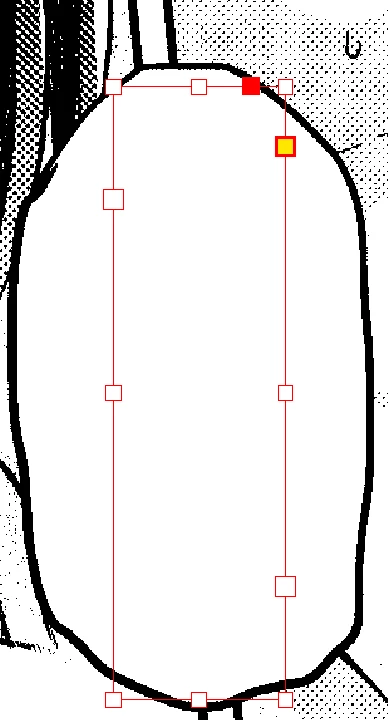
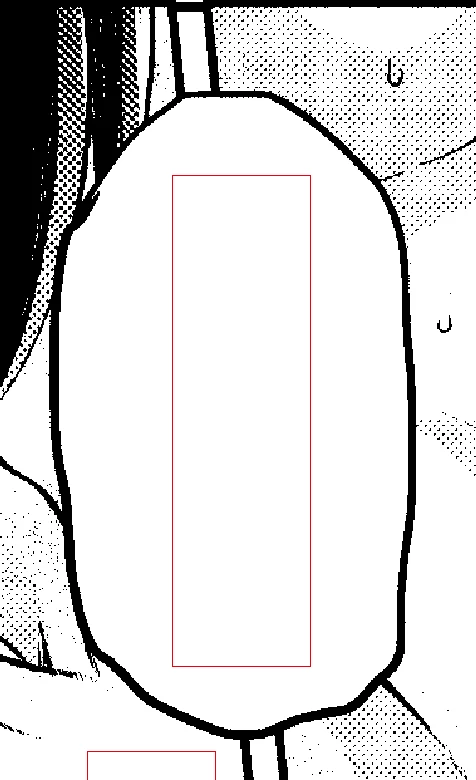
going from this, to this.


Using transform() would be easier. Try this:


//the amount to scale the frame
var s = 1.3
var d = app.activeDocument;
//change as object style name to to yours
var os = d.objectStyles.itemByName("YourStyle")
var tf = d.textFrames.everyItem().getElements();
var dl = makeLayer(d, "TextCopy");
var tm = app.transformationMatrices.add({horizontalScaleFactor:s, verticalScaleFactor:s})
var df;
for (var i = 0; i < tf.length; i++){
    df = tf[i].duplicate();
    df.transform(CoordinateSpaces.innerCoordinates, AnchorPoint.CENTER_ANCHOR, tm);
    df.itemLayer = dl;
    df.appliedObjectStyle = os;
    df.contents = ""
    df.contentType = ContentType.GRAPHIC_TYPE;
    df.contentType = ContentType.TEXT_TYPE;
};   


/**
* Makes a new named Layer 
* @ param the document to add the layer 
* @ param layer name 
* @ return the new layer 
*/

function makeLayer(d, n){
    if (d.layers.itemByName(n).isValid) {
        return d.layers.itemByName(n);
    } else {
        return d.layers.add({name:n});
    }
}

3 replies

Participating Frequently
April 8, 2024

Hi everyone, I had lots of project to finalise before getting into this action again, and it works like a charm! A huge thank you to everyone who helped. This is a great community !

rob day
Adobe Expert
February 19, 2024

Hi @Olivier5E38 , Try this:


var d = app.activeDocument;
//change as object style name to to yours
var os = d.objectStyles.itemByName("YourObjectStyle")
var dl = makeLayer(d, "TextCopy");
var tf = d.textFrames.everyItem().getElements();

var df;
for (var i = 0; i < tf.length; i++){
    df = tf[i].duplicate();
    df.itemLayer = dl
    df.appliedObjectStyle = os
};   


/**
* Makes a new named Layer 
* @ param the document to add the layer 
* @ param layer name 
* @ return the new layer 
*/

function makeLayer(d, n){
    if (d.layers.itemByName(n).isValid) {
        return d.layers.itemByName(n);
    } else {
        return d.layers.add({name:n});
    }
}
Joel Cherney
Adobe Expert
February 19, 2024

Rob, your script does exactly what Olivier is asking for in the OP, but in Olivier's second post, I see that the new frames on the new layer are meant to be horizontal text frames for Latin script, not vertical text frames for Japanese. That can't be done with an object style in a non-CJK install of InDesign. In fact, it can't even be done with a script, in a non-CJK install of InDesign.


So my solution was to revise your for loop, grabbing only the source text frame .geometricBounds and .contents:


var d = app.activeDocument;
//change as object style name to to yours
var os = d.objectStyles.itemByName("vertical text frame")
var dl = makeLayer(d, "TextCopy");
var tf = d.textFrames.everyItem().getElements();

for (var i = 0; i < tf.length; i++){
    pf = tf[i].geometricBounds;
    cf = tf[i].contents;
    var df = d.textFrames.add();
    df.properties = {
        geometricBounds : pf,
        contents : cf
    }
    df.itemLayer = dl
    df.appliedObjectStyle = os
};   


/**
* Makes a new named Layer 
* @ param the document to add the layer 
* @ param layer name 
* @ return the new layer 
*/

function makeLayer(d, n){
    if (d.layers.itemByName(n).isValid) {
        return d.layers.itemByName(n);
    } else {
        return d.layers.add({name:n});
    }
}


Given some time, I'm sure that I could eventually whip up a little bit of arithmetic to reach @Olivier5E38 's stretch goal of slightly increased geometric bounds to account for text expansion in translation from Japanese to English... but my brain is reaching for contemporary JS stuff that won't work in ExtendScript, like arrow functions, or map(). 

rob day
Adobe Expert
February 19, 2024

Not sure I’m following, think I need to see an example. In the altered script you are adding new text frames without indicating what page they should be on. So I get this with text frames on the 2-3 spread—all the new frames get added to page 1:


duplicate() clones the textFrame on top of the original using the same bounds, so the bounds of the cloned frames could be changed—this swaps their width and height:


var d = app.activeDocument;
//change as object style name to to yours
var os = d.objectStyles.itemByName("YourStyle")
var tf = d.textFrames.everyItem().getElements();
var dl = makeLayer(d, "TextCopy");
var df, b;
for (var i = 0; i < tf.length; i++){
    df = tf[i].duplicate();
    b = df.geometricBounds;
    //swaps the width and height
    df.geometricBounds = [b[0], b[1], b[0]+(b[3]-b[1]), b[1]+(b[2]-b[0])]
    df.itemLayer = dl
    df.appliedObjectStyle = os
};   


/**
* Makes a new named Layer 
* @ param the document to add the layer 
* @ param layer name 
* @ return the new layer 
*/

function makeLayer(d, n){
    if (d.layers.itemByName(n).isValid) {
        return d.layers.itemByName(n);
    } else {
        return d.layers.add({name:n});
    }
}


jmlevy
Adobe Expert
February 19, 2024

Do you really need a script? You can achieve what you need without any script:

  1. Be sure that the text frames are on a dedicated layer 
  2. In the layer panel, duplicate the layer
  3. Create a new object style with the appropriate paragraph style you need
  4. Lock the original layer
  5. Run a find change (object tab) and apply this new object style to all the text frames of the duplicated layer
Participating Frequently
February 19, 2024

the original frames are from a japanese file, and I cannot transform them into latin frames (because of the orientation of the characters). That's why I need to create new ones based on my default frames but with the position of the original ones. If I could make the frame bigger, that would be a great bonus ! 


jmlevy
Adobe Expert
February 19, 2024

and I cannot transform them into latin frames (because of the orientation of the characters). That's why I need to create new ones

Do you work with a japanese version? What happens if you apply a new paragraph style and apply any latin language to this style?


If I could make the frame bigger, that would be a great bonus ! 

In the object style, just enable “Auto-size” and the frame size will change according to the new text size.