


Known Participant
July 26, 2021
Answered

Color OTF font changing color on printer's proofs

  • July 26, 2021
  • 14 replies
  • 10856 views

I created an icon font with colors (OTF) using Fontself for Illustrator so I could easily apply colored bullets to a book I was working on. Everything looks great in InDesign, Acrobat, and printed on our color printers, but when I sent the books off for printing, the proofs came back with all the icons in different colors than they appear in my files. The printer said they are different CMYK values after running them through their prepress. I can't figure out how to fix it short of finding each and every one of them in the six books and converting them to outlines manually.

I'm open to suggestions on how to quickly fix this problem so that these books can be printed. Maybe a specific color preset when I make the PDFs? We are currently converting to US Web Coated SWOP V2 on export.  Is there a way to force InDesign to convert graphic fonts to outlines when exported to PDF?
This topic has been closed for replies.
Correct answer Brad @ Roaring Mouse

So, I've narrowed it down to an issue around the Inclusion of a Destination Profile in the PDF export.

I discovered that saving to PDF/X-4:2008 (2010), does not seem include the desination profile when Output is set to Convert to Destination, despite it actually saying so in the greyed out menu. This indeed might be a bug.

Downgrading to any of the standards below that one seem to work fine, including having "None" set as a Standard, as long as the Include Destination Profile is selected.


So, you should be able to save yourself some work/time by exported a PDF using a different standard.


14 replies

Community Expert
August 11, 2021

Hi together,

found the following articles; all from 2019 I assume:


Warning about OpenType SVG fonts in Adobe InDesign CC2019
3. March 2019 by Stephan Jaeggi
https://pdf-aktuell.ch/pa/language/en/warning-about-opentype-svg-fonts-in-adobe-indesign-cc2019/


OpenType SVG & PDF : the new printer’s nightmare
https://www.agilestreams.io/en/opentype-svg-pdf-the-new-printers-nightmare/


OpenType SVG & PDF Print: why it is better to wait…
https://www.agilestreams.io/en/opentype-svg-pdf-print-why-it-is-better-to-wait/


Now, more than two years later, the issues are still there, I think.


Regards,
Uwe Laubender

( ACP )

abailescollins
Participating Frequently
August 12, 2021

Indeed, those gentlemen are all my colleagues at the Ghent Workgroup. We talked about and researched this topic.

www.gwg.org


Until something changes on the PDF specification side, I don't expect much to change.

PDF tools like PitStop the one I look after can help with this problem, but they will not help you if you just want to export a reliable PDF from Indesign!

abailescollins
Participating Frequently
August 11, 2021

Opentype SVG fonts are not supported by PDF. Not even the latest PDF 2.0 (ISO 32000-2).

Therefore they are not handled correctly and may not print as expected as discussed.

When you export from Indesign, the result you get depends on the PDF/X version you specify.

They can be raster Type 3, outlined Type 3 or a combination of Type 3 and Type 1.


Bottom line, for print avoid Opentype SVG fonts, if you can't do that have a discussion with your print service provider about how they are able to handle them, and get proofs before printing, and not on-screen proofs.

Known Participant
August 11, 2021

Thanks for the information. This is pretty much what I have discovered. I took the time to redo the project with the SVG font converted to a normal OT font and the color applied in InDesign via GREP styles. However, I think Adobe's documentation needs to be more informative about this shortcoming of SVG fonts. When I first started looking for info on this (when my proofs came back with the wrong color), I could find very little on the topic. I'm hoping this Forum discussion will help some future designer. 🙂 

abailescollins
Participating Frequently
August 11, 2021

You and the rest of the printing industry...

🙂

As normal we all learn the hard way...

Community Expert
July 29, 2021

Well, Roger, there is a whole world of preprint that is standardized on PDF/X since 2001.

More on this e.g. here:

https://www.pdfx-ready.ch/en/


Regards,
Uwe Laubender

( ACP )

Roger Breton
Legend
July 29, 2021

2001 and even before were the "time" that such "innovation" was introduced.

It does not mean that everyone in the industry instantly jumped on the bandwagon.

I can't talk for the prevalence of the X Standards these days.

Wish I had some kind of "survey" of current practices aber I can tell you, I won't use it in my practice. 

Especially when sending files to the Orient!

I'll gladly take a look at your suggested link, Uwe.


MfG / Roger

Known Participant
July 29, 2021

I could be wrong, but I believe universal standards were created for a reason. I know I rely on them for sending one file to a variety of printers around the world without worrying that my it will be rejected over a RIP technicality. This is really the first time I've had any issues with color returning wrong on a proof, and I really do believe the font is at fault and not the standard, even though you can get it to process correctly without the standard. The standard makes sure that a PDF meets the universal requirements for prepress and sure saves a lot of time with back and forthing with a printer (especially when you lose a day both ways when dealing with printers on the other side of the world). I strike this up in the column of "live and learn." I will avoid SVG fonts for now, at least until the standards catch up and Adobe advertises full support for them. As Rob pointed out fairly early in this thread, for simple color on a font, it's just as easy to apply the color using styles in InDesign. Colored fonts are really an unnecessary shortcut at this point. Whether it's a bug or not that these fonts don't process consistently on press is moot. The issue is documentation. Designers who might resort to using them do need to know that there may be issues with certain PDFs processing correctly when color SVG fonts are used. My 2 cents. 😉 

Community Expert
July 29, 2021

I followed all this without having time doing some tests.

Will do the next days. Thank you all!


Hm.

Who is doing the bug report(s)  at InDesign UserVoice or Prerlease?

https://indesign.uservoice.com/forums/601180-adobe-indesign-bugs


Oh! Mario Aspeslagh already did in January 2020:


Color font printing in muted colors in pdf/print
Mario Aspeslagh, January 29, 2020
https://indesign.uservoice.com/forums/601180-adobe-indesign-bugs/suggestions/39561139-color-font-printing-in-muted-colors-in-pdf-print


I commented there and voted for a fix.


Regards,
Uwe Laubender

( ACP )

Known Participant
July 29, 2021

Thanks for digging that up. I wasn't sure if it counted as an InDesign bug or not, so I hadn't gone that far. Obviously it is reproducible since several have reproduced it in this thread, but since color fonts are fairly new and, from what my research has shown, intended for digital use, I wasn't sure that lack of print support was actually a bug. I will go comment and vote on the linked report. 🙂 

Roger Breton
Legend
July 29, 2021

According to my testing, so far, I could not conclude to a bug.

As a designer, I would not shy away from this feature but, having learned from your experience, I would make sure to spend the time ahead of production that these fairly new types of fonts can be color managed the same as any RGB element in the document. I'm still not sold on the technical merit of using a "standard" to create PDFs from InDesign... Your mileage can vary.

Brad @ Roaring Mouse
Community Expert
Brad @ Roaring MouseCommunity ExpertCorrect answer
Community Expert
July 28, 2021

So, I've narrowed it down to an issue around the Inclusion of a Destination Profile in the PDF export.

I discovered that saving to PDF/X-4:2008 (2010), does not seem include the desination profile when Output is set to Convert to Destination, despite it actually saying so in the greyed out menu. This indeed might be a bug.

Downgrading to any of the standards below that one seem to work fine, including having "None" set as a Standard, as long as the Include Destination Profile is selected.


So, you should be able to save yourself some work/time by exported a PDF using a different standard.


rob day
Community Expert
Community Expert
July 29, 2021

I discovered that saving to PDF/X-4:2008 (2010), does not seem include the desination profile when Output is set to Convert to Destination, despite it actually saying so in the greyed out menu. This indeed might be a bug.


Hi @Brad @ Roaring Mouse , it looks like the problem happens in the transparency flattening and isn’t related to profile inclusion. I do see better results with PDF/X-3 and PDF/X-1a where the page is flattened on Export (Acrobat 4 Compatiblity).


PDF/X-4 as well as X-3 and X-1a export Document CMYK color as Device CMYK. With PDF/X-4 it is a feature not a bug, it reduces the chance of accidental CMYK-to-CMYK conversions (i.e. [Black] converted to 4-color), and the Output Intent Profile tells the printer what the document CMYK profile is.


It looks like the SVG fonts incude transparency (InDesign’s Flattener Preview highlights Trajan Color) If I export my Trajan example as PDF/X-4 and flatten the page using AcrobatPro’s Flattener Preview the extreme color problem becomes apparent.


Ironically one of the selling points of PDF/4 is it delays flattening of live transparency and possibly color management until output, but with SVG fonts PDF/X-1a’s flattening will produce a better result.

Brad @ Roaring Mouse
Community Expert
Community Expert
July 29, 2021

"With PDF/X-4 it is a feature not a bug"

Thanks, I actually found that out after I posted! Which makes sense, but seems to be throwing ID off on the SVG.


I actually delved into the PDFs with PitStop and compared one created with the PDF/X-4 preset with a few made with other standards. In all the other ones, the objects that made up an SVG object were individually tagged with the output colorspace (in my case, GRACOL), whereas the 4:2008 one was not tagged (which, as you mentioned, was probably by design), and had the incorrect cmyk values.

I also printed my test file out to Postscript (full Level 3 PS/Color Unchanged) and it rendered properly, and also Distilled perfectly, no matter what Standard I used.

Brad @ Roaring Mouse
Community Expert
Community Expert
July 28, 2021

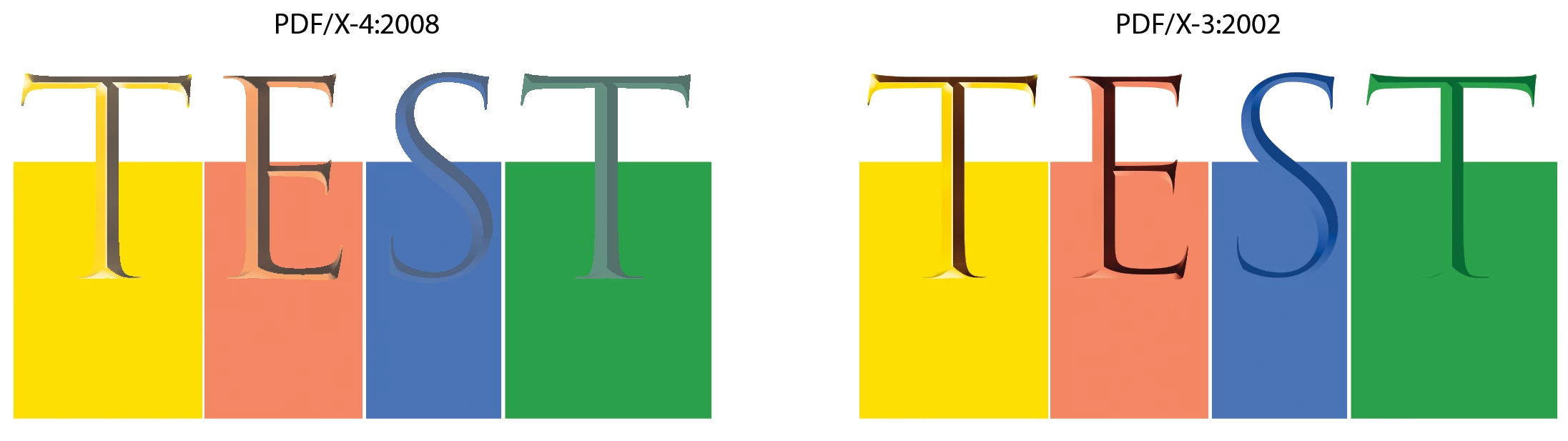
Sooooo... I think I've got it figured out:


If you use the PDF/X-4:2008 spec, the colors will screw up.


If you use PDF/X-3:2002 or PDF/X-1a: 2001, the colors will render properly.

After doing some tests with Illustrator using the same 3 standards, which work fine, it seems there's something happening when ID exports to that standard with the SVG fonts.

I also went back to ID2020 and found PDF/X-4:2008 problematic there too, but in a different way.

Anyway, here's the result...(Exported with Color Convert to Destination)

Roger Breton
Legend
July 28, 2021

I must say, while I followed the conversation and noticed the use of PDF/X4 in the various posts, in my own practice, in the prepress department I used to work with, at Transcontinental Printing, we never used anyone of those "X" standards. I tried using some "Color Font" from here Color Fonts - Get ready for the revolution! and, exporting to "plain" Acrobat 6 (PDF 1.5) with No Color Conversion on the Output tab and got correct RGB builds everywhere. I had no idea X flavors of PDFs were so prevalent these days...

Roger Breton
Legend
July 28, 2021

Here's one quick workaround. No need to use any scripting, this way.

The "solution" is to use the Edit > Convert to profile command.

And then, Export without (further) conversion to Acrobat.

The results were not perfect but much closer to the expected CMYK values.

For some reason, the objects don't show up under DeviceCMYK?

But do show up as DeviceCMYK under the Object Inspector...

rob day
Community Expert
Community Expert
July 28, 2021

Hi Roger, what profiles are you converting to? I’m not seeing any change after a convert to profile when the PDF is actually RIP’d or output.


Here the bottom Ts have been converted to outlines in InDesign and the page was exported via default PDF/X-4. The preview in AcrobatPro looks correct, but when I imitate a RIP by opening as CMYK into Photoshop the conversion of the outlined versions is correct, but the SVG version is not even close:


Known Participant
July 28, 2021

Hey, all. I appreciate all the work you have done on this, but I will add that I always PDF/X4 standard on all my print PDFs. I was able to use one of Rob's fixes from the first night of my post to get a file that exported pretty darn close to the colors I wanted (and that I could pull into Photoshop with no deviation), but when I sent that file to the printer, thinking my problem was fixed, their RIP saw the whole file as RGB and screwed up the colors again. I was at the limit of what I could test in house without having access to the actual prepress software the printer was using. I gave up and redid the files excluding the SVG color OTF.  My caution to both of you is to not think you've solved the problem just by juggling the color conversions between ID, Acrobat, and Photoshop when you don't actually have access to the prepress RIP that will be used to process the file. Everything I tried that seemed to work on my end was rejected by the printer. My new files minus the troublesome font passed the prepress with flying colors (pun intended) and are now in production. 


As to why we use the PDF/X4 standard . . . most of our printers have required it, so we created all our print presents based on it. 

Roger Breton
Legend
July 27, 2021

I'm glad I started to read this thread. And I would like to thank the original poster for taking the time to share this issue up. I must say I wasn't terribly familiar in my practive with OpenType SVG aka "Color Fonts". After reading the problem that the original poster ran into, especially in view that the books in question were to be printed in China -- the formidable language barrier! -- I deemed I had to try this out myself in InDesign. I actually created an Illustrator document in which I typed in a bit of text using the EmojiOne font, an OTF SVG "Color Font". I created the document in RGB and imported the document into InDesign. I then exported the document as PDF in various ways to see how Acrobat would handle it.

  I must say I spend a bit of time trying to research the business of color separations in the Adobe OTF SVG I could find online but there wasn't anything specifically related to color management. Bummer.

  What worries me is the "absence" of specific handling of the OTF SVG fonts in Acrobat? And there was nothing I could find as to their handling at Export time, out of InDesign. 

  The only way I was able to get the glyphs to show up in some "known" space was when I converted them to outlines in Illustrator. Otherwise, neither DeviceCMYK nor DeviceRGB were able to show these objects in Acrobat. 

  It was so weird. 

Moral of the story? I don't know what to think for I don't see a clear path of how "Color Fonts" are processed at output time from InDesign. I plan to bring up the issue with my students in Fall when we get to discussing fonts. As long as the output is destined to be the web or some form of electronic document, which is probably what these font variants were created for, in the first place, the door is wide open. But the minute we have to step into the realm of printing, then, extreme cautious must be exercised. I hope I missed something really obvious but the original poster should not have to resort to using a Script to work around the problem. My two cents.

rob day
Community Expert
Community Expert
July 27, 2021

If you care about the color I would get rid of the Type3 SVG font—replace the icons with a regular OTF font and use nested styles for the color. As Uwe mentioned SVG color is RGB, and it looks to me like Acrobat can’t color manage the conversion.

Brad @ Roaring Mouse
Community Expert
Community Expert
July 27, 2021

Exactly. If the icons are made into "just a normal" font, then you can very quickly search & replace and assign a color style to each icon.

Known Participant
July 28, 2021

This is what I actually ended up doing. Converting to outlines created flow issues, so I redid my font as a regular black OTF and then used GREP to assign the different colors based on the character used. This worked out much better than I'd dreamed as I typically forget to use GREP styles. It took me most of the day, but all 6 books are back at the printer and should process correctly now. 

Brad @ Roaring Mouse
Community Expert
Community Expert
July 26, 2021

Interesting: I took both your PDFs, and opened/rendered them into CMYK files in Photoshop. The dulling appears equally in both results. (Actually, if you open both PDFs in Illustrator, the colours are dulled there too)


Sooo,  just did a test using the Trajan Color Font, and I'm experiencing the exact same dulling problem if I export a PDF the way the you have done (i.e. Output intent US Web Coated (Convert to destination)


The PDF looked just fine on screen, but upon test-rendering it into Photoshop, the colors dulled exactky the same as you experiened.


(See Attached: It should look like the top line. At bottom, I added color squares behind each letter using the same colors in the font. They rendered correctly but you can see the font itself went dull.)


However, saving to PDF with No Color Conversion rendered properly in Photoshop. So, I suggest you export your PDF that way (you should anyway: it’s the preferred workflow); Let your printer convert it in their RIP.


As an expriement, I created the same type in an Illustrator file, saved as as PDF in both RGB and CMYK, and both rendered correctly when opened in Photoshop. In fact if I place these Illustrator PDFs into ID, they render correctly, even when the live type in ID does not.


So it appears ID has an issue with how a color space is applied to SVG type.

Known Participant
July 27, 2021

Thanks for all your work on this. Do you believe this counts as a bug that should be reported to Adobe since you were able to recreate the issue with a different font?


I will try sending the files without conversion. We had started doing the conversion on our files for this particular printer because the color coming off our materials were inconsistent if we didn't. We had a series of books with covers that had the same color and different printings of the same covers were coming off the presses with different variations of the color, and sending them forced CMYK files seemed to fix that, but that may be less of an issue with these interiors if the icons will print the correct color. I will quickly redo the print pdfs and get them off to our printer to see if your solution works. Thanks ever so much!!!!