



Roger Breton
Brainiac
December 16, 2016
Question

Color Theme Tool vs Color.Adobe.com

  • December 16, 2016
  • 2 replies
  • 3491 views

Why is there such a difference between the colors generated out the same image with both color.adobe.com and InDesign's own Color Theme Tool?

After much experimenting, I can only conclude that the Color Theme Tool is far from "matching" color.adobe.com in quality.

I may be missing something obvious, after all this time.

Here's a simple example, an sRGB image I picked the other day on Facebook.
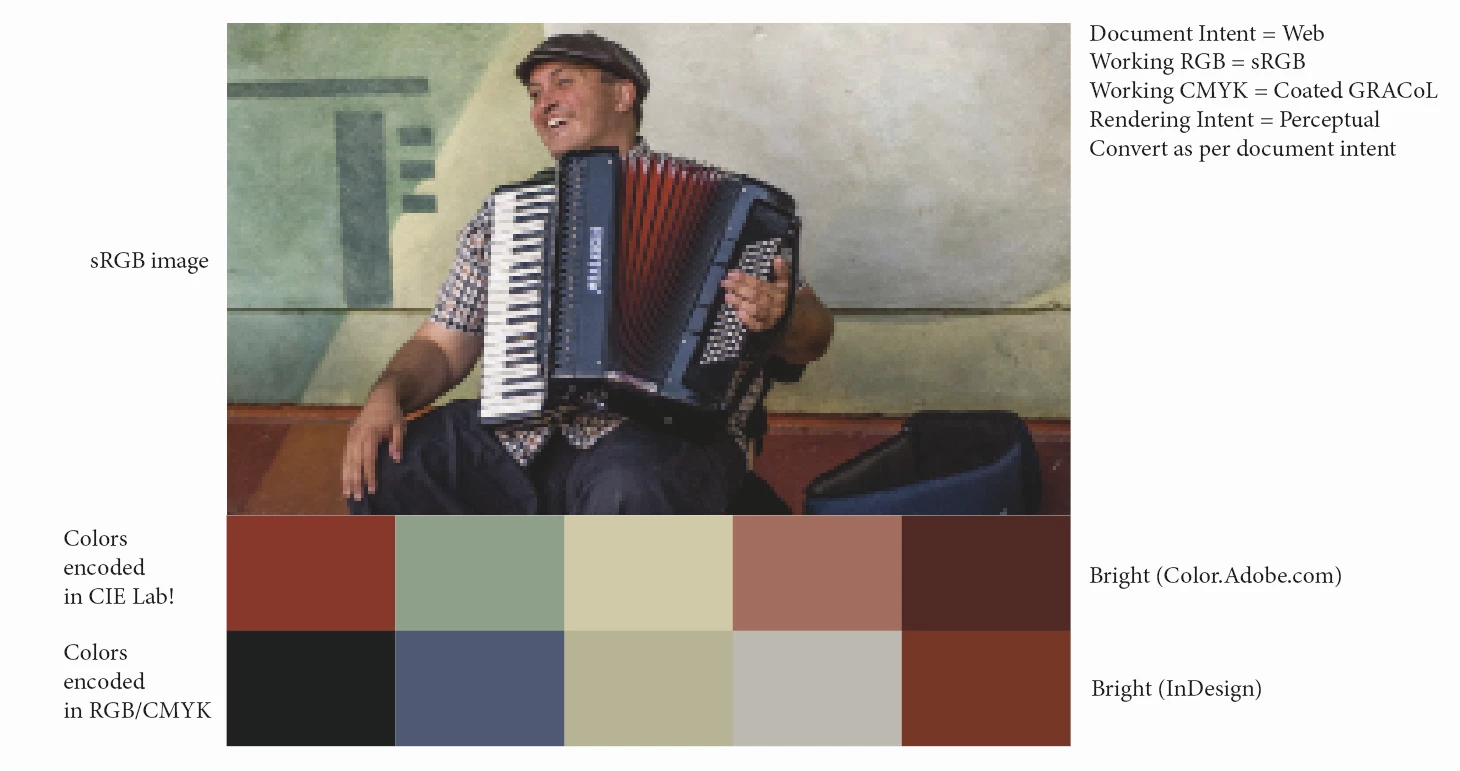
The Document Intent is "Print" ("Web" in the above screen capture), so the Color Theme Tool generates CMYK colors, out of the sRGB image. That's expected.

Granted, color.adobe.com generated themes are encoded in CIE Lab space.

To do a fair comparison, I made sure to "Proof" colors, so that the CIE Lab colors don't overly look "bright" as compared to their InDesign counterpart.

Don't get me wrong, I think the Color Theme Tool is a neat little addition to InDesign's toolbox but, as it stands, according to my limited understanding, it systematically "dumbs down" the colors of ANY image, regardless of the Document Intent (I experimented both ways, Print and Web, tried all the settings in the Color Theme Tool options).

The cherry on the icing, if I may say so, with the implementation on color.adobe.com, is the fact that, upon completion, it's plain to see where the "tool" sampled the colors from, as shown here:

    This topic has been closed for replies.

    2 replies

    Community Expert
    December 16, 2016

    In Indesign, do you have your display performance set to high quality display before you do an image sampling?

    Roger Breton
    Brainiac
    December 16, 2016

    Good suggestion Jeffrey!

    I'm glad to report that it brightened the swatches a bit. Worth it.

    So, the "main" RGB color I get from sampling the image with the Shift key down, with the Color Theme Tool is 209 114 122.

    Using the old or "regular" color picker, that value is 240 104 126, dazzlingly bright by comparison.

    Something else is going on...

    rob day
    Community Expert
    December 16, 2016

    That hardly seems so, Rob.

    I just did an experiment with the Color palette, to test how it is being color managed to the monitor profile :

    Sadly, I wrote some of my comments in french.

    It boils down to this, every UI elements is "normally" converted RelCol to the screen (monitor profile).

    That's the same behavior as Photoshop and it's the only logical way to do this.

    The problem with the Color Themes Tool palette is that, although the RGB values are correctly displayed and assigned, the appearance of the palette itself is NOT being managed.

    Take the case of 100% Magenta above (Cyan and Yellow did not make much of a difference...).

    When I select the "Convert to RGB" option in the Color Theme Tool option, given that the "Document RGB" = sRGB (in my case), a RelCol conversion should result in R=229 G=0 B=126. And this is the RGB value BEING displayed. That's correct.

    What is NOT correct, though, is that this RGB value is dumped without any further color management to the video card!!!

    Creating a visual discrepancy between the expected and the actual.

    On a wide gamut monitor like mine, the difference is even greater.

    I think I'm going to turn this into a bug request after all...


    I think I'm going to turn this into a bug request after all...

    I wouldn't expect there will be a change as long as the application version is linked to the web version. As I mentioned this problem has existed since Kuler was developed 10 years ago and when it appeared as a ID panel. If the appearance of the color theme panel was color managed (as the other ID color panels are), then the theme swatches viewed in ID would no longer match the web version because it would be extremely difficult, if not impossible, to port the Adobe color management system over to the web app. In the current web app there's nothing close to profiled CM happening.

    Roger Breton
    Brainiac
    December 16, 2016

    Here's a fresh, new experiment this morning.

    The Document Intent is Web.

    I used the Shift key along with the Color Theme Tool to capture this single color in the mad hatter's hat.

    I get the 6 harmony rules.

    Generated swatches are in RGB space.

    For curiosity, I took a sample of the same area with the old Color Picker tool -- see swatch on the right, top.

    Why does the color has to be "dumbed-down" from what it is, in the image? Why? Why? Oh why?

    It's as though the color *has* to be converted to the Working CMYK space *first", before being converted to RGB.