



Control where findGrep and changeGrep is performed (ex. a specific textframe)
Indesign cs5.5 ... MacOSX ... Javascript
I'm getting very VERY close to figuring this blasted project out .. so any help on this issue would be most appreciated. (and to all who have already helped me get this far, thanks to you as well)
Basically what I'm trying to do is pickup page numbers from a generated list (from an Indesign-made TOC), and insert those numbers as appropriate on page 2 of my document.
I'm calling the generated table of contents "tocGen" ... and the supplied list "page2TOC"
One by one, I need to pickup the town name and page number in tocGen, and replace those values with their matches in page2TOC. I'm trying to accomplish this with a series of findGrep() and changeGrep() methods.
The first time through, it works great. It picks up "5\tBethel" from the tocGen, and puts it in place of "XX\tBethel" in the page2TOC.
The second time I run the script, it ends up picking up the first line of the page2TOC ... instead of in tocGen, where it had during the first run. Makes sense, since that line is now the same format as the list in tocGen.
So it would seem that if I could control where the first findGrep is directed, the script should move onto the next town each time I run it, without issue.
So that's my question ... how do I point to a particular textFrame on a particular page for a findGrep and/or changeGrep?
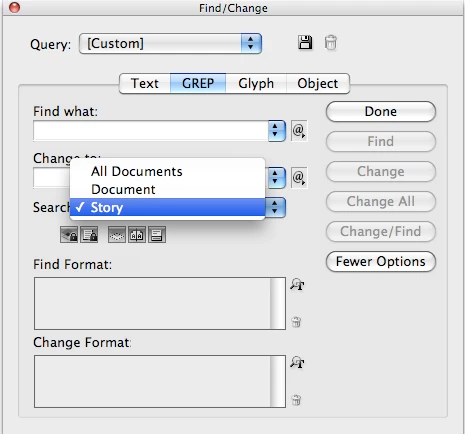
Kind of what would happen if I selected " Search: Story" on a normal find/change in Indesign:
Thanks to any and all.
Cheers,
~Nate
Supplied list (on page 2)
Fairfield County
XX Bethel (B) 01/27/2012
XX Bridgeport (W) 01/19/2012
XX Brookfield (W) 01/17/2012
XX Danbury (W) 01/26/2012
XX Darien (W) 01/17/2012
XX Easton (B) 01/13/2012
XX Fairfield (W) 01/12/2012
XX Greenwich (W) 01/26/2012
XX Monroe (W) 01/17/2012
XX New Canaan (W) 01/17/2012
XX New Fairfield (B) 01/13/2012
XX Newtown (W) 01/24/2012
XX Norwalk (W) 01/26/2012
XX Redding (B) 01/25/2012
XX Ridgefield (W) 01/09/2012
XX Shelton (W) 01/12/2012
XX Sherman (M) 12/30/2011
XX Stamford (W) 01/19/2012
XX Stratford (W) 01/20/2012
XX Trumbull (W) 01/19/2012
XX Weston (B) 12/28/2011
XX Westport (W) 01/13/2012
XX Wilton (W) 01/03/2012
Generated list (on a master page):
tocGen
5 Bethel
5 Bridgeport
6 Brookfield
7 Danbury
7 Darien
8 Fairfield
8 Greenwich
10 Monroe
10 New Canaan
11 Newtown
11 Norwalk
13 Redding
13 Ridgefield
13 Shelton
14 Stamford
17 Stratford
18 Trumbull
19 Westport
My code thus far:
// reference to tocGen text frame, an indesign generated table of contents
var tocGenFrame = document.masterSpreads.item("T-tocGen").pages.item(0).textFrames.item(0);
// reference to page2TOC ... the supplied toc with the xx's
var page2TOC = document.masterSpreads.item("T-tocGen").pages.item(0).textFrames.item(0);
app.findChangeGrepOptions.includeLockedLayersForFind = true;
app.findChangeGrepOptions.includeLockedStoriesForFind = true;
app.findChangeGrepOptions.includeHiddenLayers = true;
app.findChangeGrepOptions.includeMasterPages = true;
app.findChangeGrepOptions.includeFootnotes = true;
//select generate TOC
tocGenFrame.select();
//grab current town and whole line (has page number and town)
app.findGrepPreferences = app.changeGrepPreferences = null;
app.findGrepPreferences.findWhat = "^\\d+\\t(.*)$";
currentGen = app.activeDocument.findGrep();
currentLine = currentGen[0].contents;
currentMatch = currentGen[0].contents.match("^\\d+\\t(.*)$");
currentTown = currentMatch[1];
app.findGrepPreferences.findWhat = "^\\d+\\t"+currentTown+"$";
app.changeGrepPreferences.changeTo = "---";
app.activeDocument.changeGrep();
// function that replaces "XX\tTown" with currentLine from above
replaceTown();
function replaceTown()
{
app.findChangeGrepOptions.includeLockedLayersForFind = true;
app.findChangeGrepOptions.includeLockedStoriesForFind = true;
app.findChangeGrepOptions.includeHiddenLayers = true;
app.findChangeGrepOptions.includeMasterPages = true;
app.findChangeGrepOptions.includeFootnotes = true;
app.findGrepPreferences = app.changeGrepPreferences = null;
app.findGrepPreferences.findWhat = "^XX\\t"+currentTown+" \\(";
app.changeGrepPreferences.changeTo = currentLine+" \(";
app.activeDocument.changeGrep();
// $.writeln(currentXX);
}
 AdChoices