


Inspiring
November 3, 2025
Question

Convert Data Merged content to "standard" content?

  • November 3, 2025
  • 5 replies
  • 144 views

Is there a way to convert content that's been created via Data Merge to "standard" content?
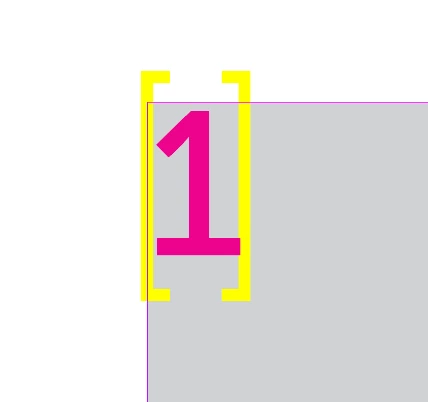
I removed the Data Source, but the hidden characters indicating Data Merged content are still there:
 

Thanks


5 replies

Community Expert
November 4, 2025

Hi @turner111 ,

you can avoid the issue, if you are using a document page for the Data Merge fields in the Data Merge template document instead of a parent page.


Kind regards,
Uwe Laubender
( Adobe Community Expert )


turner111Author
Inspiring
November 4, 2025

Hi Uwe - thanks, I'll try that out as well.

Inspiring
November 3, 2025

Find/change dialog (CTRL+F / TEXT tab) not GREP
Find:<FEFF>
replace: empty

Joel Cherney
Community Expert
Community Expert
November 3, 2025

I don't love jumping in right after you post in an ostensibly helpful way, but that advice is very dangerous if you don't mention all of the other things that are going to be found with this search. For instance, all index marks and cross-reference destinations are also encoded at FEFF, so Replace-ing those would most likely be undesirable.  Can't recall what else might be encoded at that point (besides zero width spaces, which is what that point properly represents, in Unicode) but most of them qualify as stuff you oughtn't touch without careful consideration.

turner111Author
Inspiring
November 4, 2025

Thanks for the note Joel. If I decide to try this, I'll see if I can limit it by style / content.

Mike Witherell
Community Expert
Community Expert
November 3, 2025

Maybe...

View > Structure > Show Structure

and then you could click on the xml tags and delete them.

Or ignore them. Their presence wont harm anything.

View > Structure > Hide Tag Markers

Mike Witherell
BobLevine
Community Expert
Community Expert
November 3, 2025

Can we see a shot of the entire page? That looks like it may be XML related.

turner111Author
Inspiring
November 3, 2025

Hi Bob - 
That's all that's on the page for now - here's a shot showing the structure, though, after the data source was removed:


Mike Witherell
Community Expert
Community Expert
November 3, 2025

Hi turner,

After generating a Data Merge document, the resulting new document is a standard InDesign document.

On the other hand, if you are working in the Data Merge document and have disconnected the .CSV data source file, you would also use the Type tool to delete the data placeholders, which are in the text looking like this: <<something>>. You could highlight this large character and overtype an actual text character.

Mike Witherell
turner111Author
Inspiring
November 3, 2025

Hi Mike,

The screenshot is from the document created when I Data Merged.