



James Gifford—NitroPress
Brainiac
September 10, 2021
Answered

Convert page layout on all pages

  • September 10, 2021
  • 3 replies
  • 2665 views

This seems like such a simple thing, but even between many years of ID experience and every relevant page I can find on search, no answer has come up. (I have found or been reminded of how to adjust everything, but not make it apply to existing text frames.)


I have a document (actually, many of them) with 2-column layout. Partly to facilitate export to EPUB, I want to convert all pages to 1-column.


If there's a way to do this without selecting every text frame and changing the column setting, I haven't been able to find it. (Nothing I can find in the Pages panel, Layout menu or Document Setup pane will adjust the existing text frames.)


So, what am I missing here?
This topic has been closed for replies.
Correct answer Brad @ Roaring Mouse

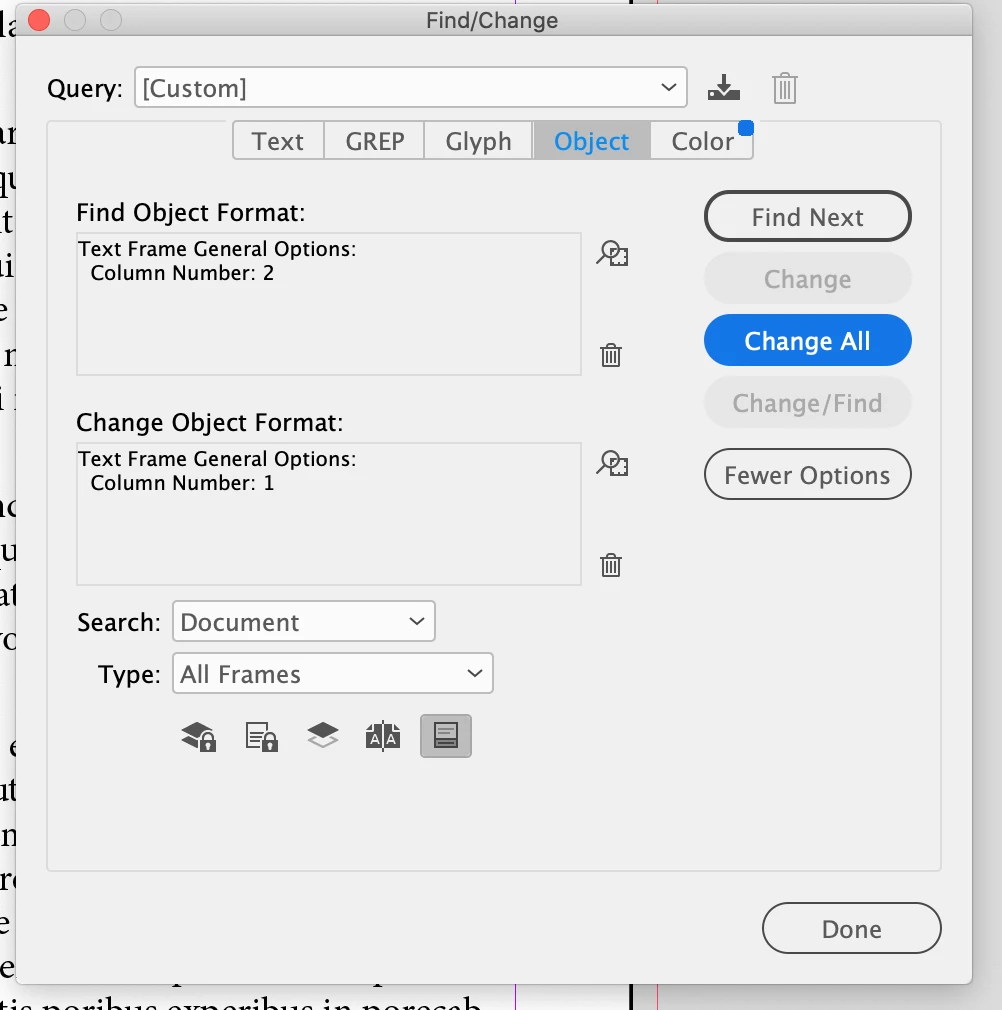
Just Find/Change > Object > Text Frame Options...

like so:

 Is that not the answer you need?


3 replies

Brad @ Roaring Mouse
Brad @ Roaring MouseCorrect answer
Community Expert
September 11, 2021

Just Find/Change > Object > Text Frame Options...

like so:

 Is that not the answer you need?


James Gifford—NitroPress
Brainiac
September 11, 2021

It's the answer that will work, thanks.


I was not thinking of text frame columns as an "object" to be found and changed, but as a setting like that used initially. I hate it when someone moves the goalposts like this. 🙂

Dave Creamer of IDEAS
Community Expert
September 10, 2021

Did you use a primary text frame?

Did you use an object style?

What are your master pages set to--and are you using layout adjustment? (Note: changing the page columns on the masters may not change the text frame columns.)


David Creamer: Community Expert (ACI and ACE 1995-2023)
James Gifford—NitroPress
Brainiac
September 10, 2021

I don't see the relevance of the questions, other than that yes, I am using a primary text frame.


My question is very simple: is there a way to make changes to the master page text frame, and have them applied to the text frames in the document? Since ID will use the page frame layout in initial layout, it seems as if there must be some way to change—for example—the column layout and have it globally propagate through a document.


Or... not?

(I've been using ID since at least CS2 and train other users on it; I have exhausted my knowledge trying to find this seemingly simple operation.)

Dave Creamer of IDEAS
Community Expert
September 10, 2021

>>My question is very simple: is there a way to make changes to the master page text frame, and have them applied to the text frames in the document? 


Yes, assuming the document was built correctly.

David Creamer: Community Expert (ACI and ACE 1995-2023)
J E L
Community Expert
September 10, 2021

@James Gifford—NitroPress If you had it set in your paragraph style, you could change it universally here:


James Gifford—NitroPress
Brainiac
September 10, 2021

I know I can change column span, but this document has 30+ styles. Not really a good option.


I'd like/hope to just change the page format itself to one-column, without having to do it manually on each text frame.


J E L
Community Expert
September 10, 2021

I see. I guess you've already searched through all the available scripts for converting multicolumn text frames. I guess deleting the two-column object style and replacing it with a new one-column object style (and deselecting Preserve Formatting) doesn't work. You seem to have tried everything else. Hopefully someone will come along with more suggestions!