


Participant
December 7, 2020
Answered

Convert SVG to object in Indesign to wrap text around vector

  • December 7, 2020
  • 2 replies
  • 1477 views

Hello everyone, 

I created a vector in Illustrator and I would like to use it to wrap text around it in Indesign for my ebook. However, when I use the "wrap around object shape" tool, the text wraps around the SVG as if there was a background. The background is transparent but when I upload it in Indesign it keeps the frame. I would like to convert this vector into an object so that I can wrap the text perfectly around the shape. 


How can I do it? 

Thank you 🙂
This topic has been closed for replies.
Correct answer Steve Werner

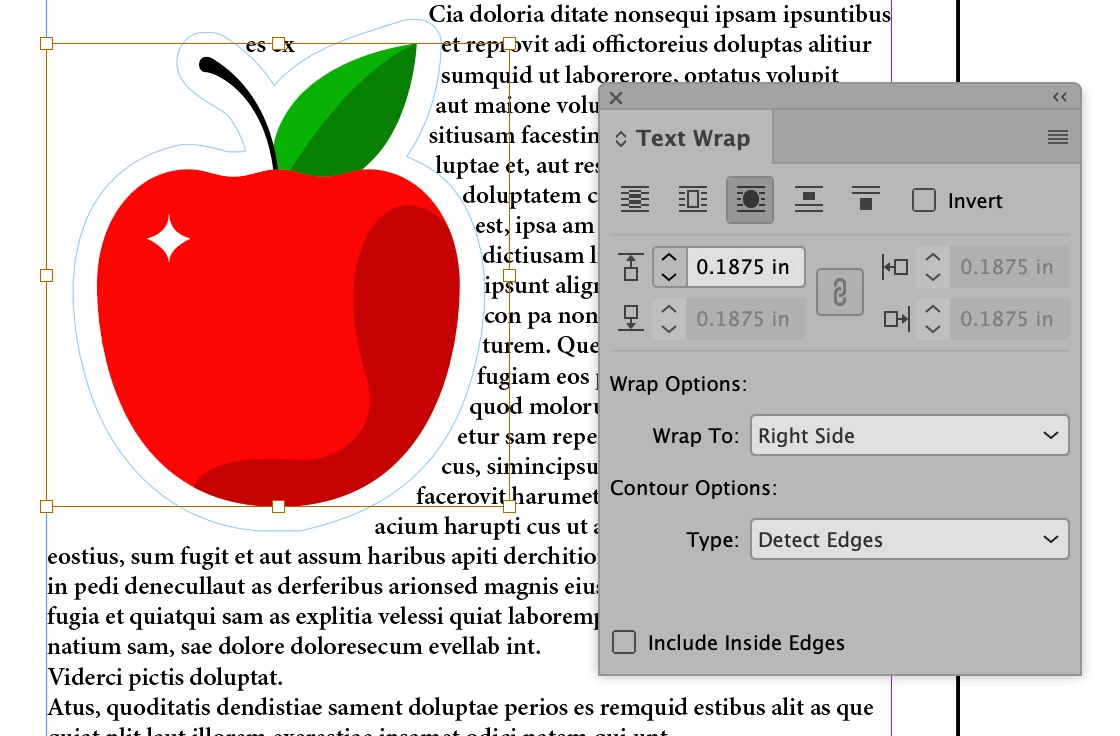
You need to choose Detect Edges in the Text Wrap Contour Options. If you're using InDesign 2021, you could also choose Select Subject. Here is an example of an SVG with a contour "Wrap Around Object Shape".


2 replies

Community Expert
December 7, 2020

Hi Steve,

are you sure that "Select Subject" will work with a SVG vector graphic?


As far as I can see one needs a pixel image like a JPG, TIFF or PSD file for this.

Tried some SVG vector images. "Select Subject" will always do a rectangular shape: the shape of the frame and not the shape of the subject.


FWIW: With "Detect Edges" it could be hit or miss:


Regards,
Uwe Laubender

( ACP )

Steve Werner
Community Expert
Community Expert
December 7, 2020

You may be right. I didn't try that and don't have time to test it now.


Steve Werner
Community Expert
Steve WernerCommunity ExpertCorrect answer
Community Expert
December 7, 2020

You need to choose Detect Edges in the Text Wrap Contour Options. If you're using InDesign 2021, you could also choose Select Subject. Here is an example of an SVG with a contour "Wrap Around Object Shape".


Participant
December 7, 2020

Thank you so much!!!!!!! It worked 🙂 


Have a great day 🙂