


michaela_sue
New Participant
November 19, 2016
Answered

Create a horizontal rule - in Indesign - that will export to epub

  • November 19, 2016
  • 1 reply
  • 5533 views

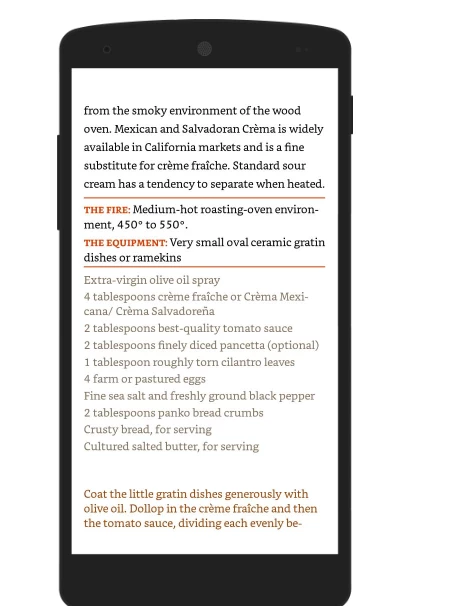
I'm making a reflowable epub in indesign that will be used for kindle devices. Can anyone tell me if it is possible to make a horizontal rule (Just a simple <hr> that will span the width of whatever screen it viewed) in my indesign document that will export? I attached an example of what I want—and I only got that to work by placing it as an above line object.
This topic has been closed for replies.
Correct answer Marvest

Hi,

two things are needed:

1.

two paragraph styles, if this are two paragraphs! Otherwise the two paragraphs could be exported as one para and separated with a shift return.

2. Search the two styles in the css and add.

.myStyleAbove {

  1px solid red;

}

.myStyleBelow {

  1px solid red;

}


Hi Kai,

The ideal situation would be to include Additional CSS using Add Style Sheet while exporting to ePub. That way you don't have to crack open it after the fact. I tried your code but it didn't work. This is what works for me assuming two paragraphs named Rule-above and Rule-below respectively:

p.Rule-above{

border-top: 1px solid red;

padding-top: 5px;

}

p.Rule-below{

border-bottom: 1px solid red;

padding-bottom: 5px;

}

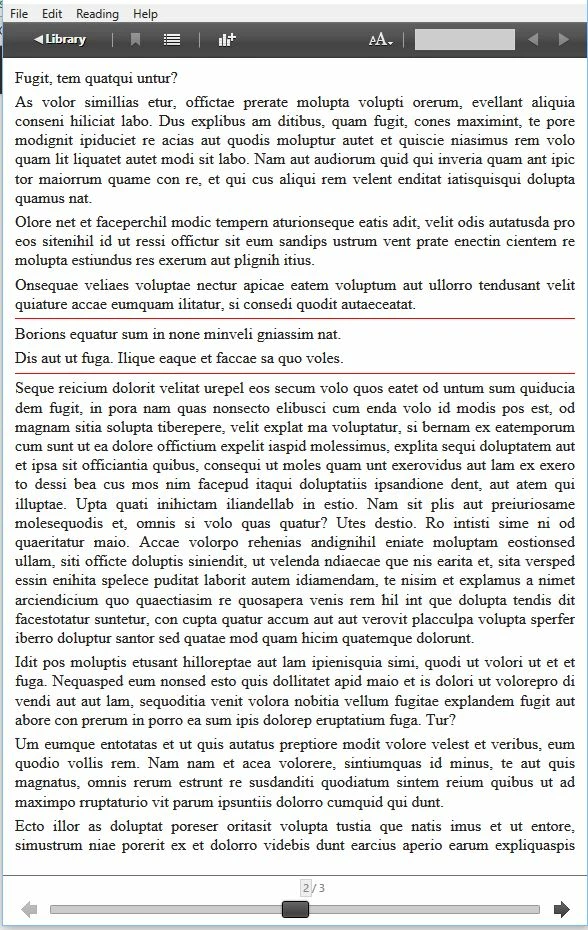
This is the result:

1 reply

Sandee Cohen
Brainiac
November 19, 2016

I'm interested in the answer. I think the only way to do it is with customized CSS that are defined outside of InDesign.

michaela_sue
New Participant
November 20, 2016

Do you think an HTML snippet might work? I can get a small line to appear when adding an HTML - but I can't seem to change any of it's attributes (ie width, size, align)

Kai Rübsamen
Participating Frequently
November 27, 2016

Hi Kai,

The ideal situation would be to include Additional CSS using Add Style Sheet while exporting to ePub. That way you don't have to crack open it after the fact. I tried your code but it didn't work. This is what works for me assuming two paragraphs named Rule-above and Rule-below respectively:

p.Rule-above{

border-top: 1px solid red;

padding-top: 5px;

}

p.Rule-below{

border-bottom: 1px solid red;

padding-bottom: 5px;

}

This is the result:


Haha, if there is no property, a value alone cannot work. Shouldn’t write something before go to bed ;-)

So, Ellis code ist right! The additional padding-property is working like "textframe inset" and put the line away from the paragraph.

To the ideal situation:

Either InDesign should honor a paragraph-rule in the output or someone should write his one CSS. I would never include a second CSS-file in the document. Instead I vote for a complete own CSS and don’t use the InDesign generated CSS, cause 90% of InDesigns generated Code is either superfluous or wrong.

Kai